
Join the Conversation
- Find Answers
- :
- Splunk Administration
- :
- Monitoring Splunk
- :
- Re: My Splunk is not working and cannot restart
- Subscribe to RSS Feed
- Mark Topic as New
- Mark Topic as Read
- Float this Topic for Current User
- Bookmark Topic
- Subscribe to Topic
- Mute Topic
- Printer Friendly Page
- Mark as New
- Bookmark Message
- Subscribe to Message
- Mute Message
- Subscribe to RSS Feed
- Permalink
- Report Inappropriate Content

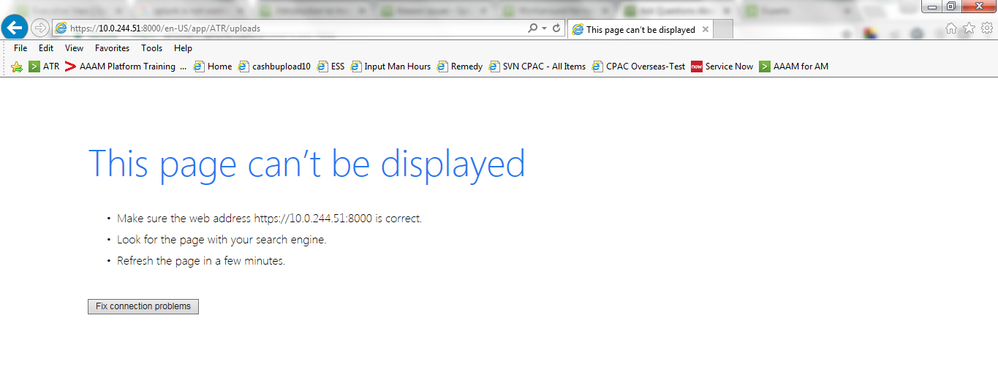
My Splunk is not working. It shows "This page can't be displayed"
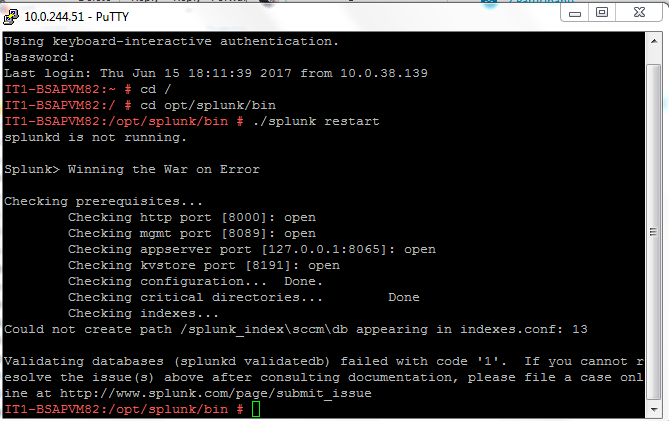
Then I tried to restart Splunk but it's not working.
How should I fix this error?


- Mark as New
- Bookmark Message
- Subscribe to Message
- Mute Message
- Subscribe to RSS Feed
- Permalink
- Report Inappropriate Content


Hi Hi urapaveerapan,
usually prerequisites are described in installation documentation, but in splunkbase there isn't any documentation on this App.
in this url https://devpost.com/software/splunk-app-for-microsoft-system-center-configuration-manager-sccm I found that SCCM App must be installed on the Windows Machine where is installed SCCM, probably there are some executable for Windows.
As you can see in this documentation they suggest to install a forwarder on the SCCM Server with the App to send logs to Splunk.
Bye.
Giuseppe
- Mark as New
- Bookmark Message
- Subscribe to Message
- Mute Message
- Subscribe to RSS Feed
- Permalink
- Report Inappropriate Content
Dear cusello,
Thank you very much. It's clear all the question.
- Mark as New
- Bookmark Message
- Subscribe to Message
- Mute Message
- Subscribe to RSS Feed
- Permalink
- Report Inappropriate Content
Hi Hi urapaveerapan,
usually prerequisites are described in installation documentation, but in splunkbase there isn't any documentation on this App.
in this url https://devpost.com/software/splunk-app-for-microsoft-system-center-configuration-manager-sccm I found that SCCM App must be installed on the Windows Machine where is installed SCCM, probably there are some executable for Windows.
As you can see in this documentation they suggest to install a forwarder on the SCCM Server with the App to send logs to Splunk.
Bye.
Giuseppe
- Mark as New
- Bookmark Message
- Subscribe to Message
- Mute Message
- Subscribe to RSS Feed
- Permalink
- Report Inappropriate Content
Dear Giuseppe,
Thank you for your point. My server is Linux. I had installed new application from Splunk base after restart the Splunk. It's not working anymore. Now I just delete the new application and restart again which is working.
Does it because this application not support Linux or it's just not support some Splunk version?
Normally does the Add-on app always work in both Linux and Windows?
I'd downloaded this https://splunkbase.splunk.com/app/2750/.
Thank you again for your point and I'm appreciate if you can answer my additional question.
- Mark as New
- Bookmark Message
- Subscribe to Message
- Mute Message
- Subscribe to RSS Feed
- Permalink
- Report Inappropriate Content
Hi urapaveerapan,
could you share more informations (OS, version)?
At first sight, viewing your screenshot it seems that you are running your Splunk on a linux system but you configured the homepath of your indexes using "\" instead "/" as if you used an indexes.conf from a Windows Splunk.
Bye.
Giuseppe

Join the Splunk Community Slack to learn, troubleshoot, and make connections with fellow Splunk practitioners in real time!
Join Splunk User Groups to connect and learn in-person by region or remotely by topic or industry.
Announcing Modern Navigation: A New Era of Splunk User Experience
Modernize your Splunk Apps – Introducing Python 3.13 in Splunk
Step into “Hunt the Insider: An Splunk ES Premier Mystery” to catch a cybercriminal ...
