
Join the Conversation
- Find Answers
- :
- Splunk Administration
- :
- Monitoring Splunk
- :
- Re: how to remove source on data summary
- Subscribe to RSS Feed
- Mark Topic as New
- Mark Topic as Read
- Float this Topic for Current User
- Bookmark Topic
- Subscribe to Topic
- Mute Topic
- Printer Friendly Page
- Mark as New
- Bookmark Message
- Subscribe to Message
- Mute Message
- Subscribe to RSS Feed
- Permalink
- Report Inappropriate Content

Hi, I have the following problem:
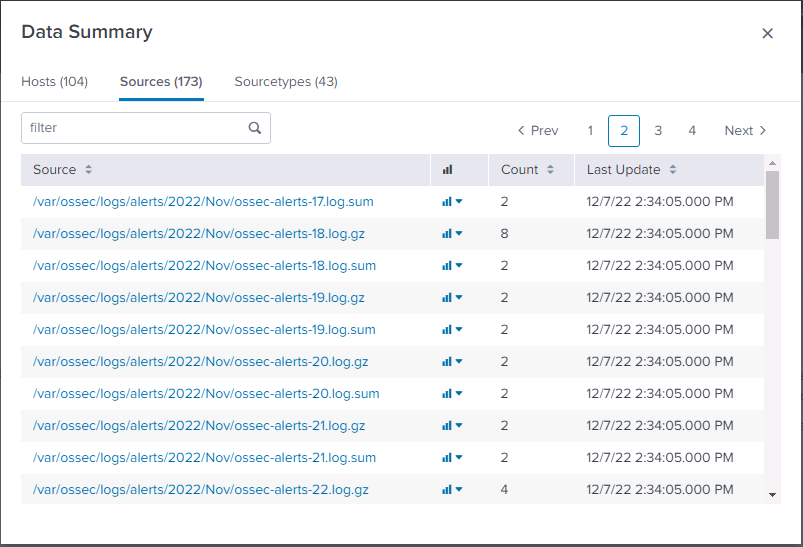
Is there any way to remove these garbage sources, after one wrong log push, I had a lot of these garbage sources
- Mark as New
- Bookmark Message
- Subscribe to Message
- Mute Message
- Subscribe to RSS Feed
- Permalink
- Report Inappropriate Content


Hi @quangtran ,
You can logically (not physically) remove these data running a search where the results are the wrong events and adding at the end the "delete" command.
Remember that by default none user can delete events, so you have to enable the "can_delete" role for your user and I hint to remove this role from your account after events deleting.
As I said, you don't recover disk space because it's a logical deletion.
Ciao.
Giuseppe
- Mark as New
- Bookmark Message
- Subscribe to Message
- Mute Message
- Subscribe to RSS Feed
- Permalink
- Report Inappropriate Content
Hi @quangtran ,
You can logically (not physically) remove these data running a search where the results are the wrong events and adding at the end the "delete" command.
Remember that by default none user can delete events, so you have to enable the "can_delete" role for your user and I hint to remove this role from your account after events deleting.
As I said, you don't recover disk space because it's a logical deletion.
Ciao.
Giuseppe
- Mark as New
- Bookmark Message
- Subscribe to Message
- Mute Message
- Subscribe to RSS Feed
- Permalink
- Report Inappropriate Content
Hi @quangtranì,
good for you, see next time!
Ciao and happy splunking
Giuseppe
P.S.: Karma Points are appreciated 😉


Join the Splunk Community Slack to learn, troubleshoot, and make connections with fellow Splunk practitioners in real time!
Join Splunk User Groups to connect and learn in-person by region or remotely by topic or industry.
Cisco Data Fabric from Architecture to Investigation, Better SOC Visibility, and More ...
The Trust Gap: Why a Data Foundation is Fundamental to an Agentic Enterprise
Data Management Digest – September 2026
