
Join the Conversation
- Find Answers
- :
- Splunk Administration
- :
- Monitoring Splunk
- :
- Re: Server is busy - HTTP Event Collector - how d...
- Subscribe to RSS Feed
- Mark Topic as New
- Mark Topic as Read
- Float this Topic for Current User
- Bookmark Topic
- Subscribe to Topic
- Mute Topic
- Printer Friendly Page
- Mark as New
- Bookmark Message
- Subscribe to Message
- Mute Message
- Subscribe to RSS Feed
- Permalink
- Report Inappropriate Content

Hi
We are sending in Opentelemtory metrics into Splunk via HTTP Event Collector.
However, we got the following errors the other days "server is busy" . I can see the data did come in at that time, but it gets retried so that explains that.
How do I stop this from happening in the future?
Another question is what is the max throughput Splunk can take in via HTTP?
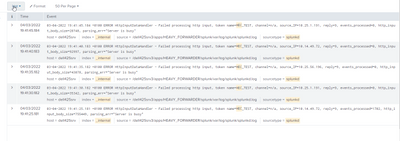
The below code came from the OP - Python scripts
2022-03-04T19:41:36.125+0100 info exporterhelper/queued_retry.go:215 Exporting failed. Will retry the request after interval. {"kind": "exporter", "name": "splunk_hec/logs", "error": "Post \https://dell425srv:9088/services/collector\: context deadline exceeded (Client.Timeout exceeded while awaiting headers)", "interval": "5.6081835s"}
Thanks in advance
Rob
- Mark as New
- Bookmark Message
- Subscribe to Message
- Mute Message
- Subscribe to RSS Feed
- Permalink
- Report Inappropriate Content

I would tune Splunk HEC so that it's thruput is optimized. A good read is here: https://conf.splunk.com/files/2017/slides/measuring-hec-performance-for-fun-and-profit.pdf
- Mark as New
- Bookmark Message
- Subscribe to Message
- Mute Message
- Subscribe to RSS Feed
- Permalink
- Report Inappropriate Content
I would tune Splunk HEC so that it's thruput is optimized. A good read is here: https://conf.splunk.com/files/2017/slides/measuring-hec-performance-for-fun-and-profit.pdf
- Mark as New
- Bookmark Message
- Subscribe to Message
- Mute Message
- Subscribe to RSS Feed
- Permalink
- Report Inappropriate Content
Hi
This is good information, and thanks
I will look at it and hopefully it will help me.
Another question to ask is, do you think increased HEC traffic on an non-optmised Splunk can cause Splunk to crash with "inotify cannot be used, reverting to polling: Too many open files". I am starting to get that now and the only major change is the new traffic from HEC.
Thanks
Rob

Join the Splunk Community Slack to learn, troubleshoot, and make connections with fellow Splunk practitioners in real time!
Join Splunk User Groups to connect and learn in-person by region or remotely by topic or industry.
Make Your Machine Data AI-Ready in Splunk
Splunk Asynchronous Forwarding Explained
How to Monitor AI Agents with Splunk Agent Observability
