
Join the Conversation
- Find Answers
- :
- Splunk Administration
- :
- Monitoring Splunk
- :
- Any idea what is causing high memory usage in inde...
- Subscribe to RSS Feed
- Mark Topic as New
- Mark Topic as Read
- Float this Topic for Current User
- Bookmark Topic
- Subscribe to Topic
- Mute Topic
- Printer Friendly Page
- Mark as New
- Bookmark Message
- Subscribe to Message
- Mute Message
- Subscribe to RSS Feed
- Permalink
- Report Inappropriate Content

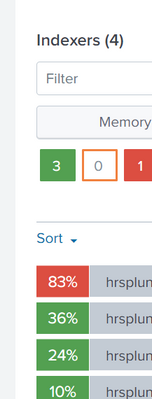
We have distributed environment with 4 Splunk Indexers which are consuming high memory . It reaches to 100% and remains unreachable until we restart splunkd service. Once restarted, memory comes down and the same process repeats on other indexers within a span of couple of hours.
64GB of Physical Memory is available on each indexer and saved searches/Scheduled searches are not consuming high memory. Unable to understand why there is spike in the memory usage.
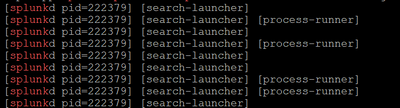
In DMC It shows,Splunkd server is using high Physical Memory usage by process class. PID keeps increasing as below. Please suggest how do i find the root cause for this issue and how to fix it
- Mark as New
- Bookmark Message
- Subscribe to Message
- Mute Message
- Subscribe to RSS Feed
- Permalink
- Report Inappropriate Content


Hi @Ashwini008,
maybe, but anyway, open a Case to Splunk Support, they can find and hint how to solve the issue.
Ciao.
Giuseppe
- Mark as New
- Bookmark Message
- Subscribe to Message
- Mute Message
- Subscribe to RSS Feed
- Permalink
- Report Inappropriate Content

Hi.
If your splunk version is 9.1 or higher, please refer to the case below.
You can solve it by setting the option below in server.conf to false.
> https://splunk.my.site.com/customer/s/article/PreforkedSearchProcessException-can-t-launch-new-searc...
However, since the default setting is true, it is recommended to contact splunk support and decide.
[general]
enable_search_process_long_lifespan = false
- Mark as New
- Bookmark Message
- Subscribe to Message
- Mute Message
- Subscribe to RSS Feed
- Permalink
- Report Inappropriate Content
Did you solve this problem?
I had the same symptoms and was wondering how you solved it.
- Mark as New
- Bookmark Message
- Subscribe to Message
- Mute Message
- Subscribe to RSS Feed
- Permalink
- Report Inappropriate Content
Hi @Ashwini008,
there's no apparent reason because 64 GB RAM aren't sufficient for an Indexer.
open a Case to Splunk Support.
Ciao.
Giuseppe
- Mark as New
- Bookmark Message
- Subscribe to Message
- Mute Message
- Subscribe to RSS Feed
- Permalink
- Report Inappropriate Content
Hi @gcusello ,
We haven't faced this issue from past 4 years.We have been using the same specifications till now.
There is no increase in the indexing data. We recently copied splunk_home/var/lib/splunk data (this was backed up data) into 4 indexers , I also see that there are excess buckets. Could this be an reason?

- Mark as New
- Bookmark Message
- Subscribe to Message
- Mute Message
- Subscribe to RSS Feed
- Permalink
- Report Inappropriate Content
Hi @Ashwini008,
maybe, but anyway, open a Case to Splunk Support, they can find and hint how to solve the issue.
Ciao.
Giuseppe
- Mark as New
- Bookmark Message
- Subscribe to Message
- Mute Message
- Subscribe to RSS Feed
- Permalink
- Report Inappropriate Content
Hi @Ashwini008,
if one answer solves your need, please accept one answer for the other people of Community or tell us how we can help you.
Ciao and happy splunking
Giuseppe
P.S.: Karma Points are appreciated 😉

Join the Splunk Community Slack to learn, troubleshoot, and make connections with fellow Splunk practitioners in real time!
Join Splunk User Groups to connect and learn in-person by region or remotely by topic or industry.
May 2026 Splunk Expert Sessions: Security & Observability
Network to App: Observability Unlocked [May & June Series]
SPL2 Deep Dives, AppDynamics Integrations, SAML Made Simple and Much More on Splunk ...
