
Join the Conversation
- Find Answers
- :
- Splunk Administration
- :
- Admin Other
- :
- Knowledge Management
- :
- Splunk Calculated fields
- Subscribe to RSS Feed
- Mark Topic as New
- Mark Topic as Read
- Float this Topic for Current User
- Bookmark Topic
- Subscribe to Topic
- Mute Topic
- Printer Friendly Page
- Mark as New
- Bookmark Message
- Subscribe to Message
- Mute Message
- Subscribe to RSS Feed
- Permalink
- Report Inappropriate Content
Splunk Calculated fields

Hi,
I may be looking in the wrong place, but I am not able to find out information on how to use a few calculated fields.
I have a requirement like this,
If host = "host 1 or host 2 or host 3 . . . . . host10" -> mark clusterName as ClusterA
If host = "host 11 or host 12 or host 13 . . . . . host20" -> mark clusterName as ClusterB
I have attached the screenshot of the page to create calculated fields.
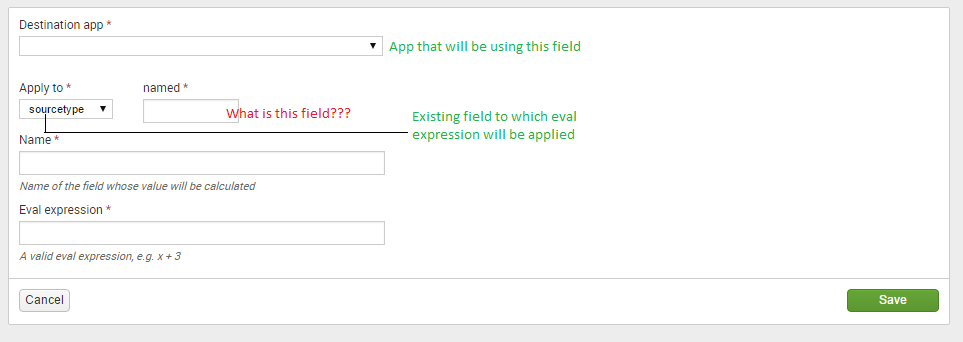
Is the below info correct?
Destination app - My custom app
Apply to - Host
named ---- WHAT SHOULD I GIVE???
Name-clusterName
Eval expression - host 1 or host 2 or host 3 . . . . . host10
Kindly help me out.

- Mark as New
- Bookmark Message
- Subscribe to Message
- Mute Message
- Subscribe to RSS Feed
- Permalink
- Report Inappropriate Content

The Apply to selection gives the context/scope of the new field.
Name can be ClusterName.
The Eval expression can be -
case(

 host == "host1", "ClusterA",
 host == "host2", "ClusterA",
 host == "host3", "ClusterA",

.... to add the rest

 host == "host11", "ClusterB",
 host == "host12", "ClusterB",
 host == "host13", "ClusterB",

.... to add the rest
)
By doing that you end up with a new field called ClusterName which would have either ClusterA or ClusterB as its value.
- Mark as New
- Bookmark Message
- Subscribe to Message
- Mute Message
- Subscribe to RSS Feed
- Permalink
- Report Inappropriate Content
Here is a corrected answer....
In this case where you want to evaluate all hosts, then named would be *
Apply to = Host
Named = *
Name = your name for the resultant group
Eval expression = the expression that isolates the group

Join the Splunk Community Slack to learn, troubleshoot, and make connections with fellow Splunk practitioners in real time!
Join Splunk User Groups to connect and learn in-person by region or remotely by topic or industry.
Persistent Queue at TcpOut — One of Splunk's Most Practical Features
Catalog Is Now Generally Available on Splunk Cloud Platform
Your Path to AgenticOps: AI Experiences for Every Splunk Practitioner
