
Join the Conversation
- Find Answers
- :
- Splunk Administration
- :
- Admin Other
- :
- Knowledge Management
- :
- SRe: Props and transforms not extracting fields pr...
- Subscribe to RSS Feed
- Mark Topic as New
- Mark Topic as Read
- Float this Topic for Current User
- Bookmark Topic
- Subscribe to Topic
- Mute Topic
- Printer Friendly Page
- Mark as New
- Bookmark Message
- Subscribe to Message
- Mute Message
- Subscribe to RSS Feed
- Permalink
- Report Inappropriate Content

I have a CSV data in following format and I have written props and transforms to extract the fields. Somehow, the ""Summary|vSphere Tag"" field values are not getting extracted wherein I have written transforms for it. Below are my configuration files - inputs, props and transforms :
CSV Data:
"Name","Summary|vSphere Tag"
"DC4VPWSAM","[<Application_category-Software Asset Management>, <Sub_class-Facilities>, <Department-Infrastructure & Operations>, <Primary_System_Owner-Pankaj Gadhari>, <Section-SM Service Support_Sec>, <Organisation-Technology & Infrastructure>, <Division-I&O Service Management>, <Application_Name-Manager Suite>, <Unit-SM Service Support>, <Class-Line of Business>]"

"DC1VPWSAM","[<Application_category-Software Asset Management>, <Sub_class-Facilities>, <Department-Infrastructure & Operations>, <Primary_System_Owner-Pankaj Gadhari>, <Section-SM Service Support_Sec>, <Organisation-Technology & Infrastructure>, <Division-I&O Service Management>, <Application_Name-Manager Suite>, <Unit-SM Service Support>, <Class-Line of Business>]"

"DC3VPWSAM","[<Application_category-Software Asset Management>, <Sub_class-Facilities>, <Department-Infrastructure & Operations>, <Primary_System_Owner-Pankaj Gadhari>, <Section-SM Service Support_Sec>, <Organisation-Technology & Infrastructure>, <Division-I&O Service Management>, <Application_Name-Manager Suite>, <Unit-SM Service Support>, <Class-Line of Business>]"

"DCVPWSCCM","[<Primary_System_Owner-Pankaj Gadhari>]"

"witsql-esx","none"
Inputs.conf
[monitor://C:\VMware-Tags\tagsplit\*.csv]
disabled = false
index = vmware
sourcetype = vmware-tags-csv
crcSalt = <SOURCE>
Props.conf
[vmware-tags-csv]
DATETIME_CONFIG = CURRENT
INDEXED_EXTRACTIONS = csv
KV_MODE = none
NO_BINARY_CHECK = true
SHOULD_LINEMERGE = false
category = Structured
disabled = false
pulldown_type = true
REPORT-vmtags = myplaintransform1
EXTRACT-vmname = (?<vmname>[A-Za-z0-9]+),
transforms
[myplaintransform1]
REGEX=(?<vmname>[A-Za-z0-9]+),\<(.*?)-(.*?)\>
FORMAT=$1::$2
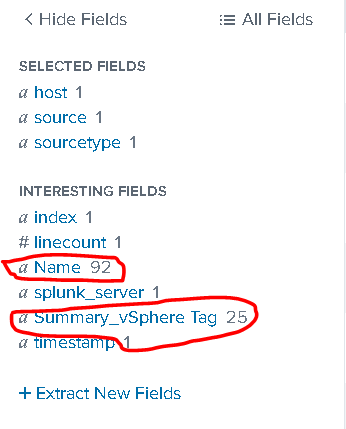
somehow the transforms is not working and the fields are not getting extracted. I want to extract Key Value pairs from "Summary|vSphere Tag" field so that it should show in search as below :
vmname,
Application_category
Primary_System_Owner and so on...
Please help resolve the issue.
- Mark as New
- Bookmark Message
- Subscribe to Message
- Mute Message
- Subscribe to RSS Feed
- Permalink
- Report Inappropriate Content


The transform defines 3 capture groups, but only uses 2. One of the capture groups extracts a field (vmname) that is also extracted by the EXTRACT setting.
Since the "Summary|vSphere Tag" field contains multiple key/value pairs, I believe the transforms needs the MV_ADD=true setting.
If this reply helps you, Karma would be appreciated.
- Mark as New
- Bookmark Message
- Subscribe to Message
- Mute Message
- Subscribe to RSS Feed
- Permalink
- Report Inappropriate Content
The transform defines 3 capture groups, but only uses 2. One of the capture groups extracts a field (vmname) that is also extracted by the EXTRACT setting.
Since the "Summary|vSphere Tag" field contains multiple key/value pairs, I believe the transforms needs the MV_ADD=true setting.
If this reply helps you, Karma would be appreciated.
- Mark as New
- Bookmark Message
- Subscribe to Message
- Mute Message
- Subscribe to RSS Feed
- Permalink
- Report Inappropriate Content
sure. I will check that setting and get back to you.

Join the Splunk Community Slack to learn, troubleshoot, and make connections with fellow Splunk practitioners in real time!
Join Splunk User Groups to connect and learn in-person by region or remotely by topic or industry.
Meet the .conf26 AI Agent Buildathon Winners
Trusted Autonomy in the SOC: A Maturity Journey
Supercharging Windows Security Detection Performance: Introducing Hybrid Field ...
