
Join the Conversation
- Find Answers
- :
- Splunk Administration
- :
- Admin Other
- :
- Knowledge Management
- :
- Re: How to combine an xyseries output with other a...
- Subscribe to RSS Feed
- Mark Topic as New
- Mark Topic as Read
- Float this Topic for Current User
- Bookmark Topic
- Subscribe to Topic
- Mute Topic
- Printer Friendly Page
- Mark as New
- Bookmark Message
- Subscribe to Message
- Mute Message
- Subscribe to RSS Feed
- Permalink
- Report Inappropriate Content

This is an extension to my other question in https://answers.splunk.com/answers/812982/summary-of-stats-from-multiple-events-for-each-ide.html?mi...
The input and output that I need are in the screenshot below:
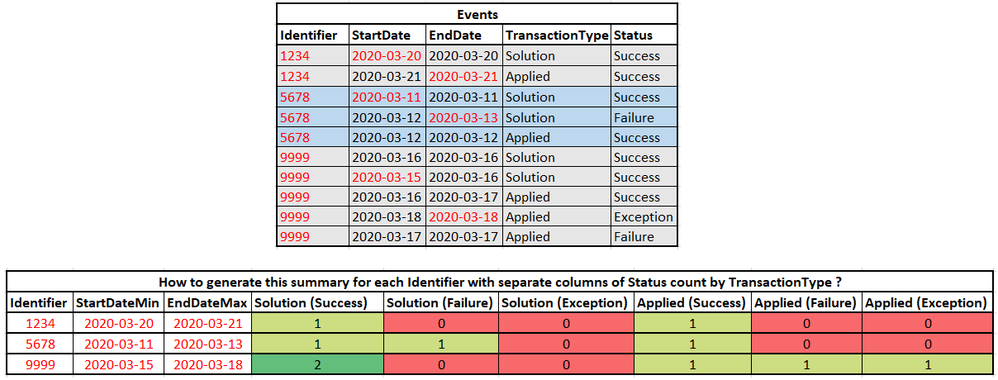
I was able to use xyseries with below command to generate output with identifier and all the Solution and Applied columns for each status. However now I want additional 2 columns for each identifier which is:
* StartDateMin - minimum value of StartDate for all events with a specific identifier
* EndDateMax - maximum value of EndDate for all events with a specific identifier
index = |
| stats count by Identifier, TransactionType, Status
| eval TransactionType = TransactionType." (".Status.")"
| xyseries Identifier, TransactionType, count
| fillnull value=0
How do I embed the new columns StartDateMin and EndDateMax with query modification of above query ?
One option I can think of is to separately generate identifier with startdatemin, end datemin and then again identifier with other columns and then perform a join based on identifier but would involve repetition of lot of conditions two times.
Is there an easy way out while using the above query to do the same ?

- Mark as New
- Bookmark Message
- Subscribe to Message
- Mute Message
- Subscribe to RSS Feed
- Permalink
- Report Inappropriate Content

Hi @pavanml,
Try this:
| makeresults
| eval _raw="Identifier, TransactionType, Status, StartDate, EndDate
  1234, Solution, Success, 2020-03-14, 2020-03-15
  1234, Solution, Success, 2020-03-16, 2020-03-17
  1234, Applied, Fail, 2020-03-17, 2020-030-18
  4567, Solution, Fail, 2020-03-14, 2020-03-15
  4567, Solution, Excepetion, 2020-03-18, 2020-03-19"
| multikv forceheader=1
| eventstats count, min(StartDate) as StartDateMin, max(EndDate) as EndDateMax by Identifier
| stats count, min(StartDateMin) as StartDateMin, max(EndDateMax) as EndDateMax by Identifier, TransactionType, Status
| eval TransactionType = TransactionType." (".Status.")", Identifier=mvzip(Identifier, mvzip(StartDateMin, EndDateMax, ","), ",")
| xyseries Identifier, TransactionType, count
| fillnull value=0
| eval split=split(Identifier, ", "), Identifier=mvindex(split, 0), StartDateMin=mvindex(split, 1), EndDateMax=mvindex(split, 2)
- Mark as New
- Bookmark Message
- Subscribe to Message
- Mute Message
- Subscribe to RSS Feed
- Permalink
- Report Inappropriate Content
Hi @pavanml,
Try this:
| makeresults
| eval _raw="Identifier, TransactionType, Status, StartDate, EndDate
  1234, Solution, Success, 2020-03-14, 2020-03-15
  1234, Solution, Success, 2020-03-16, 2020-03-17
  1234, Applied, Fail, 2020-03-17, 2020-030-18
  4567, Solution, Fail, 2020-03-14, 2020-03-15
  4567, Solution, Excepetion, 2020-03-18, 2020-03-19"
| multikv forceheader=1
| eventstats count, min(StartDate) as StartDateMin, max(EndDate) as EndDateMax by Identifier
| stats count, min(StartDateMin) as StartDateMin, max(EndDateMax) as EndDateMax by Identifier, TransactionType, Status
| eval TransactionType = TransactionType." (".Status.")", Identifier=mvzip(Identifier, mvzip(StartDateMin, EndDateMax, ","), ",")
| xyseries Identifier, TransactionType, count
| fillnull value=0
| eval split=split(Identifier, ", "), Identifier=mvindex(split, 0), StartDateMin=mvindex(split, 1), EndDateMax=mvindex(split, 2)
- Mark as New
- Bookmark Message
- Subscribe to Message
- Mute Message
- Subscribe to RSS Feed
- Permalink
- Report Inappropriate Content
That worked perfectly !! Thanks a lot.

Join the Splunk Community Slack to learn, troubleshoot, and make connections with fellow Splunk practitioners in real time!
Join Splunk User Groups to connect and learn in-person by region or remotely by topic or industry.
Announcing Modern Navigation: A New Era of Splunk User Experience
Modernize your Splunk Apps – Introducing Python 3.13 in Splunk
Step into “Hunt the Insider: An Splunk ES Premier Mystery” to catch a cybercriminal ...
