
Join the Conversation
- Find Answers
- :
- Splunk Administration
- :
- Admin Other
- :
- Knowledge Management
- :
- How to combine an xyseries output with other aggre...
- Subscribe to RSS Feed
- Mark Topic as New
- Mark Topic as Read
- Float this Topic for Current User
- Bookmark Topic
- Subscribe to Topic
- Mute Topic
- Printer Friendly Page
- Mark as New
- Bookmark Message
- Subscribe to Message
- Mute Message
- Subscribe to RSS Feed
- Permalink
- Report Inappropriate Content

This is an extension to my other question in https://answers.splunk.com/answers/812982/summary-of-stats-from-multiple-events-for-each-ide.html?mi...
The input and output that I need are in the screenshot below:
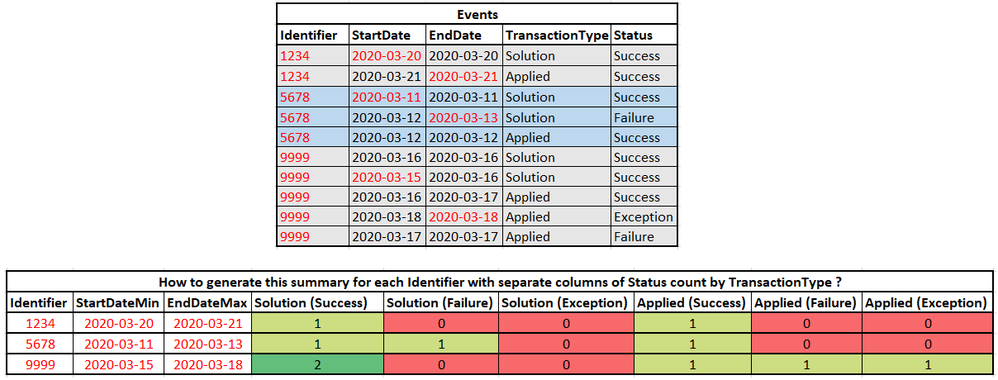
I was able to use xyseries with below command to generate output with identifier and all the Solution and Applied columns for each status. However now I want additional 2 columns for each identifier which is:
* StartDateMin - minimum value of StartDate for all events with a specific identifier
* EndDateMax - maximum value of EndDate for all events with a specific identifier
index = |
| stats count by Identifier, TransactionType, Status
| eval TransactionType = TransactionType." (".Status.")"
| xyseries Identifier, TransactionType, count
| fillnull value=0
How do I embed the new columns StartDateMin and EndDateMax with query modification of above query ?
One option I can think of is to separately generate identifier with startdatemin, end datemin and then again identifier with other columns and then perform a join based on identifier but would involve repetition of lot of conditions two times.
Is there an easy way out while using the above query to do the same ?

- Mark as New
- Bookmark Message
- Subscribe to Message
- Mute Message
- Subscribe to RSS Feed
- Permalink
- Report Inappropriate Content

Hi @pavanml,
Try this:
| makeresults
| eval _raw="Identifier, TransactionType, Status, StartDate, EndDate
  1234, Solution, Success, 2020-03-14, 2020-03-15
  1234, Solution, Success, 2020-03-16, 2020-03-17
  1234, Applied, Fail, 2020-03-17, 2020-030-18
  4567, Solution, Fail, 2020-03-14, 2020-03-15
  4567, Solution, Excepetion, 2020-03-18, 2020-03-19"
| multikv forceheader=1
| eventstats count, min(StartDate) as StartDateMin, max(EndDate) as EndDateMax by Identifier
| stats count, min(StartDateMin) as StartDateMin, max(EndDateMax) as EndDateMax by Identifier, TransactionType, Status
| eval TransactionType = TransactionType." (".Status.")", Identifier=mvzip(Identifier, mvzip(StartDateMin, EndDateMax, ","), ",")
| xyseries Identifier, TransactionType, count
| fillnull value=0
| eval split=split(Identifier, ", "), Identifier=mvindex(split, 0), StartDateMin=mvindex(split, 1), EndDateMax=mvindex(split, 2)
- Mark as New
- Bookmark Message
- Subscribe to Message
- Mute Message
- Subscribe to RSS Feed
- Permalink
- Report Inappropriate Content
Hi @pavanml,
Try this:
| makeresults
| eval _raw="Identifier, TransactionType, Status, StartDate, EndDate
  1234, Solution, Success, 2020-03-14, 2020-03-15
  1234, Solution, Success, 2020-03-16, 2020-03-17
  1234, Applied, Fail, 2020-03-17, 2020-030-18
  4567, Solution, Fail, 2020-03-14, 2020-03-15
  4567, Solution, Excepetion, 2020-03-18, 2020-03-19"
| multikv forceheader=1
| eventstats count, min(StartDate) as StartDateMin, max(EndDate) as EndDateMax by Identifier
| stats count, min(StartDateMin) as StartDateMin, max(EndDateMax) as EndDateMax by Identifier, TransactionType, Status
| eval TransactionType = TransactionType." (".Status.")", Identifier=mvzip(Identifier, mvzip(StartDateMin, EndDateMax, ","), ",")
| xyseries Identifier, TransactionType, count
| fillnull value=0
| eval split=split(Identifier, ", "), Identifier=mvindex(split, 0), StartDateMin=mvindex(split, 1), EndDateMax=mvindex(split, 2)
- Mark as New
- Bookmark Message
- Subscribe to Message
- Mute Message
- Subscribe to RSS Feed
- Permalink
- Report Inappropriate Content
That worked perfectly !! Thanks a lot.

Join the Splunk Community Slack to learn, troubleshoot, and make connections with fellow Splunk practitioners in real time!
Join Splunk User Groups to connect and learn in-person by region or remotely by topic or industry.
Why Splunk Customers Should Attend Cisco Live 2026 Las Vegas
What Is the Name of the USB Key Inserted by Bob Smith? (BOTS Hint, Not the Answer)
Automating Threat Operations and Threat Hunting with Recorded Future
