
Join the Conversation
- Find Answers
- :
- Splunk Administration
- :
- Admin Other
- :
- Knowledge Management
- :
- Re: Edit Permissions is not in Dashboard Actions
- Subscribe to RSS Feed
- Mark Topic as New
- Mark Topic as Read
- Float this Topic for Current User
- Bookmark Topic
- Subscribe to Topic
- Mute Topic
- Printer Friendly Page
- Mark as New
- Bookmark Message
- Subscribe to Message
- Mute Message
- Subscribe to RSS Feed
- Permalink
- Report Inappropriate Content
Edit Permissions is not in Dashboard Actions

I created a Dashboard in the Search & Reporting app and was not given the option to set the sharing/permissions at the time of creation. And when I go to the Dashboards page and expand the "Edit" dropdown under the "Actions" column I do not see an option for "Edit Permissions".
My Splunk user account has the power and admin roles, and I've confirmed that the Search & Reporting app has granted write permission to the admin role.
I have other colleagues that have the same roles as I have, and they ARE able to change permissions on Dashboards, so I believe that my user account may be misconfigured.
Could someone please help me resolve this issue?
- Mark as New
- Bookmark Message
- Subscribe to Message
- Mute Message
- Subscribe to RSS Feed
- Permalink
- Report Inappropriate Content
Are you using LDAP for authentication? You can try to reload the auth configuration from here
settings -> Authentication methods
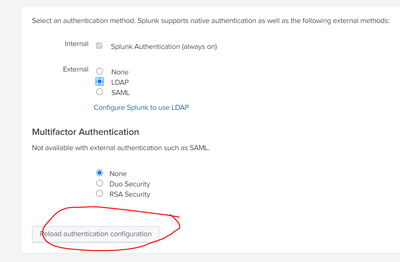
Hope this helps
- Mark as New
- Bookmark Message
- Subscribe to Message
- Mute Message
- Subscribe to RSS Feed
- Permalink
- Report Inappropriate Content
This is what I see when I click "Settings":
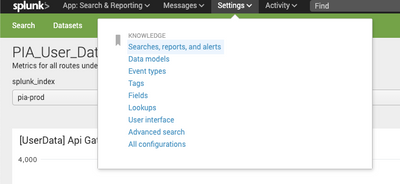
I'm guessing I'm missing some options there for the same reasons as my initial issue?
- Mark as New
- Bookmark Message
- Subscribe to Message
- Mute Message
- Subscribe to RSS Feed
- Permalink
- Report Inappropriate Content
looks like you are not part of the admin role. Can you check with your team about your role who has more privileges? They can check here
settings -> users -> yourname
If you are part of the AD Group that mapped to admin role and still does not see admin capabilities, please ask the user (currently has admin capabilities) to reload authentication as mentioned earlier.

Join the Splunk Community Slack to learn, troubleshoot, and make connections with fellow Splunk practitioners in real time!
Join Splunk User Groups to connect and learn in-person by region or remotely by topic or industry.
Index This | What travels the world but is also stuck in place?
Discover New Use Cases: Unlock Greater Value from Your Existing Splunk Data
Continue Your Journey: Join Session 2 of the Data Management and Federation Bootcamp ...
