
Join the Conversation
- Find Answers
- :
- Splunk Administration
- :
- Admin Other
- :
- Installation
- :
- Re: Indexing problems
- Subscribe to RSS Feed
- Mark Topic as New
- Mark Topic as Read
- Float this Topic for Current User
- Bookmark Topic
- Subscribe to Topic
- Mute Topic
- Printer Friendly Page
- Mark as New
- Bookmark Message
- Subscribe to Message
- Mute Message
- Subscribe to RSS Feed
- Permalink
- Report Inappropriate Content

Hello Splunkers!
I'm pretty new with Splunk and I retrieve an old splunk project that i didn't set up at all. I'm trying to train myself on it, but... I have some problems i couldn't solve alone.
I have one Search Head, one Indexer and between 3 and 5 forwarders depending on my need.
Here is the VM of my indexer :
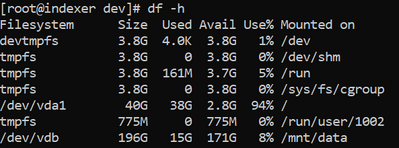
Almost all logs that I collected went in /dev/vda1, which is not suppose to be the case. I've override the default storage location , but i guess it doesn't matter ...
/opt/splunk/etc/system/local/indexes.conf :
[main]
homePath = /mnt/data/$_index_name/db
I assume it's the reason why i stillm got those messages :
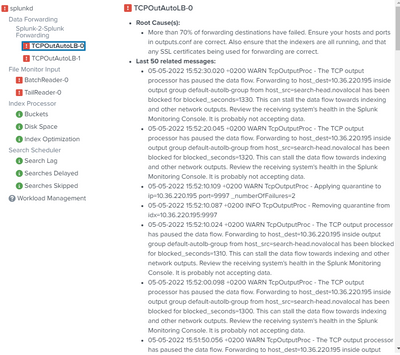
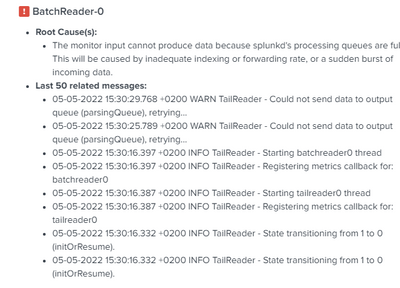
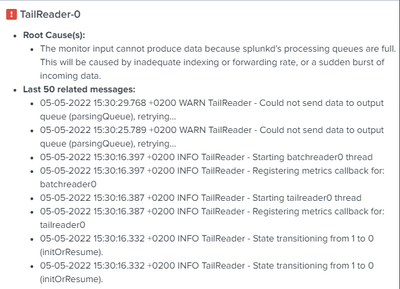
Please let me know if I did something wrong or if i missed something,
Thanks in advance for your help!
Regards ,
Antoine
- Mark as New
- Bookmark Message
- Subscribe to Message
- Mute Message
- Subscribe to RSS Feed
- Permalink
- Report Inappropriate Content


Hi @AntoineDRN,
you have to set the $SPLUNK_DB variable on Indexers in $SPLUNK_HOME/etc/splunk-launch.conf:
you should find it commented, you have to uncomment it and use the correct folder where indexes are located,
by default it's $SPLUNK_HOME/var/lib/splunk, in your case it should be /dev/vda1.
Then, you have to insert in each path that you find in each indexes,conf
[index_name]
coldPath = $SPLUNK_DB\index_name\colddb
homePath = $SPLUNK_DB\index_name\db
thawedPath = $SPLUNK_DB\index_name\thaweddb
Remember to restart Splunk after conf files upgrade.
In this way the indexes.conf files address the correct folders.
Ciao.
Giuseppe
- Mark as New
- Bookmark Message
- Subscribe to Message
- Mute Message
- Subscribe to RSS Feed
- Permalink
- Report Inappropriate Content
Hi @AntoineDRN,
you have to set the $SPLUNK_DB variable on Indexers in $SPLUNK_HOME/etc/splunk-launch.conf:
you should find it commented, you have to uncomment it and use the correct folder where indexes are located,
by default it's $SPLUNK_HOME/var/lib/splunk, in your case it should be /dev/vda1.
Then, you have to insert in each path that you find in each indexes,conf
[index_name]
coldPath = $SPLUNK_DB\index_name\colddb
homePath = $SPLUNK_DB\index_name\db
thawedPath = $SPLUNK_DB\index_name\thaweddb
Remember to restart Splunk after conf files upgrade.
In this way the indexes.conf files address the correct folders.
Ciao.
Giuseppe

Join the Splunk Community Slack to learn, troubleshoot, and make connections with fellow Splunk practitioners in real time!
Join Splunk User Groups to connect and learn in-person by region or remotely by topic or industry.
Make Your Machine Data AI-Ready in Splunk
Splunk Asynchronous Forwarding Explained
How to Monitor AI Agents with Splunk Agent Observability
