
Join the Conversation
- Find Answers
- :
- Splunk Administration
- :
- Getting Data In
- :
- Re: universal forwarder change deployment server u...
- Subscribe to RSS Feed
- Mark Topic as New
- Mark Topic as Read
- Float this Topic for Current User
- Bookmark Topic
- Subscribe to Topic
- Mute Topic
- Printer Friendly Page
- Mark as New
- Bookmark Message
- Subscribe to Message
- Mute Message
- Subscribe to RSS Feed
- Permalink
- Report Inappropriate Content

- Mark as New
- Bookmark Message
- Subscribe to Message
- Mute Message
- Subscribe to RSS Feed
- Permalink
- Report Inappropriate Content


Hi @love0sxy,
if you want to manage deploymentclient.conf by Deployment Server you have to follow the procedure I described in my previous answer because files in $SPLUNK_HOME/etc/system/local folder aren't manageable by DS, for this reason the changes aren't effective.
Ciao.
Giuseppe
- Mark as New
- Bookmark Message
- Subscribe to Message
- Mute Message
- Subscribe to RSS Feed
- Permalink
- Report Inappropriate Content
Hi @love0sxy,
how did you configure the deploymentclient.conf file in your UFs?
if this file in in a custom Add-On deployed using the Deployment Server, you can modify this file in the app to deploy and the new addressing is deployed to all the UFs.
If instead you configured it using the CLI command and the deploymentclient.conf file is in $SPLUNK_HOME/etc/system/local, there isn't any automatic way to change the DS addressing.
In this case, you could deploy an add-on containing this file using the old DS and run a remote script that deletes the old deploymentclient.conf file and restarts Splunk.
Ciao.
Giuseppe
- Mark as New
- Bookmark Message
- Subscribe to Message
- Mute Message
- Subscribe to RSS Feed
- Permalink
- Report Inappropriate Content
hi! Esteemed Legend
I thank know Manually changing files for uf /etc/system/local/deploymentclient,
and restar splunkd.exe it can change deployment server
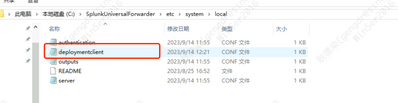
but i use deployment server push a newpath a deploymentclient.conf to UF is Not effective
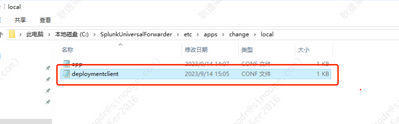
- Mark as New
- Bookmark Message
- Subscribe to Message
- Mute Message
- Subscribe to RSS Feed
- Permalink
- Report Inappropriate Content
Hi @love0sxy,
if you want to manage deploymentclient.conf by Deployment Server you have to follow the procedure I described in my previous answer because files in $SPLUNK_HOME/etc/system/local folder aren't manageable by DS, for this reason the changes aren't effective.
Ciao.
Giuseppe
- Mark as New
- Bookmark Message
- Subscribe to Message
- Mute Message
- Subscribe to RSS Feed
- Permalink
- Report Inappropriate Content
- Mark as New
- Bookmark Message
- Subscribe to Message
- Mute Message
- Subscribe to RSS Feed
- Permalink
- Report Inappropriate Content
Hi @love0sxy ,
good for you, see next time!
Ciao and happy splunking
Giuseppe
P.S.: Karma Points are appreciated 😉

Join the Splunk Community Slack to learn, troubleshoot, and make connections with fellow Splunk practitioners in real time!
Join Splunk User Groups to connect and learn in-person by region or remotely by topic or industry.
Catalog Is Now Generally Available on Splunk Cloud Platform
Your Path to AgenticOps: AI Experiences for Every Splunk Practitioner
The Data Connection - October 2026
