
Join the Conversation
- Find Answers
- :
- Splunk Administration
- :
- Getting Data In
- :
- Re: turn a columns with multiple entries into a ch...
- Subscribe to RSS Feed
- Mark Topic as New
- Mark Topic as Read
- Float this Topic for Current User
- Bookmark Topic
- Subscribe to Topic
- Mute Topic
- Printer Friendly Page
- Mark as New
- Bookmark Message
- Subscribe to Message
- Mute Message
- Subscribe to RSS Feed
- Permalink
- Report Inappropriate Content

Hello,
I am pretty new to splunk, and just feel lost at times. I have a question that i cant seem to find an answer for.
I have data that looks like
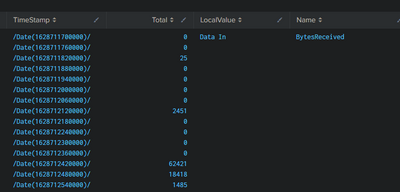
so the above is like 1 row and then there are multiple rows with the same type of list of entries for timestamp and total
now I want to turn each row into a line on a line chart where the x-axis is the timestamp and the y-axis is the "Total". sort of like overlapping line charts based on all the rows.
anyone have ideas
- Mark as New
- Bookmark Message
- Subscribe to Message
- Mute Message
- Subscribe to RSS Feed
- Permalink
- Report Inappropriate Content


| eval zipped=mvzip(TimeStamp,Total,"!")
| mvexpand zipped
| eval TimeStamp=mvindex(split(zipped,"!"),0)
| eval Total=mvindex(split(zipped,"!"),1)
| fields - zipped- Mark as New
- Bookmark Message
- Subscribe to Message
- Mute Message
- Subscribe to RSS Feed
- Permalink
- Report Inappropriate Content
| eval zipped=mvzip(TimeStamp,Total,"!")
| mvexpand zipped
| eval TimeStamp=mvindex(split(zipped,"!"),0)
| eval Total=mvindex(split(zipped,"!"),1)
| fields - zipped- Mark as New
- Bookmark Message
- Subscribe to Message
- Mute Message
- Subscribe to RSS Feed
- Permalink
- Report Inappropriate Content
you are a beautiful soul
- Mark as New
- Bookmark Message
- Subscribe to Message
- Mute Message
- Subscribe to RSS Feed
- Permalink
- Report Inappropriate Content


Great solution, just noticed that my solution has the issues that I'm dedupping the same results so this will lead to an incorrect total value
- Mark as New
- Bookmark Message
- Subscribe to Message
- Mute Message
- Subscribe to RSS Feed
- Permalink
- Report Inappropriate Content
Hello, So i have tried that the issue is tho and then i get a table that looks like this
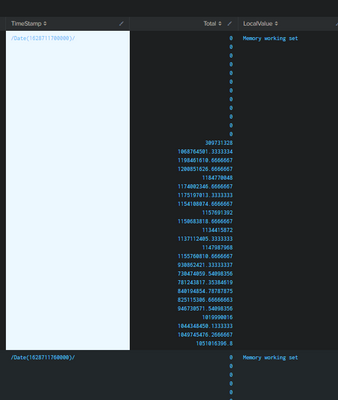
so then i apply same thing to the Total columns and i get a bunch of duplicate rows, is there a way to delete all duplicate rows at that point?
- Mark as New
- Bookmark Message
- Subscribe to Message
- Mute Message
- Subscribe to RSS Feed
- Permalink
- Report Inappropriate Content
Hi, have you tried to expand the Multiple Value field with
| mvexand TimeStamp?
- Mark as New
- Bookmark Message
- Subscribe to Message
- Mute Message
- Subscribe to RSS Feed
- Permalink
- Report Inappropriate Content
Hello, So i have tried that the issue is tho and then i get a table that looks like this
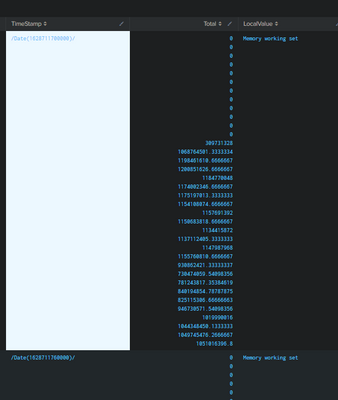
so then i apply same thing to the Total columns and i get a bunch of duplicate rows, is there a way to delete all duplicate rows at that point?
- Mark as New
- Bookmark Message
- Subscribe to Message
- Mute Message
- Subscribe to RSS Feed
- Permalink
- Report Inappropriate Content
yes, try
| dedup TimeStamp,Total

Join the Splunk Community Slack to learn, troubleshoot, and make connections with fellow Splunk practitioners in real time!
Join Splunk User Groups to connect and learn in-person by region or remotely by topic or industry.
Best Practices: Splunk auto adjust pipeline queue
Request for Professional Development: Attending .conf26
[Puzzles] Solve, Learn, Repeat: Classic British Rock Bands
