
Join the Conversation
- Find Answers
- :
- Splunk Administration
- :
- Getting Data In
- :
- Re: remove prefix on every events using SEDCMD
- Subscribe to RSS Feed
- Mark Topic as New
- Mark Topic as Read
- Float this Topic for Current User
- Bookmark Topic
- Subscribe to Topic
- Mute Topic
- Printer Friendly Page
- Mark as New
- Bookmark Message
- Subscribe to Message
- Mute Message
- Subscribe to RSS Feed
- Permalink
- Report Inappropriate Content

Hi Guys
We are getting logs through syslog with its priority / facility data “ <14>1” prepended with every events as below;
<14>1 2024-01-18T13:45:06.621+0000 756565656565701b-cd27-475e-bab4-3e0e0893d273
<14>1 2024-01-18T13:39:47.014+0000 565gt5t54t-cd27-475e-bab4-565656565gh
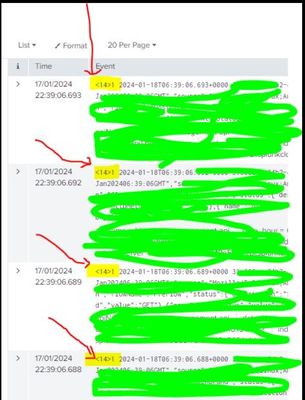
We are trying to remove this prefix texts “<14>1” using SEDCMD on props.conf as below;
[source::tcp:7514]
SEDCMD-strip-tcp-priority=s/^<\d+>//
This is doing almost very close help by removing “<14>” but still “1” is coming up in events. Can some one please help us how to remove this prefix “ <14>1” on every events using SEDCMD ?
Regards.
- Mark as New
- Bookmark Message
- Subscribe to Message
- Mute Message
- Subscribe to RSS Feed
- Permalink
- Report Inappropriate Content


- Mark as New
- Bookmark Message
- Subscribe to Message
- Mute Message
- Subscribe to RSS Feed
- Permalink
- Report Inappropriate Content
SEDCMD-strip-tcp-priority=s/^<\d+>\d//- Mark as New
- Bookmark Message
- Subscribe to Message
- Mute Message
- Subscribe to RSS Feed
- Permalink
- Report Inappropriate Content
Hi ITWhisperer,
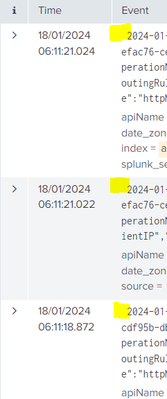
Thanks, its almost done, but i see a space (gap) before the timestamp, how can we delete this space?
- Mark as New
- Bookmark Message
- Subscribe to Message
- Mute Message
- Subscribe to RSS Feed
- Permalink
- Report Inappropriate Content
SEDCMD-strip-tcp-priority=s/^<\d+>\d\s//- Mark as New
- Bookmark Message
- Subscribe to Message
- Mute Message
- Subscribe to RSS Feed
- Permalink
- Report Inappropriate Content

If you need to tweak your regexes, that's a great interactive tool to test them.


Join the Splunk Community Slack to learn, troubleshoot, and make connections with fellow Splunk practitioners in real time!
Join Splunk User Groups to connect and learn in-person by region or remotely by topic or industry.
Agentic SOC Triage: Investigating Splunk ES Notables with MCP Server and a Local LLM
All Work and No Play? Not at .conf26! Unwind at These Evening Events
Join the Hackathon at .conf26 and build a No-Code AI agent
