
Join the Conversation
- Find Answers
- :
- Splunk Administration
- :
- Getting Data In
- :
- Re: regex error
- Subscribe to RSS Feed
- Mark Topic as New
- Mark Topic as Read
- Float this Topic for Current User
- Bookmark Topic
- Subscribe to Topic
- Mute Topic
- Printer Friendly Page
- Mark as New
- Bookmark Message
- Subscribe to Message
- Mute Message
- Subscribe to RSS Feed
- Permalink
- Report Inappropriate Content
regex error

Hi Team,
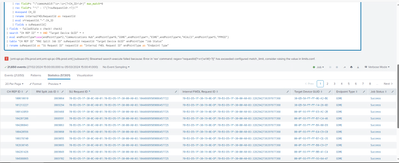
While running the query I'm able see this error.
but how to overcome this I have tried with spath command, but it does not work.
I have attached screen shot for the same. Please could you help on this asap.
Thanks Advance
- Mark as New
- Bookmark Message
- Subscribe to Message
- Mute Message
- Subscribe to RSS Feed
- Permalink
- Report Inappropriate Content


Your expression is matching on at least 1 word character or non-word character i.e. almost anything, it then reduces back to the fewest characters match this, i.e. 1 character, so each instance of x is now a single character. This is why you are blowing the max_match limit. Try either including a trailing anchor pattern (and removing the ?), or improving the matching pattern.
- Mark as New
- Bookmark Message
- Subscribe to Message
- Mute Message
- Subscribe to RSS Feed
- Permalink
- Report Inappropriate Content
Hi
@efavreau @ITWhisperer ,
Actually present I'm using this regex in query
| rex field=_raw ""requestId"(?<x>[\w\W]+?)]"
My raw data is json format
"batchId" : "63361",
"internalFWDLRequestId" : "70-B3-D5-1F-30-5F-30-00:70-B3-D5-1F-30-00-A0-03:519633036",
"initialJobId" : 3860464,
"batchCreationDate" : 1709203012824,
"batchSubmissionDate" : 1709293013333,
"allowMultipleRequests" : true,
"abortedCountForDuplicateRepId" : 0,
"abortedDuplicatesJobId" : null,
"image" : {
"approvedFirmwareVersionId" : "00070400",
"fileName" : "00070400",
"imageByteCount" : 663191,
"mfcImageThumbprint" : "663125_675428228_vQhOAh27O+KHxkpO/Qrq0g=="
},
"serviceUserRequests" : [ {
"requestId" : "70-B3-D5-1F-30-5F-30-00:70-B3-D5-1F-30-00-A0-03:519633036",
"requestDate" : 1709203013315,
"imageCRC" : 2291340038,
"numberOfCommsHubs" : 3,
"deliveryPoints" : [ {
"commsHubId" : 101388585,
"endpointId" : "00-1D-24-02-01-0B-11-8E"
}, {
"commsHubId" : 101762268,
"endpointId" : "00-1D-24-02-01-0A-D0-81"
}, {
"commsHubId" : 102016271,
"endpointId" : "00-1D-24-02-01-0A-CF-75"
} ]
} ],
"endpointType" : 1
- Mark as New
- Bookmark Message
- Subscribe to Message
- Mute Message
- Subscribe to RSS Feed
- Permalink
- Report Inappropriate Content
Try something like this
| rex field=_raw "\"requestId\"\s:\s\"(?<x>[^\"]+)"- Mark as New
- Bookmark Message
- Subscribe to Message
- Mute Message
- Subscribe to RSS Feed
- Permalink
- Report Inappropriate Content
@ITWhisperer
Its not working which you have shared in my query
- Mark as New
- Bookmark Message
- Subscribe to Message
- Mute Message
- Subscribe to RSS Feed
- Permalink
- Report Inappropriate Content
Here is a runanywhere example using the example you posted showing the extract working. If the sample data does not match your events sufficiently closely enough, please post a more accurate representation of your raw events, preferably in a code block </> similar to how I have done.
| makeresults
| fields - _time
| eval _raw="{\"batchId\" : \"63361\",

  \"internalFWDLRequestId\" : \"70-B3-D5-1F-30-5F-30-00:70-B3-D5-1F-30-00-A0-03:519633036\",

  \"initialJobId\" : 3860464,

  \"batchCreationDate\" : 1709203012824,

  \"batchSubmissionDate\" : 1709293013333,

  \"allowMultipleRequests\" : true,

  \"abortedCountForDuplicateRepId\" : 0,

  \"abortedDuplicatesJobId\" : null,

  \"image\" : {

    \"approvedFirmwareVersionId\" : \"00070400\",

    \"fileName\" : \"00070400\",

    \"imageByteCount\" : 663191,

    \"mfcImageThumbprint\" : \"663125_675428228_vQhOAh27O+KHxkpO/Qrq0g==\"

  },

  \"serviceUserRequests\" : [ {

    \"requestId\" : \"70-B3-D5-1F-30-5F-30-00:70-B3-D5-1F-30-00-A0-03:519633036\",

    \"requestDate\" : 1709203013315,

    \"imageCRC\" : 2291340038,

    \"numberOfCommsHubs\" : 3,

    \"deliveryPoints\" : [ {

      \"commsHubId\" : 101388585,

      \"endpointId\" : \"00-1D-24-02-01-0B-11-8E\"

    }, {

      \"commsHubId\" : 101762268,

      \"endpointId\" : \"00-1D-24-02-01-0A-D0-81\"

    }, {

      \"commsHubId\" : 102016271,

      \"endpointId\" : \"00-1D-24-02-01-0A-CF-75\"

    } ]

  } ],

  \"endpointType\" : 1}"
| rex field=_raw "\"requestId\"\s:\s\"(?<x>[^\"]+)"- Mark as New
- Bookmark Message
- Subscribe to Message
- Mute Message
- Subscribe to RSS Feed
- Permalink
- Report Inappropriate Content
Actually this is my query
index=fwdl-meter-batching-agent-logs earliest=-7d@h-5d
| rex field=_raw ""requestId"(?<x>[\w\W]+?)]" max_match=0
| table internalFWDLRequestId x
| mvexpand x
| rex field=x "\"commsHubId\"\s+:\s+(?<CH_ID>\d+)" max_match=0
| rex field=x "^\" : \"(?<suRequestId>.+?)\""
| mvexpand CH_ID
| rename internalFWDLRequestId as requestId
| eval x=requestId."-".CH_ID
| fields x suRequestId
- Mark as New
- Bookmark Message
- Subscribe to Message
- Mute Message
- Subscribe to RSS Feed
- Permalink
- Report Inappropriate Content
Since this looks like JSON, why not use spath? Try something like this:
| spath serviceUserRequests{} output=serviceUserRequests
| mvexpand serviceUserRequests
Obviously you will have to modify the paths to fit your actual events.
- Mark as New
- Bookmark Message
- Subscribe to Message
- Mute Message
- Subscribe to RSS Feed
- Permalink
- Report Inappropriate Content

1) The limits.conf file is configured by your administrator: https://docs.splunk.com/Documentation/Splunk/9.2.0/admin/limitsconf#.5Brex.5D
2) When I search for similar questions to yours. I find some possible answers to your problem:
https://community.splunk.com/t5/Splunk-Search/Rex-has-exceeded-configured-match-limit/m-p/391837
https://community.splunk.com/t5/Splunk-Search/Regex-error-exceeded-configured-match-limit/m-p/469890
https://community.splunk.com/t5/Splunk-Search/Error-has-exceeded-configured-match-limit/m-p/539725
3) You'll notice in these other answers, that the questions supply a log sample and their query to show what the rex is working against. Only do this if the event information is not sensitive. But without that information, it'll be difficult for the community to help you. That's why I'm supplying you with some other information too.
If this reply helps you, an upvote would be appreciated.

Join the Splunk Community Slack to learn, troubleshoot, and make connections with fellow Splunk practitioners in real time!
Join Splunk User Groups to connect and learn in-person by region or remotely by topic or industry.
Make Your Machine Data AI-Ready in Splunk
Splunk Asynchronous Forwarding Explained
How to Monitor AI Agents with Splunk Agent Observability
