
Join the Conversation
- Find Answers
- :
- Splunk Administration
- :
- Getting Data In
- :
- Re: mvexpand & split command not working on JSON d...
- Subscribe to RSS Feed
- Mark Topic as New
- Mark Topic as Read
- Float this Topic for Current User
- Bookmark Topic
- Subscribe to Topic
- Mute Topic
- Printer Friendly Page
- Mark as New
- Bookmark Message
- Subscribe to Message
- Mute Message
- Subscribe to RSS Feed
- Permalink
- Report Inappropriate Content
mvexpand & split command not working on JSON data

Hi,
I have JSON data, which seems to be properly prased. I have a field which holds multiple IPs in a new lined when seen in formatted events and seperated with \n when seen in un-formatted.
Check the below screenshot
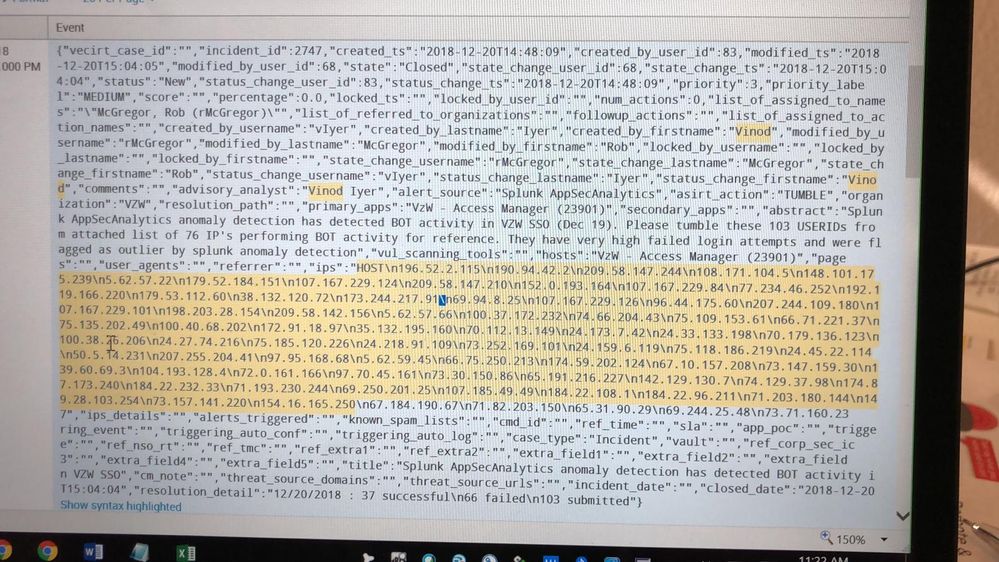
I am unable to use mvexpand or split or even i tried to use makemv command but it doesn't work as expected.
Any clue, how to handle this situation, when i do a stats or table i want IPs as multivalued whereas currently it is displayed as just a text with IPs separated with space.
- Mark as New
- Bookmark Message
- Subscribe to Message
- Mute Message
- Subscribe to RSS Feed
- Permalink
- Report Inappropriate Content

@ashish9433 I am also facing the same issue where splunk is unable to run split and mvexpand on the json data. Did you find a resolution to your question? If so, could you share it?
- Mark as New
- Bookmark Message
- Subscribe to Message
- Mute Message
- Subscribe to RSS Feed
- Permalink
- Report Inappropriate Content

@visngla1
What is your log?
If not, ask another question.
- Mark as New
- Bookmark Message
- Subscribe to Message
- Mute Message
- Subscribe to RSS Feed
- Permalink
- Report Inappropriate Content

maybe something like this:
... | rex "\"ips\"\:\"(?<all_ips>[^\"]+)"
this will capture all ips as a long string and assign it as a value to the field: "all_ips">
now go to the makemv and mvexpand
... | makemv all_ips delim = "\n" | mvexpand all_ips
hope it helps



Join the Splunk Community Slack to learn, troubleshoot, and make connections with fellow Splunk practitioners in real time!
Join Splunk User Groups to connect and learn in-person by region or remotely by topic or industry.
Cisco Data Fabric from Architecture to Investigation, Better SOC Visibility, and More ...
The Trust Gap: Why a Data Foundation is Fundamental to an Agentic Enterprise
Data Management Digest – September 2026
