
Turn on suggestions
Auto-suggest helps you quickly narrow down your search results by suggesting possible matches as you type.
Getting Data In
×
Join the Conversation
Without signing in, you're just watching from the sidelines. Sign in or Register to connect, share, and be part of the Splunk Community.
- Find Answers
- :
- Splunk Administration
- :
- Getting Data In
- :
- cannot collect WMI events on splunk 6.2.1
Options
- Subscribe to RSS Feed
- Mark Topic as New
- Mark Topic as Read
- Float this Topic for Current User
- Bookmark Topic
- Subscribe to Topic
- Mute Topic
- Printer Friendly Page
- Mark as New
- Bookmark Message
- Subscribe to Message
- Mute Message
- Subscribe to RSS Feed
- Permalink
- Report Inappropriate Content

mataharry
Communicator
02-04-2015
05:31 PM
I installed a splunk forwarder on windows, and setup monitoring of remote wmi.
Configured splunk to run on a domain user, with permissions.
wmi.conf
[WMI:getmylogs]
disabled = 0
event_log_file = Security
index = default
interval = 5
server = secure.hiddencastle.kp
But cannot retrieve anything.
I do not see any wplunk-wmi.exe process
and I double check that I can access the remote logs with the user using wbemtest.exe wbemtest
1 Solution
- Mark as New
- Bookmark Message
- Subscribe to Message
- Mute Message
- Subscribe to RSS Feed
- Permalink
- Report Inappropriate Content

yannK

Splunk Employee
02-04-2015
05:33 PM
Check if the wmi default monitor is enabled with a btool
splunk cmd btool inputs list script

[script://$SPLUNK_HOME\bin\scripts\splunk-wmi.path]
disabled = 1
and it this is the case, enable it in $SPLUNK_HOME\etc\system\local\inputs.conf
[script://$SPLUNK_HOME\bin\scripts\splunk-wmi.path]
disabled = 0
- Mark as New
- Bookmark Message
- Subscribe to Message
- Mute Message
- Subscribe to RSS Feed
- Permalink
- Report Inappropriate Content
yannK
Splunk Employee
02-04-2015
05:33 PM
Check if the wmi default monitor is enabled with a btool
splunk cmd btool inputs list script

[script://$SPLUNK_HOME\bin\scripts\splunk-wmi.path]
disabled = 1
and it this is the case, enable it in $SPLUNK_HOME\etc\system\local\inputs.conf
[script://$SPLUNK_HOME\bin\scripts\splunk-wmi.path]
disabled = 0
- Mark as New
- Bookmark Message
- Subscribe to Message
- Mute Message
- Subscribe to RSS Feed
- Permalink
- Report Inappropriate Content
mataharry
Communicator
02-04-2015
05:36 PM
It worked, after the restart we see events.
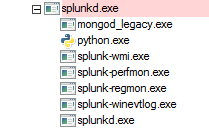
and the splunk-wmi.exe process shows up in my process explorer.


Got questions? Get answers!
Join the Splunk Community Slack to learn, troubleshoot, and make connections with fellow Splunk practitioners in real time!
Meet up IRL or virtually!
Join Splunk User Groups to connect and learn in-person by region or remotely by topic or industry.
Get Updates on the Splunk Community!
Break the Build: Inside the KubeDoom Lounge at .conf26
You step up to the machine. The pixelated corridors of a certain 1993 FPS load in front of you, EMP Pulse ...
Splunk Auto Ingestion Parallel Pipeline Scaling
Why this feature matters
Many Splunk environments experience ingestion pressure long before the host is fully ...
Best Practices: Splunk auto adjust pipeline queue
When you enable autoAdjustQueue in Splunk, maxSize should be understood as the queue size Splunk starts with ...
