
Join the Conversation
- Find Answers
- :
- Splunk Administration
- :
- Getting Data In
- :
- Why is Splunk not parsing JSON data correctly with...
- Subscribe to RSS Feed
- Mark Topic as New
- Mark Topic as Read
- Float this Topic for Current User
- Bookmark Topic
- Subscribe to Topic
- Mute Topic
- Printer Friendly Page
- Mark as New
- Bookmark Message
- Subscribe to Message
- Mute Message
- Subscribe to RSS Feed
- Permalink
- Report Inappropriate Content

I am trying to import JSON objects into splunk, my sourcetype is below,
[ _json_cloudflare ]
CHARSET=UTF-8
INDEXED_EXTRACTIONS=json
KV_MODE=none
NO_BINARY_CHECK=true
SHOULD_LINEMERGE=true
TIMESTAMP_FIELDS=timestamp
TIME_FORMAT=%s%9N
TIME_PREFIX=^
category=Structured
description=JSON cloudflare
disabled=false
pulldown_type=true
This works flawlessly on the search head, but when I index the data, it goes into Splunk like below,
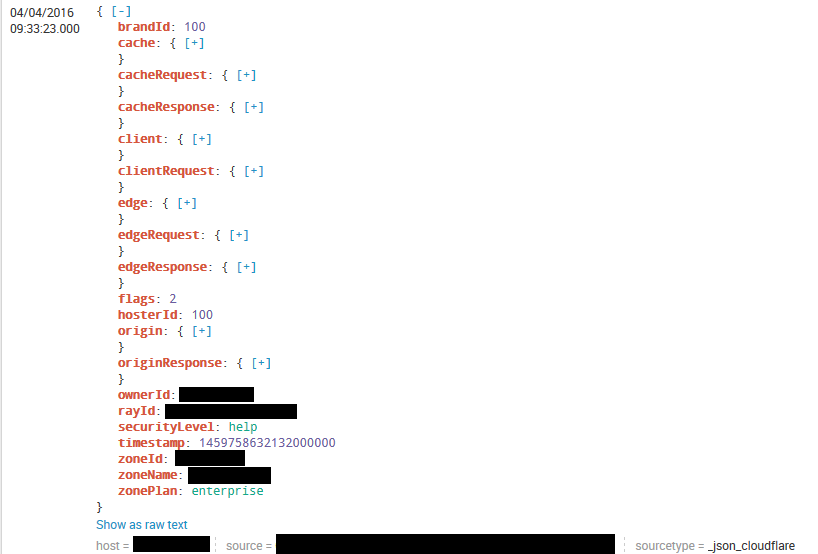
The sourcetype is on both the universal forwarder & the indexer, any ideas what is wrong?

- Mark as New
- Bookmark Message
- Subscribe to Message
- Mute Message
- Subscribe to RSS Feed
- Permalink
- Report Inappropriate Content


JSON is a wonderful data structure that Splunk handles beautifully so long as it is 100% JSON and Splunk is properly informed about it.
So, a few things I would do:
- Don't use a _ to prefix your sourcetype names. I know, Splunk does that in the UI but I'm of the opinion _names should only be used for internal-to-Splunk data types, field names, etc.
- Remove the spaces inside the stanza declaration: [good_stanza] vs. [ bad_stanza ]
Place only the relevant bits of the props.conf where they matter.
props.conf on the universal forwarder and search head:
[json_sourcetype]
INDEXED_EXTRACTIONS = JSONprops.conf on the indexer(s):
[json_sourcetype]
TIME_PREFIX = timestamp:
TIME_FORMAT = %s%3N
MAX_TIMESTAMP_LOOKAHEAD = 15
I removed TIMESTAMP_FIELDS in favour of TIME_PREFIX so that time extraction will work in the event field extractions fail.
- Mark as New
- Bookmark Message
- Subscribe to Message
- Mute Message
- Subscribe to RSS Feed
- Permalink
- Report Inappropriate Content
How are you bringing in CloudFlare logs?
- Mark as New
- Bookmark Message
- Subscribe to Message
- Mute Message
- Subscribe to RSS Feed
- Permalink
- Report Inappropriate Content
JSON is a wonderful data structure that Splunk handles beautifully so long as it is 100% JSON and Splunk is properly informed about it.
So, a few things I would do:
- Don't use a _ to prefix your sourcetype names. I know, Splunk does that in the UI but I'm of the opinion _names should only be used for internal-to-Splunk data types, field names, etc.
- Remove the spaces inside the stanza declaration: [good_stanza] vs. [ bad_stanza ]
Place only the relevant bits of the props.conf where they matter.
props.conf on the universal forwarder and search head:
[json_sourcetype]
INDEXED_EXTRACTIONS = JSONprops.conf on the indexer(s):
[json_sourcetype]
TIME_PREFIX = timestamp:
TIME_FORMAT = %s%3N
MAX_TIMESTAMP_LOOKAHEAD = 15
I removed TIMESTAMP_FIELDS in favour of TIME_PREFIX so that time extraction will work in the event field extractions fail.
- Mark as New
- Bookmark Message
- Subscribe to Message
- Mute Message
- Subscribe to RSS Feed
- Permalink
- Report Inappropriate Content
Thanks, that worked !
- Mark as New
- Bookmark Message
- Subscribe to Message
- Mute Message
- Subscribe to RSS Feed
- Permalink
- Report Inappropriate Content

I don't see any issues here. The JSON parser of Splunk Web shows the JSON syntax highlighted, and that means the indexed data is correctly parsed as JSON.
If you want to see the actual raw data without highlighting, click on the "Show as raw text" hyperlink below the event.

Join the Splunk Community Slack to learn, troubleshoot, and make connections with fellow Splunk practitioners in real time!
Join Splunk User Groups to connect and learn in-person by region or remotely by topic or industry.
Announcing Modern Navigation: A New Era of Splunk User Experience
Modernize your Splunk Apps – Introducing Python 3.13 in Splunk
Step into “Hunt the Insider: An Splunk ES Premier Mystery” to catch a cybercriminal ...
