
Join the Conversation
- Find Answers
- :
- Splunk Administration
- :
- Getting Data In
- :
- Re: Why does outputlookup gives a different _time ...
- Subscribe to RSS Feed
- Mark Topic as New
- Mark Topic as Read
- Float this Topic for Current User
- Bookmark Topic
- Subscribe to Topic
- Mute Topic
- Printer Friendly Page
- Mark as New
- Bookmark Message
- Subscribe to Message
- Mute Message
- Subscribe to RSS Feed
- Permalink
- Report Inappropriate Content

Hi
I used SPL to get the number of logins by the hour for 1 month. The goal is to later import them into python using pandas.
But I am having problems understanding the "_time" column.
This is what I see in Splunk's SPL search result:
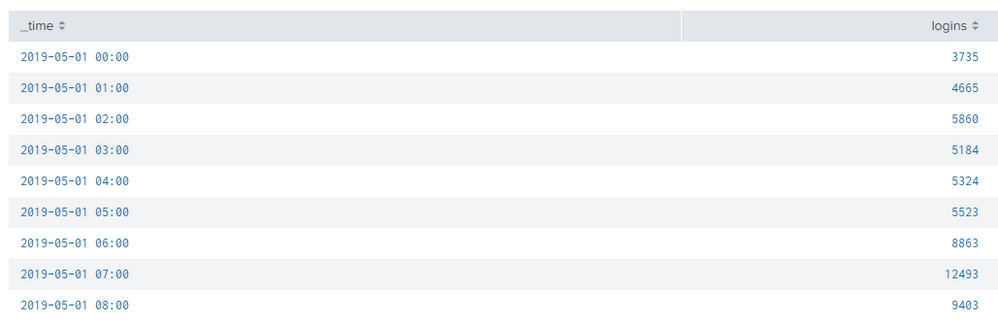
But when I export it into .csv, I see:
                      _time   Logins
2019-05-01T00:00:00.000-0400    3735
2019-05-01T01:00:00.000-0400    4665
2019-05-01T02:00:00.000-0400    5860
2019-05-01T03:00:00.000-0400    5184
2019-05-01T04:00:00.000-0400    5324
2019-05-01T05:00:00.000-0400    5523
2019-05-01T06:00:00.000-0400    8863
2019-05-01T07:00:00.000-0400    12493
And when I use "outpulookup" to create the .csv, I see:
   _time    logins  _span
1556683200  3735    3600
1556686800  4665    3600
1556690400  5860    3600
1556694000  5184    3600
1556697600  5324    3600
1556701200  5523    3600
1556704800  8863    3600
1556708400  12493   3600
The SPL to get the search results are:
index=fortigate status=logon
|timechart span=1h count(status) as logins
Thank you

- Mark as New
- Bookmark Message
- Subscribe to Message
- Mute Message
- Subscribe to RSS Feed
- Permalink
- Report Inappropriate Content
When you export to csv, Splunk is showing literally what you see in the search results, when you do outputlookup, Splunk is inserting the value for _time that the field normally has, which is an epoch time. Splunk treats _time as a special field and so will automatically convert epoch to human readable in the UI. That's why it looks different when you compare the two searches. One is deliberately meant to be human readable, the other is meant to be readable by Splunk.
- Mark as New
- Bookmark Message
- Subscribe to Message
- Mute Message
- Subscribe to RSS Feed
- Permalink
- Report Inappropriate Content
When you export to csv, Splunk is showing literally what you see in the search results, when you do outputlookup, Splunk is inserting the value for _time that the field normally has, which is an epoch time. Splunk treats _time as a special field and so will automatically convert epoch to human readable in the UI. That's why it looks different when you compare the two searches. One is deliberately meant to be human readable, the other is meant to be readable by Splunk.

Join the Splunk Community Slack to learn, troubleshoot, and make connections with fellow Splunk practitioners in real time!
Join Splunk User Groups to connect and learn in-person by region or remotely by topic or industry.
Tuning Edge Processor in Hybrid Mode: What Limits Each Data Path
Best Practices: Splunk auto adjust pipeline queue
Request for Professional Development: Attending .conf26
