
Join the Conversation
- Find Answers
- :
- Splunk Administration
- :
- Getting Data In
- :
- Why are the ulimits set correctly, not showing in ...
- Subscribe to RSS Feed
- Mark Topic as New
- Mark Topic as Read
- Float this Topic for Current User
- Bookmark Topic
- Subscribe to Topic
- Mute Topic
- Printer Friendly Page
- Mark as New
- Bookmark Message
- Subscribe to Message
- Mute Message
- Subscribe to RSS Feed
- Permalink
- Report Inappropriate Content
Why are the ulimits set correctly, not showing in splunk web?

I'm working on the initial set up of splunk single instance on prem and I haven't been able to get data in yet. I have installed the universal forwarder on 2 windows servers and installed the add on for windows on those servers. I get this message in the monitoring console.
| ulimits.data_segment_size (current / recommended) | ulimits.open_files (current / recommended) | ulimits.user_processes (current / recommended) |
| -1 | 4096 / 64000 | 47318 / 16000 |
Then when I log onto the Cent OS server and look at ulimits and they are set as the recommended minimum values.

How can I get the Splunk web to recognize how these settings are set on the server?
- Mark as New
- Bookmark Message
- Subscribe to Message
- Mute Message
- Subscribe to RSS Feed
- Permalink
- Report Inappropriate Content


Hi @TaraPennington,
Can you try restarting the server?
- Mark as New
- Bookmark Message
- Subscribe to Message
- Mute Message
- Subscribe to RSS Feed
- Permalink
- Report Inappropriate Content
I rebooted the server and still seeing the same messages in splunk web. Do I need to also change these settings from the link you sent?
Set limits using the /etc/systemd configuration files
- Mark as New
- Bookmark Message
- Subscribe to Message
- Mute Message
- Subscribe to RSS Feed
- Permalink
- Report Inappropriate Content
If Splunk is running under systemd , it will help.
- Mark as New
- Bookmark Message
- Subscribe to Message
- Mute Message
- Subscribe to RSS Feed
- Permalink
- Report Inappropriate Content
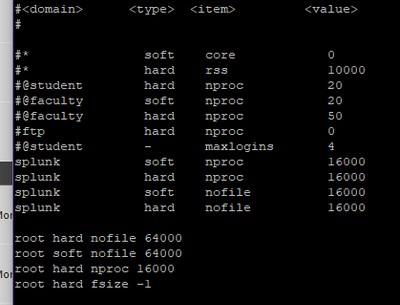
I added these lines at the end of the /etc/security/limits.conf on the root profile, I'm still getting the same message.
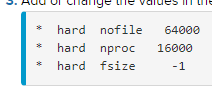
I didn't configure splunk to run on the systemd, so I didn't add those other settings.
This is how the bottom of the file looks, I'm not sure if these are entered correctly.
- Mark as New
- Bookmark Message
- Subscribe to Message
- Mute Message
- Subscribe to RSS Feed
- Permalink
- Report Inappropriate Content

Hi @TaraPennington,
for which user did you setted your ulimits?
You have to se it for te user who runs splunk process (usually root or splunk).
Ciao.
Giuseppe
- Mark as New
- Bookmark Message
- Subscribe to Message
- Mute Message
- Subscribe to RSS Feed
- Permalink
- Report Inappropriate Content
It was using the root user account.
- Mark as New
- Bookmark Message
- Subscribe to Message
- Mute Message
- Subscribe to RSS Feed
- Permalink
- Report Inappropriate Content
Hi @TaraPennington,
did you configured ulimit in /etc/security/limits.conf ?
if not, you have to insert at the end of this file:
root hard nofile 64000
root soft nofile 64000
then exit from the user or restart Splunk.
Ciao.
Giuseppe
- Mark as New
- Bookmark Message
- Subscribe to Message
- Mute Message
- Subscribe to RSS Feed
- Permalink
- Report Inappropriate Content
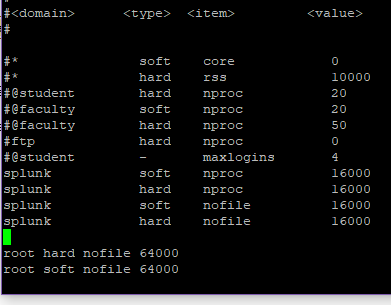
I believe I added those two lines to the end of the /etc/security/limits.conf correctly
I saved this and restarted splunk and am still getting the same message about ulimits.
- Mark as New
- Bookmark Message
- Subscribe to Message
- Mute Message
- Subscribe to RSS Feed
- Permalink
- Report Inappropriate Content
hi @TaraPennington,
to apply the updates, you have to:
- exit the user,
- access again,
- restart Splunk.
Ciao.
Giuseppe

Join the Splunk Community Slack to learn, troubleshoot, and make connections with fellow Splunk practitioners in real time!
Join Splunk User Groups to connect and learn in-person by region or remotely by topic or industry.
Observability Simplified: Combining User Experience, Application Performance & ...
Event Series May & June: From Network Visibility to Service Intelligence
Global Splunk User Group Events: May + June 2026
