
Join the Conversation
- Find Answers
- :
- Splunk Administration
- :
- Getting Data In
- :
- Re: Why are Windows event logs with MSSQLSERVER$AU...
- Subscribe to RSS Feed
- Mark Topic as New
- Mark Topic as Read
- Float this Topic for Current User
- Bookmark Topic
- Subscribe to Topic
- Mute Topic
- Printer Friendly Page
- Mark as New
- Bookmark Message
- Subscribe to Message
- Mute Message
- Subscribe to RSS Feed
- Permalink
- Report Inappropriate Content

Hi,
We have an auditing setup which logs in Windows event logs (Forwarded Events) as "MSSQLSERVER$AUDIT" source.
they are well displayed in event viewer console, but the log is truncated and message is empty :
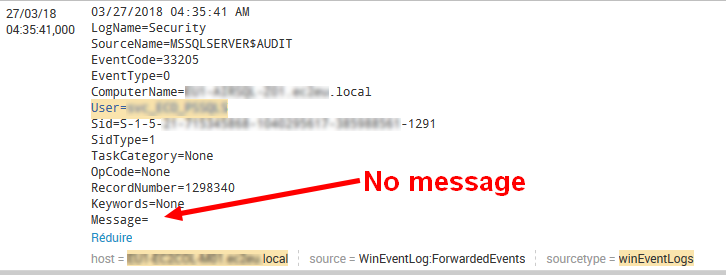
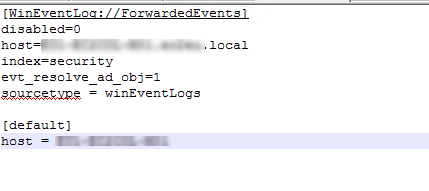
here the input file on windows server :
on the other side "Microsoft Windows Security auditing" events that are in "Forwarded Events" too are correctly sent and parsed in Splunk Indexer.
how come ?
where elsewhere do I have to check ?
Splunk UF is installed on Windows server with the Windows Events Collector
Thanks


- Mark as New
- Bookmark Message
- Subscribe to Message
- Mute Message
- Subscribe to RSS Feed
- Permalink
- Report Inappropriate Content
After searching and get helped from support, I tried the solution described in https://answers.splunk.com/answers/326943/why-is-windows-event-log-message-data-being-trunca.html
now logs are fully sent and parsed.
- Mark as New
- Bookmark Message
- Subscribe to Message
- Mute Message
- Subscribe to RSS Feed
- Permalink
- Report Inappropriate Content
After searching and get helped from support, I tried the solution described in https://answers.splunk.com/answers/326943/why-is-windows-event-log-message-data-being-trunca.html
now logs are fully sent and parsed.
- Mark as New
- Bookmark Message
- Subscribe to Message
- Mute Message
- Subscribe to RSS Feed
- Permalink
- Report Inappropriate Content


@gregory.cordier If your problem is resolved, please accept the answer to help future readers.
If this reply helps you, Karma would be appreciated.

Join the Splunk Community Slack to learn, troubleshoot, and make connections with fellow Splunk practitioners in real time!
Join Splunk User Groups to connect and learn in-person by region or remotely by topic or industry.
Make Your Machine Data AI-Ready in Splunk
Splunk Asynchronous Forwarding Explained
How to Monitor AI Agents with Splunk Agent Observability
