
Join the Conversation
- Find Answers
- :
- Splunk Administration
- :
- Getting Data In
- :
- What time is displayed in raw splunk logs
- Subscribe to RSS Feed
- Mark Topic as New
- Mark Topic as Read
- Float this Topic for Current User
- Bookmark Topic
- Subscribe to Topic
- Mute Topic
- Printer Friendly Page
- Mark as New
- Bookmark Message
- Subscribe to Message
- Mute Message
- Subscribe to RSS Feed
- Permalink
- Report Inappropriate Content

I am trying to debug issues related to delay in splunk forwarding or indexing in a separate splunk query "https://answers.splunk.com/answers/730136/why-are-our-splunk-indexes-not-showing-all-log-ent.html. But I would like to understand how the display of raw logs are governed, so opening a new ticket.
Attached below is a mockup of how I see logs in raw format and account settings. I have my account settings configured to GMT timezone. When I search any logs in raw format, I see each log entry beginning with EST timestamp. When I expand it, I see _time field showing time in GMT format.
How and where can I change the settings for the log entry so that it remains consistent and I can debug correct time period to view logs . The servers from where we are forwarding the logs is also in GMT time as far as I know.
Time-mockup: 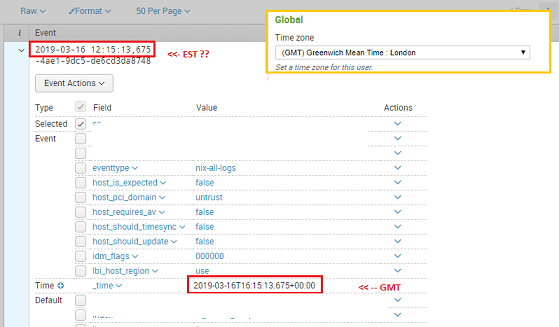

- Mark as New
- Bookmark Message
- Subscribe to Message
- Mute Message
- Subscribe to RSS Feed
- Permalink
- Report Inappropriate Content

There is no such thing as time displayed in logs; there is only text displayed in logs so the thing that you see in the raw event is the unmodified text the way that the event came in.
Do you see the Raw v that is above Event that is above your timestamp?
Click on that and change it to List. You will then see a new column called Time between i and Event that shows the event's timestamp adjusted to your user's Time zone setting. BTW, List is the default so at some point you changed this (or somebody logged in as you), so don't blame Splunk!
- Mark as New
- Bookmark Message
- Subscribe to Message
- Mute Message
- Subscribe to RSS Feed
- Permalink
- Report Inappropriate Content
There is no such thing as time displayed in logs; there is only text displayed in logs so the thing that you see in the raw event is the unmodified text the way that the event came in.
Do you see the Raw v that is above Event that is above your timestamp?
Click on that and change it to List. You will then see a new column called Time between i and Event that shows the event's timestamp adjusted to your user's Time zone setting. BTW, List is the default so at some point you changed this (or somebody logged in as you), so don't blame Splunk!
- Mark as New
- Bookmark Message
- Subscribe to Message
- Mute Message
- Subscribe to RSS Feed
- Permalink
- Report Inappropriate Content
Thanks for the explanation. I am not blaming splunk for anything, just trying to understand so it can utilized in correct manner.
With the explanation you are giving, it seems the source log file is logging in EST, that would mean the server which I assumed was in GMT is in fact in EST location. So, I need to change my account settings to EST then, to get consistent logs.
I will try this and see if it helps in finding old logs in appropriate date time range.
- Mark as New
- Bookmark Message
- Subscribe to Message
- Mute Message
- Subscribe to RSS Feed
- Permalink
- Report Inappropriate Content
You've got it.

Join the Splunk Community Slack to learn, troubleshoot, and make connections with fellow Splunk practitioners in real time!
Join Splunk User Groups to connect and learn in-person by region or remotely by topic or industry.
May 2026 Splunk Expert Sessions: Security & Observability
Network to App: Observability Unlocked [May & June Series]
SPL2 Deep Dives, AppDynamics Integrations, SAML Made Simple and Much More on Splunk ...
