
Join the Conversation
- Find Answers
- :
- Splunk Administration
- :
- Getting Data In
- :
- What props.conf and transforms.conf settings I nee...
- Subscribe to RSS Feed
- Mark Topic as New
- Mark Topic as Read
- Float this Topic for Current User
- Bookmark Topic
- Subscribe to Topic
- Mute Topic
- Printer Friendly Page
- Mark as New
- Bookmark Message
- Subscribe to Message
- Mute Message
- Subscribe to RSS Feed
- Permalink
- Report Inappropriate Content

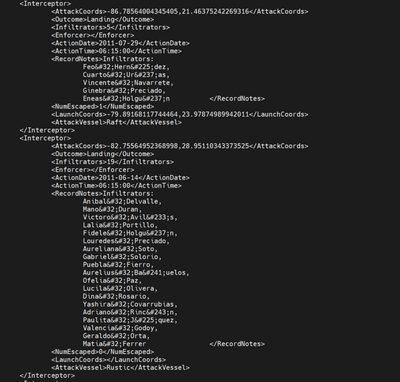
This ^ is sample xml log file that I want to onboard. Please guide me about the settings which I should set in order to properly input this data. Also tell me on which instances the settings (props.conf and transforms.conf) are required. I am running a Distributed system with indexer clustering.
- Mark as New
- Bookmark Message
- Subscribe to Message
- Mute Message
- Subscribe to RSS Feed
- Permalink
- Report Inappropriate Content


Hi
First You should test this with sample data on your local dev instance. This is the easiest way to integrate data source to splunk.
On your local instance start with
- Settings -> Add Data -> Monitor/Upload
- Select source file from your local disk
- Configure the next parts
- Event Breaks (Regex ([\n\r]+)\s*<Interceptor>)
- Timestamp: Advanced
- Format: %Y-%m-%d</ActionDate>\n\s*<ActionTime>%H:%M%S (check with your actual data)
- Prefix: <ActionDate>
- Lookahead: enough long to match Format
- Advanced: If something is needed
When you are happy what you see on your preview, then "Save As" a new sourcetype. Also you can copy those with link "Copy to clipboard".
Then add that props.conf into the first full Splunk Enterprise instance on path from your source system to indexers. And remember restart that instance.
I prefer to create own TA for those config and then distribute that TA where it is needed.
r. Ismo
- Mark as New
- Bookmark Message
- Subscribe to Message
- Mute Message
- Subscribe to RSS Feed
- Permalink
- Report Inappropriate Content
Hi
First You should test this with sample data on your local dev instance. This is the easiest way to integrate data source to splunk.
On your local instance start with
- Settings -> Add Data -> Monitor/Upload
- Select source file from your local disk
- Configure the next parts
- Event Breaks (Regex ([\n\r]+)\s*<Interceptor>)
- Timestamp: Advanced
- Format: %Y-%m-%d</ActionDate>\n\s*<ActionTime>%H:%M%S (check with your actual data)
- Prefix: <ActionDate>
- Lookahead: enough long to match Format
- Advanced: If something is needed
When you are happy what you see on your preview, then "Save As" a new sourcetype. Also you can copy those with link "Copy to clipboard".
Then add that props.conf into the first full Splunk Enterprise instance on path from your source system to indexers. And remember restart that instance.
I prefer to create own TA for those config and then distribute that TA where it is needed.
r. Ismo

Join the Splunk Community Slack to learn, troubleshoot, and make connections with fellow Splunk practitioners in real time!
Join Splunk User Groups to connect and learn in-person by region or remotely by topic or industry.
Announcing Modern Navigation: A New Era of Splunk User Experience
Modernize your Splunk Apps – Introducing Python 3.13 in Splunk
Step into “Hunt the Insider: An Splunk ES Premier Mystery” to catch a cybercriminal ...
