
Join the Conversation
- Find Answers
- :
- Splunk Administration
- :
- Getting Data In
- :
- Use stat with two different Index with different f...
- Subscribe to RSS Feed
- Mark Topic as New
- Mark Topic as Read
- Float this Topic for Current User
- Bookmark Topic
- Subscribe to Topic
- Mute Topic
- Printer Friendly Page
- Mark as New
- Bookmark Message
- Subscribe to Message
- Mute Message
- Subscribe to RSS Feed
- Permalink
- Report Inappropriate Content

Hello Splunk TEAM,
I have a problem with my search because I use to different index and the data which I want to compare when I want to define by a field is different for example.
I have two Index
in one I have ContactByName and in the other index I have PerformedByName.
I the two fields I have the same data but when I want to compare the data in that information I cant.
I try to rename ContactByName as PerformedByName to do my search again but is not a good idea.
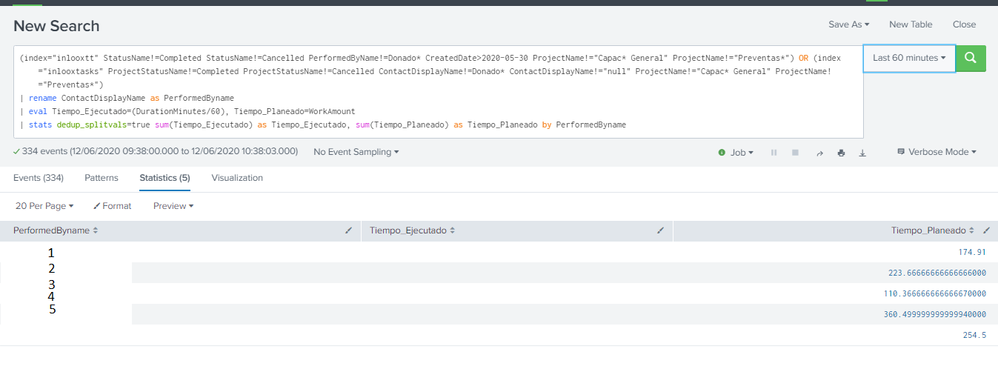
I have this Right now:
(index="inlooxtt" StatusName!=Completed StatusName!=Cancelled PerformedByName!=Donado* CreatedDate>2020-05-30 ProjectName!="Capac* General" ProjectName!="Preventas*") OR (index="inlooxtasks" ProjectStatusName!=Completed ProjectStatusName!=Cancelled ContactDisplayName!=Donado* ContactDisplayName!="null" ProjectName!="Capac* General" ProjectName!="Preventas*")
| rename ContactDisplayName as PerformedByname
| eval Tiempo_Ejecutado=(DurationMinutes/60), Tiempo_Planeado=WorkAmount
| stats dedup_splitvals=true sum(Tiempo_Ejecutado) as Tiempo_Ejecutado, sum(Tiempo_Planeado) as Tiempo_Planeado by PerformedByname
But I have this:
The Tiempo_Ejecutado didnt appear 😞
Thanks all
- Mark as New
- Bookmark Message
- Subscribe to Message
- Mute Message
- Subscribe to RSS Feed
- Permalink
- Report Inappropriate Content


Try using coalesce in place of rename.
(index="inlooxtt" StatusName!=Completed StatusName!=Cancelled PerformedByName!=Donado* CreatedDate>2020-05-30 ProjectName!="Capac* General" ProjectName!="Preventas*") OR (index="inlooxtasks" ProjectStatusName!=Completed ProjectStatusName!=Cancelled ContactDisplayName!=Donado* ContactDisplayName!="null" ProjectName!="Capac* General" ProjectName!="Preventas*")
| eval PerformedBy = coalesce( ContactDisplayName, PerformedByname)
| eval Tiempo_Ejecutado=(DurationMinutes/60), Tiempo_Planeado=WorkAmount
| stats dedup_splitvals=true sum(Tiempo_Ejecutado) as Tiempo_Ejecutado, sum(Tiempo_Planeado) as Tiempo_Planeado by PerformedBy
If this reply helps you, Karma would be appreciated.
- Mark as New
- Bookmark Message
- Subscribe to Message
- Mute Message
- Subscribe to RSS Feed
- Permalink
- Report Inappropriate Content

Join the Splunk Community Slack to learn, troubleshoot, and make connections with fellow Splunk practitioners in real time!
Join Splunk User Groups to connect and learn in-person by region or remotely by topic or industry.
Persistent Queue at TcpOut — One of Splunk's Most Practical Features
Build resilience for the agentic era: Join us at Splunk Go San Jose
Manage Edge Processor pipelines end to end with APIs
