
Join the Conversation
- Find Answers
- :
- Splunk Administration
- :
- Getting Data In
- :
- Unversal Forwarder (win/*nix 9.1.1) with specific ...
- Subscribe to RSS Feed
- Mark Topic as New
- Mark Topic as Read
- Float this Topic for Current User
- Bookmark Topic
- Subscribe to Topic
- Mute Topic
- Printer Friendly Page
- Mark as New
- Bookmark Message
- Subscribe to Message
- Mute Message
- Subscribe to RSS Feed
- Permalink
- Report Inappropriate Content
Unversal Forwarder (win/*nix 9.1.1) with specific Index does not show up in Data summary anymore

Hi all,
I successfully forward data from Windows using the command
msiexec.exe /i splunkuniversalforwarder_x86.msi RECEIVING_INDEXER="indexer1:9997" WINEVENTLOG_SEC_ENABLE=1 WINEVENTLOG_SYS_ENABLE=1 AGREETOLICENSE=Yes /quietfrom Install a Windows universal forwarder .
The same for Linux with the command
./splunk add monitor /var/logfrom Configure the universal forwarder using configuration files .
Both works fine and I can see the hosts in the Data Summary as visible in the following figure.
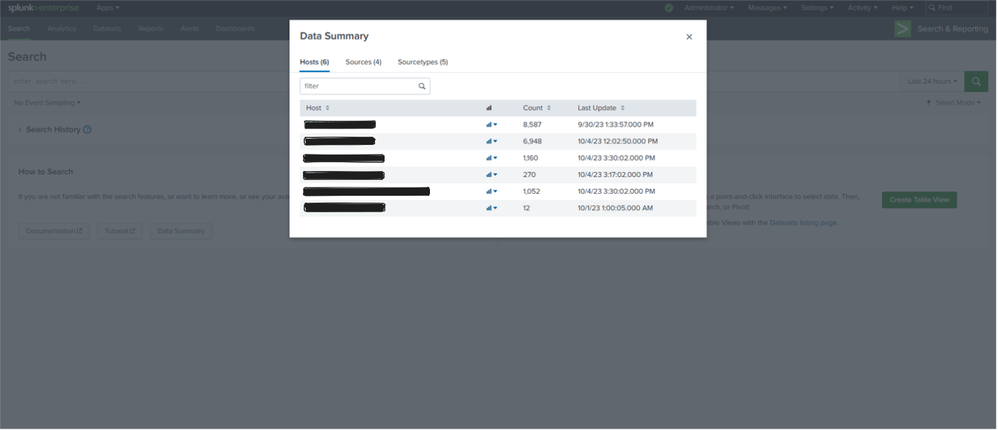
If I instead set up the input in the local "inputs.conf" file after basic installation like
[perfmon://LocalPhysicalDisk]
interval = 10
object = PhysicalDisk
counters = Disk Bytes/sec; % Disk Read Time; % Disk Write Time; % Disk Time
instances = *
disabled = 0
index = winfwtestinger
for example and assign a specific index, I can see that data is ingested if I search for the specific index but they will not appear in the Data Summary. I would be very happy about any suggestion what I am doing wrong here.
Best regards
- Mark as New
- Bookmark Message
- Subscribe to Message
- Mute Message
- Subscribe to RSS Feed
- Permalink
- Report Inappropriate Content


this should be tested. maybe i will give it a try today evening.
well, looks like the developers made some basic errors.. even if we raise support ticket for this, splunk would consider this as low priority ticket.


Join the Splunk Community Slack to learn, troubleshoot, and make connections with fellow Splunk practitioners in real time!
Join Splunk User Groups to connect and learn in-person by region or remotely by topic or industry.
Event Series: Level up your SOC: Advancing with Splunk Enterprise Security
Announcing Modern Navigation: A New Era of Splunk User Experience
SOC4Kafka - New Kafka Connector Powered by OpenTelemetry
