
Join the Conversation
- Find Answers
- :
- Splunk Administration
- :
- Getting Data In
- :
- Strange timestamp warning
- Subscribe to RSS Feed
- Mark Topic as New
- Mark Topic as Read
- Float this Topic for Current User
- Bookmark Topic
- Subscribe to Topic
- Mute Topic
- Printer Friendly Page
- Mark as New
- Bookmark Message
- Subscribe to Message
- Mute Message
- Subscribe to RSS Feed
- Permalink
- Report Inappropriate Content

Hi everyone,
I'm importing data from Windows event logs to a Splunk machine in Unix (version 7.0.3).
I have a weird warning when I try to do my timestamp configuration.
My logs timestamp looks like this:
2019-03-10 12:04:44:foo: bar ...
So I follow the official doc and I put:
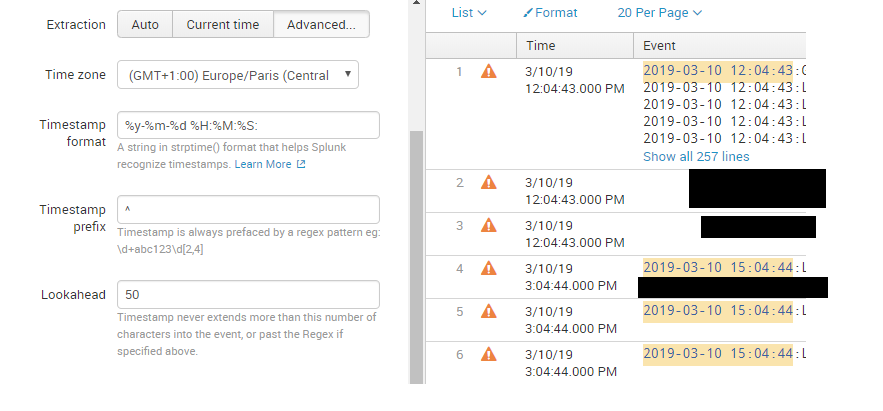
TIME_FORMAT = %y-%m-%d %H:%M:%S:
but I get some warnings and the event breaking is wrong.
Warning: Could not use strptime to
parse timestamp from"2019-03-10
12:04:44:foo..."
Then when I try:
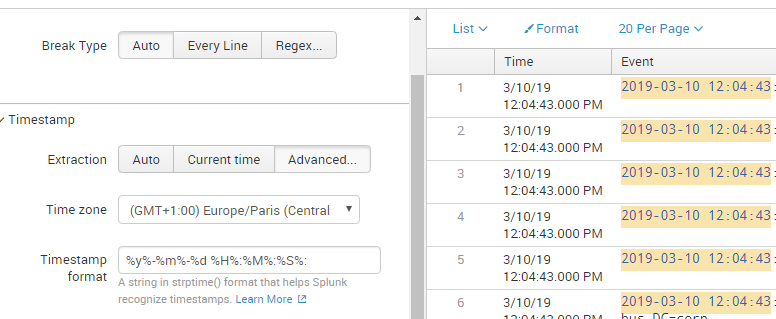
TIME_FORMAT= %y%-%m%-%d %H%:%M%:%S%:
which is surprisingly not a format anywhere in the docs, everything looks fine.
Can anyone help me understand what's going on?
I'm not sure if I'm following the best practices...
I join some screenshots.
Thank you in advance.
With warning:
Without warning:


- Mark as New
- Bookmark Message
- Subscribe to Message
- Mute Message
- Subscribe to RSS Feed
- Permalink
- Report Inappropriate Content


I don't why the second format works, but it shouldn't. Your first format is almost correct, it just needs to be modified to look for 4-digit years.
TIME_FORMAT = %Y-%m-%d %H:%M:%S
If this reply helps you, Karma would be appreciated.
- Mark as New
- Bookmark Message
- Subscribe to Message
- Mute Message
- Subscribe to RSS Feed
- Permalink
- Report Inappropriate Content
I don't why the second format works, but it shouldn't. Your first format is almost correct, it just needs to be modified to look for 4-digit years.
TIME_FORMAT = %Y-%m-%d %H:%M:%S
If this reply helps you, Karma would be appreciated.
- Mark as New
- Bookmark Message
- Subscribe to Message
- Mute Message
- Subscribe to RSS Feed
- Permalink
- Report Inappropriate Content
Thank you richgalloway. It was my mistake %Y-%m-%d %H:%M:%S works well but the other format works well too.
That's why I was confused.

Join the Splunk Community Slack to learn, troubleshoot, and make connections with fellow Splunk practitioners in real time!
Join Splunk User Groups to connect and learn in-person by region or remotely by topic or industry.
Persistent Queue at TcpOut — One of Splunk's Most Practical Features
Catalog Is Now Generally Available on Splunk Cloud Platform
Your Path to AgenticOps: AI Experiences for Every Splunk Practitioner
