
Join the Conversation
- Find Answers
- :
- Splunk Administration
- :
- Getting Data In
- :
- Splunk server not recieving data from node
- Subscribe to RSS Feed
- Mark Topic as New
- Mark Topic as Read
- Float this Topic for Current User
- Bookmark Topic
- Subscribe to Topic
- Mute Topic
- Printer Friendly Page
- Mark as New
- Bookmark Message
- Subscribe to Message
- Mute Message
- Subscribe to RSS Feed
- Permalink
- Report Inappropriate Content
Splunk server not recieving data from node

I have a splunk enterprise server and a node configured with Linux forwarder. These are the things configured in both the ends:
server:
enabled port 9997 to be reciever
added the following in inputs.conf file
[splunktcp://9997]
disabled = 0
node:
added forward server and started forwarder
added the following in outputs.conf file
[tcpout:default-autolb-group]
server = 172.xx.x.xxx:9997
[tcpout-server://172.xx.x.xxx:9997]
added a custom folder to monitor list
But in Splunk web dashboard, I am not able to recieve any data from the node.
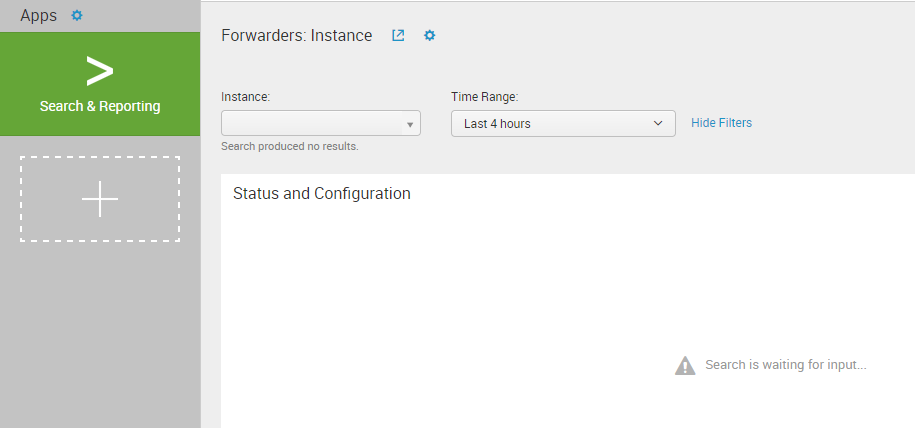
Can someone please help me..?
- Mark as New
- Bookmark Message
- Subscribe to Message
- Mute Message
- Subscribe to RSS Feed
- Permalink
- Report Inappropriate Content


Hi vysakhnubelity,
you can follow Splunk documentation at https://docs.splunk.com/Documentation/Splunk/6.5.3/Forwarding/Receiverconnection
At first you should verify connection from the client:
telnet 172.xx.x.xxx 9997
so you can understand if there is the mandatory connectivity between Splunk servers.
After you should verify if indexer receives internal logs from forwarder:
index=_internal host=your_host
if there are internal logs, this means that you have to verify your log input otherwise that there is a connection problems between Splunk servers.
at least you should verify if date and time of both servers are aligned.
At this point, you should understand where is located the problem.
Bye.
Giuseppe
- Mark as New
- Bookmark Message
- Subscribe to Message
- Mute Message
- Subscribe to RSS Feed
- Permalink
- Report Inappropriate Content
Hello,
Thanks for the response. I verified that the connection exists and there's this audit data coming in to dashboard, I can see this once I click search and reporting and then on data summary.
But how can I get the same in the dashboard (I mean the home page when I login to Splunk Web)? In the above image, I should be able to select the instance and then the data appears below the same. How can I achieve this?



Join the Splunk Community Slack to learn, troubleshoot, and make connections with fellow Splunk practitioners in real time!
Join Splunk User Groups to connect and learn in-person by region or remotely by topic or industry.
A Four-Part Event Series: Full Stack Observability For the AI Era
SOC4Kafka - New Kafka Connector Powered by OpenTelemetry
Event Series: Level up your SOC: Advancing with Splunk Enterprise Security
