
Join the Conversation
- Find Answers
- :
- Splunk Administration
- :
- Getting Data In
- :
- Splunk not recognizing nested json
- Subscribe to RSS Feed
- Mark Topic as New
- Mark Topic as Read
- Float this Topic for Current User
- Bookmark Topic
- Subscribe to Topic
- Mute Topic
- Printer Friendly Page
- Mark as New
- Bookmark Message
- Subscribe to Message
- Mute Message
- Subscribe to RSS Feed
- Permalink
- Report Inappropriate Content
Splunk not recognizing nested json

I've searched quite some time, but I'm not able to find why Splunk is not recognizing a nested JSON.
Here's how my data/events looks in raw text ( path of the data is SES->SNS->Lambda->HEC)
{"Records":[{"EventSource":"aws:sns","EventVersion":"1.0","EventSubscriptionArn":"arn:aws:sns:eu-north-1:doesntmatter","Sns":{"Type":"Notification","MessageId":"87b93315-f1f6-56f8-83dc-6b099eb5e18e","TopicArn":"arn:aws:sns:eu-north-1:doesntmatter","Subject":null,"Message":"{\"notificationType\":\"Delivery\",\"mail\":{\"timestamp\":\"2020-11-04T08:57:37.646Z\",\"source\":\"[email protected]\",\"sourceArn\":\"arn:aws:ses:eu-north-1:MYaccountID:identity/[email protected]\",\"sourceIp\":\"X.X.X.X\",\"sendingAccountId\":\"MYaccountID\",\"messageId\":\"011001759279ce6e-67642459-31fa-4f4b-b852-315ea7e8d284-000000\",\"destination\":[\"[email protected]\"],\"headersTruncated\":false,\"headers\":[{\"name\":\"Received\",\"value\":\"from ip-X.X.X.X.eu-north-1.compute.internal (ec2-X.X.X.X.eu-north-1.compute.amazonaws.com [X.X.X.X]) by email-smtp.amazonaws.com with SMTP (SimpleEmailService-d-090KRTZ85) id RANDOM for [email protected]; Wed, 04 Nov 2020 08:57:37 +0000 (UTC)\"},{\"name\":\"Content-Type\",\"value\":\"multipart/mixed; boundary=\\\"===============digits==\\\"\"},{\"name\":\"MIME-Version\",\"value\":\"1.0\"},{\"name\":\"Subject\",\"value\":\"to me from NEW NEW\"},{\"name\":\"To\",\"value\":\"[email protected]\"},{\"name\":\"From\",\"value\":\"[email protected]\"},{\"name\":\"Date\",\"value\":\"Wed, 04 Nov 2020 08:57:37 +0000\"},{\"name\":\"X-Priority\",\"value\":\"3\"},{\"name\":\"X-Splunk-SID\",\"value\":\"digits.2\"},{\"name\":\"X-Splunk-ServerName\",\"value\":\"ip-X.X.X.X.eu-north-1.compute.internal\"},{\"name\":\"X-Splunk-Version\",\"value\":\"8.1.0\"},{\"name\":\"X-Splunk-Build\",\"value\":\"f57c09e87251\"}],\"commonHeaders\":{\"from\":[\"[email protected]\"],\"date\":\"Wed, 04 Nov 2020 08:57:37 +0000\",\"to\":[\"[email protected]\"],\"subject\":\"to me from NEW NEW\"}},\"delivery\":{\"timestamp\":\"2020-11-04T08:57:39.153Z\",\"processingTimeMillis\":1507,\"recipients\":[\"[email protected]\"],\"smtpResponse\":\"250 2.6.0 <[email protected]> [InternalId=digits, Hostname=random hostname] 12107 bytes in 0.057, 206.415 KB/sec Queued mail for delivery\",\"remoteMtaIp\":\"Y.Y.Y.Y\",\"reportingMTA\":\"e240-9.smtp-out.eu-north-1.amazonses.com\"}}","Timestamp":"2020-11-04T08:57:39.198Z","SignatureVersion":"1","Signature":"SIGNATURE","SigningCertUrl":"https://sns.eu-north-1.amazonaws.com/SimpleNotificationService-PEM.pem","UnsubscribeUrl":"https://sns.eu-north-1.amazonaws.com/?Action=Unsubscribe&SubscriptionArn=arn:aws:sns:eu-north-1:doesntmatter","MessageAttributes":{}}}]}
I'm sending the data to :8088/collector . Here's the screenshot of how the data looks like in syntax:
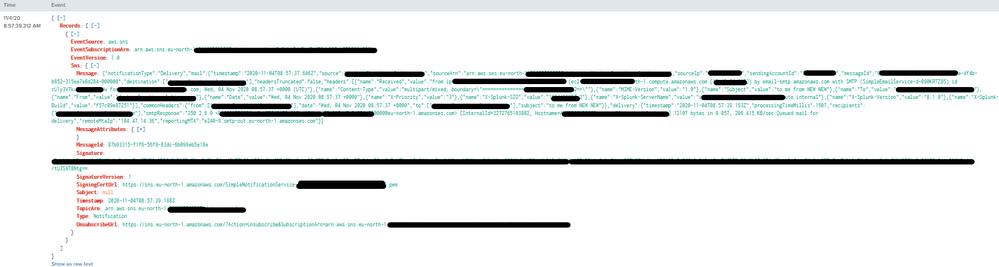
I would like to extract some fields from "Message" which is a valid JSON, however I'm not able to do it since Splunk is not recognizing it as a JSON and my knowledge about filtering using rex is below 0 😐 .
I believe it has something to do with the backslashes, but when I use to remove them:
SEDCMD-replace_backslash = s/\\//g
in my props.conf, Splunk stops to recognize the whole event as json and it's not formatting it (showing as raw when I do a search).
My props.conf looks like:
[ses_json_new]
category = Custom
pulldown_type = 1
If I add to props.conf
KV_MODE = json
Nothing happens, nor with:
INDEXED_EXTRACTIONS = json
Appreciate your help and please excuse me for my nescience.
Thank you.

Join the Splunk Community Slack to learn, troubleshoot, and make connections with fellow Splunk practitioners in real time!
Join Splunk User Groups to connect and learn in-person by region or remotely by topic or industry.
Splunk Enterprise Security: An Automated Phishing Response Workflow
Sharper ES Detections, Agentic AI Integrations, Smarter Workload Management, and More ...
Data Outage Monitoring and Reporting
