
Join the Conversation
- Find Answers
- :
- Splunk Administration
- :
- Getting Data In
- :
- Re: Splunk Universal Forwarder On AIX Fails To Sta...
- Subscribe to RSS Feed
- Mark Topic as New
- Mark Topic as Read
- Float this Topic for Current User
- Bookmark Topic
- Subscribe to Topic
- Mute Topic
- Printer Friendly Page
- Mark as New
- Bookmark Message
- Subscribe to Message
- Mute Message
- Subscribe to RSS Feed
- Permalink
- Report Inappropriate Content
Splunk Universal Forwarder On AIX Fails To Start After Upgrade To 8.0.2

Dear all,
I upgraded universal forwarder from 7.2.0 to 8.0.2 on AIX.
When i start it, i have encountered the below problem:
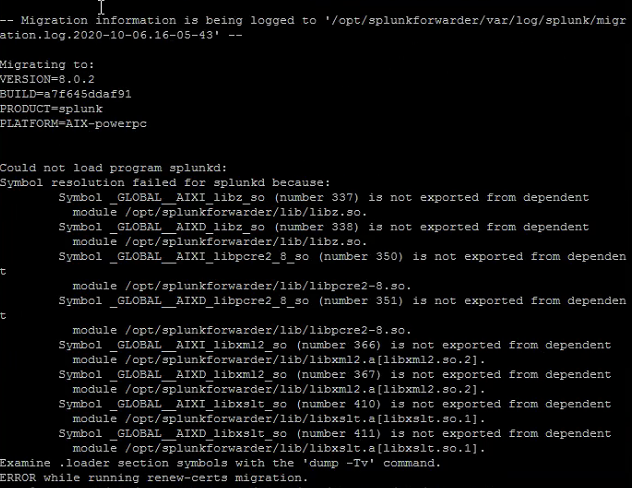
I have tried to run slibclean and re run upgrade again. but it still failed.
also, i have try to run 'splunk validate files' .

- Mark as New
- Bookmark Message
- Subscribe to Message
- Mute Message
- Subscribe to RSS Feed
- Permalink
- Report Inappropriate Content


Do you have the AIX Toolbox for Linux Applications installed? See https://docs.splunk.com/Documentation/Forwarder/8.0.6/Forwarder/Installanixuniversalforwarder#Instal...
I believe the slibclean utility modified some Splunk binaries so now they fail the integrity check. Re-install Splunk to correct that.
If this reply helps you, Karma would be appreciated.
- Mark as New
- Bookmark Message
- Subscribe to Message
- Mute Message
- Subscribe to RSS Feed
- Permalink
- Report Inappropriate Content
for slibclean , i have try to do it and reinstall splunk but it still failed.
for AIX toolbox, as i can upgrade from 6.3.1 to 7.0.0 and then upgrade 7.0.0 to 7.2.0. but i cannot upgrade to 7.2.0 to 8.0.2.


Join the Splunk Community Slack to learn, troubleshoot, and make connections with fellow Splunk practitioners in real time!
Join Splunk User Groups to connect and learn in-person by region or remotely by topic or industry.
At .conf26, Don’t Just See What’s Next. Help Shape It at Innovation Labs.
Forwarder Topology Guidance: Intermediate HF vs Intermediate UF
Data Management Digest – August 2026
