
Turn on suggestions
Auto-suggest helps you quickly narrow down your search results by suggesting possible matches as you type.
Getting Data In
×
Join the Conversation
Without signing in, you're just watching from the sidelines. Sign in or Register to connect, share, and be part of the Splunk Community.
- Find Answers
- :
- Splunk Administration
- :
- Getting Data In
- :
- Re: Splunk REST API calls using custom authenticat...
Options
- Subscribe to RSS Feed
- Mark Topic as New
- Mark Topic as Read
- Float this Topic for Current User
- Bookmark Topic
- Subscribe to Topic
- Mute Topic
- Printer Friendly Page
- Mark as New
- Bookmark Message
- Subscribe to Message
- Mute Message
- Subscribe to RSS Feed
- Permalink
- Report Inappropriate Content

ansif
Motivator
11-26-2017
11:30 PM
Hello,
I am trying to input data from 3PAR storage ,below are the steps I did:
Please find my authhandlers.py file below:
from requests.auth import AuthBase
import hmac
import base64
import hashlib
import urlparse
import urllib
**import requests,json1**
#add your custom auth handler class to this module
**class SessionKeyAuth(AuthBase):

def __init__(self,**args):
    self.auth_url = args['auth_url']
    pass

def __call__(self, r):
    if not 'X-HP3PAR-WSAPI-SessionKey' in r.headers:
    #perform auth
        credentials = {'user':'<username>','password':'<password>'}
        req_args = {"verify" : False}
        headers = {'content-type': 'application/json'}
        auth_response = requests.post(self.auth_url,data=json.dumps(credentials),headers=headers,**req_args)
        response_json = json.loads(auth_response.text)
        session_key = response_json["key"]
        r.headers['X-HP3PAR-WSAPI-SessionKey'] = session_key
        return r**

#template
class MyCustomAuth(AuthBase):
    def __init__(self,**args):
        # setup any auth-related data here
        #self.username = args['username']
        #self.password = args['password']
        pass

    def __call__(self, r):
        # modify and return the request
        #r.headers['foouser'] = self.username
        #r.headers['foopass'] = self.password
        return r


class MyUnifyAuth(AuthBase):
     def __init__(self,**args):
         self.username = args['username']
         self.password = args['password']
         self.url = args['url']
         pass

     def __call__(self, r):
         login_url = '%s?username=%s&login=login&password=%s' % self.url,self.username,self.password
         login_response = requests.get(login_url)
         cookies = login_response.cookies
         if cookies:
            r.cookies = cookies
         return r

#example of adding a client certificate
class MyAzureCertAuthHAndler(AuthBase):
    def __init__(self,**args):
        self.cert = args['certPath']
        pass

    def __call__(self, r):
        r.cert = self.cert
        return r

#example of adding a client certificate
class GoogleBigQueryCertAuthHandler(AuthBase):
    def __init__(self,**args):
        self.cert = args['certPath']
        pass

    def __call__(self, r):
        r.cert = self.cert
        return r

#cloudstack auth example
class CloudstackAuth(AuthBase):
    def __init__(self,**args):
        # setup any auth-related data here
        self.apikey = args['apikey']
        self.secretkey = args['secretkey']
        pass

    def __call__(self, r):
        # modify and return the request

        parsed = urlparse.urlparse(r.url)
        url = parsed.geturl().split('?',1)[0]
        url_params= urlparse.parse_qs(parsed.query)

        #normalize the list value
        for param in url_params:
            url_params[param] = url_params[param][0]

        url_params['apikey'] = self.apikey

        keys = sorted(url_params.keys())

        sig_params = []
        for k in keys:
            sig_params.append(k + '=' + urllib.quote_plus(url_params[k]).replace("+", "%20"))

        query = '&'.join(sig_params)

        signature = base64.b64encode(hmac.new(
            self.secretkey,
            msg=query.lower(),
            digestmod=hashlib.sha1
        ).digest())


        query += '&signature=' + urllib.quote_plus(signature)

        r.url = url + '?' + query

        return r
And REST API Modular Input setting below:
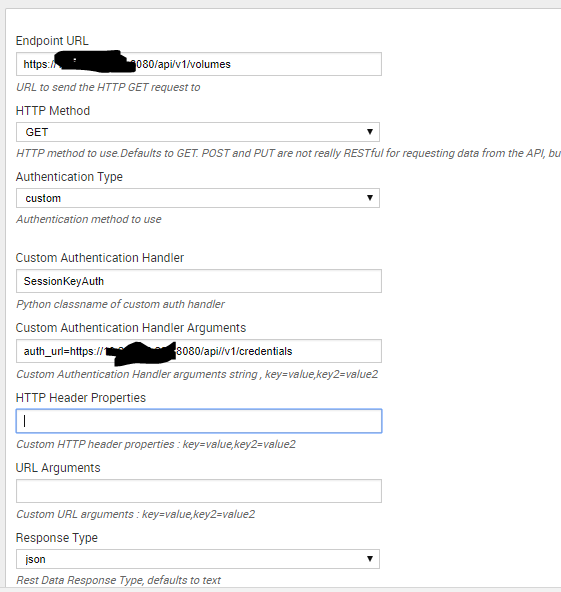
While running a search against sourcetype=3PAR (which is defined in the modular input,unable to get any data.Please help us in this.
Thanks

1 Solution
- Mark as New
- Bookmark Message
- Subscribe to Message
- Mute Message
- Subscribe to RSS Feed
- Permalink
- Report Inappropriate Content
ansif
Motivator
12-05-2017
02:34 AM
I have resolved the issue, the problem is with my python script which is mixed with spaces and tabs.I have used only tabs for sub statements and issue resolved:
class SessionKeyAuth(AuthBase):

 def __init__(self,**args):
     self.auth_url = args['auth_url']
     pass

     def __call__(self, r):
         if not 'X-HP3PAR-WSAPI-SessionKey' in r.headers:
         #perform auth
             credentials = {'user':'<username>','password':'<password>'}
             req_args = {"verify" : False}
             headers = {'content-type': 'application/json'}
             auth_response = requests.post(self.auth_url,data=json.dumps(credentials),headers=headers,**req_args)
             response_json = json.loads(auth_response.text)
             session_key = response_json["key"]
             r.headers['X-HP3PAR-WSAPI-SessionKey'] = session_key
             return r
Use only spaces or only tabs in python script.
- Mark as New
- Bookmark Message
- Subscribe to Message
- Mute Message
- Subscribe to RSS Feed
- Permalink
- Report Inappropriate Content
ansif
Motivator
12-05-2017
02:34 AM
I have resolved the issue, the problem is with my python script which is mixed with spaces and tabs.I have used only tabs for sub statements and issue resolved:
class SessionKeyAuth(AuthBase):

 def __init__(self,**args):
     self.auth_url = args['auth_url']
     pass

     def __call__(self, r):
         if not 'X-HP3PAR-WSAPI-SessionKey' in r.headers:
         #perform auth
             credentials = {'user':'<username>','password':'<password>'}
             req_args = {"verify" : False}
             headers = {'content-type': 'application/json'}
             auth_response = requests.post(self.auth_url,data=json.dumps(credentials),headers=headers,**req_args)
             response_json = json.loads(auth_response.text)
             session_key = response_json["key"]
             r.headers['X-HP3PAR-WSAPI-SessionKey'] = session_key
             return r
Use only spaces or only tabs in python script.

Got questions? Get answers!
Join the Splunk Community Slack to learn, troubleshoot, and make connections with fellow Splunk practitioners in real time!
Meet up IRL or virtually!
Join Splunk User Groups to connect and learn in-person by region or remotely by topic or industry.
Get Updates on the Splunk Community!
Splunk Enterprise Security: An Automated Phishing Response Workflow
Originally posted on Splunk.com.
Key takeaways
The volume of phishing emails can overwhelm even the most ...
Sharper ES Detections, Agentic AI Integrations, Smarter Workload Management, and More ...
Splunk Lantern is Splunk’s customer success center that provides practical guidance from Splunk experts on key ...
Data Outage Monitoring and Reporting
We’ve all been there, right? Living our best life, working on our Splunk environment, when out of nowhere a ...
