
Join the Conversation
- Find Answers
- :
- Splunk Administration
- :
- Getting Data In
- :
- Re: Splunk Management Console - Error [subsearch] ...
- Subscribe to RSS Feed
- Mark Topic as New
- Mark Topic as Read
- Float this Topic for Current User
- Bookmark Topic
- Subscribe to Topic
- Mute Topic
- Printer Friendly Page
- Mark as New
- Bookmark Message
- Subscribe to Message
- Mute Message
- Subscribe to RSS Feed
- Permalink
- Report Inappropriate Content

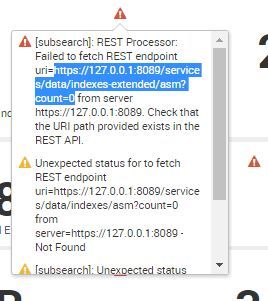
I have an indexing cluster and this error is when I'm working from the Management Console on the Master.
I go to: Indexing -> Indexes and Volumes -> Index Detail: Deployment (this error is throughout the console)
I am thinking I need to modify the URI within the alert and change it from https://127.0.0.1:8089 to my master IP?
Any advice would be appreciated ... Thanks! ~Sean
- Mark as New
- Bookmark Message
- Subscribe to Message
- Mute Message
- Subscribe to RSS Feed
- Permalink
- Report Inappropriate Content


I'd venture to say that you are working in a distributed environment and have the wrong role configured for your Cluster Master Node.
Go through your configuration for your Management Console and remove the Indexer role from your Cluster Master instance.
- Mark as New
- Bookmark Message
- Subscribe to Message
- Mute Message
- Subscribe to RSS Feed
- Permalink
- Report Inappropriate Content
I'd venture to say that you are working in a distributed environment and have the wrong role configured for your Cluster Master Node.
Go through your configuration for your Management Console and remove the Indexer role from your Cluster Master instance.
- Mark as New
- Bookmark Message
- Subscribe to Message
- Mute Message
- Subscribe to RSS Feed
- Permalink
- Report Inappropriate Content
Yea, that seemed to do it ... Thank You.
I can't recall why it was added ...
Management Console (Master) -> Settings (on the green bar not the top black bar) -> General Setup
1) Edit Actions on the Master
2) Edit Server Roles
2) remove indexer role



Join the Splunk Community Slack to learn, troubleshoot, and make connections with fellow Splunk practitioners in real time!
Join Splunk User Groups to connect and learn in-person by region or remotely by topic or industry.
Vibe-coding, AI, and Splunkcraft: Highlights from the .conf26 Builder Bar
Thanks for the Memories: .conf26 Took Learning to New Heights
Best Practices: Splunk auto adjust pipeline queue
