
Join the Conversation
- Find Answers
- :
- Splunk Administration
- :
- Getting Data In
- :
- Source Type, Web Application and BREAK_ONLY_BEFORE
- Subscribe to RSS Feed
- Mark Topic as New
- Mark Topic as Read
- Float this Topic for Current User
- Bookmark Topic
- Subscribe to Topic
- Mute Topic
- Printer Friendly Page
- Mark as New
- Bookmark Message
- Subscribe to Message
- Mute Message
- Subscribe to RSS Feed
- Permalink
- Report Inappropriate Content

I discovered our logs were split between events. I notice that Splunk split the event ANY date and time it found in our logs. See below.
<ResponseEndTimestamp>11/05/2020 09:53:33</ResponseEndTimestamp> </RCExtResponse> 2020-11-05 08:53:36,916 [http-nio-8080-exec-4] [198.153.9.206||1573FF21ECE6B4E4DA213F08E73230B3|] INFO c.v.c.d.DrFirstGatewayService - Retrived patient object(Patient:...) ....
2020-11-05 08:53:37,110 [http-nio-8080-exec-4] should have started a new event.
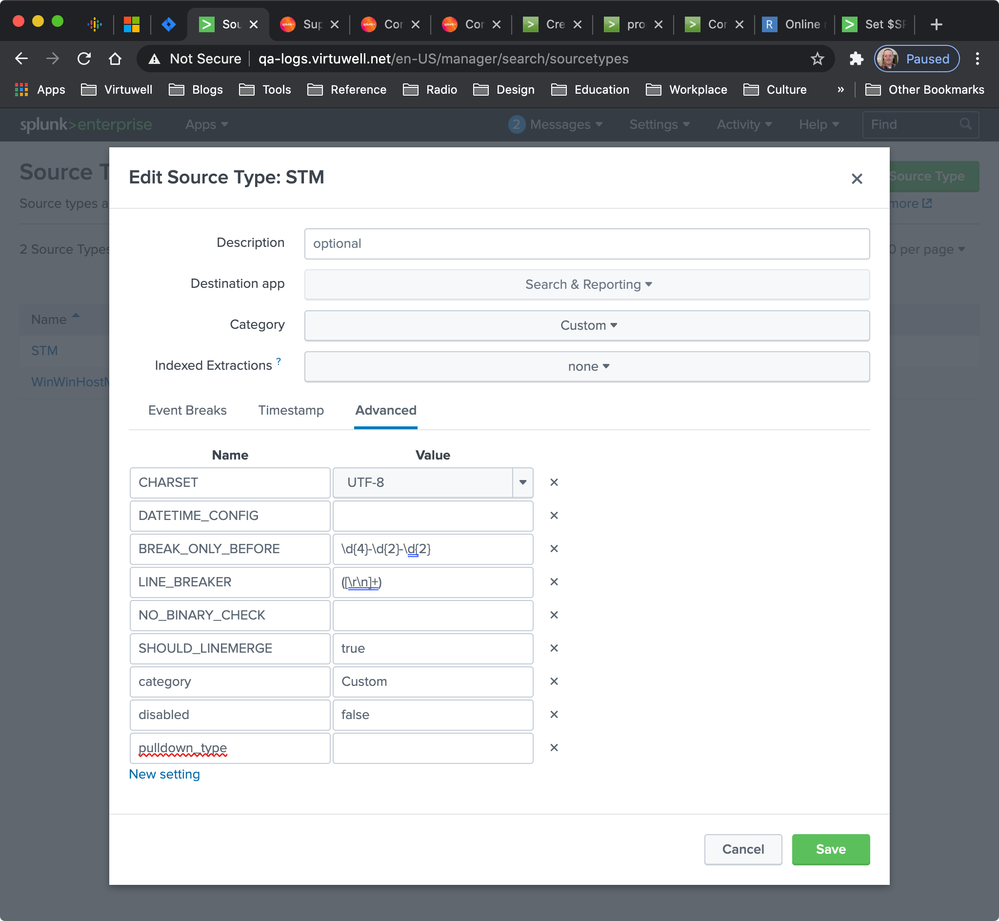
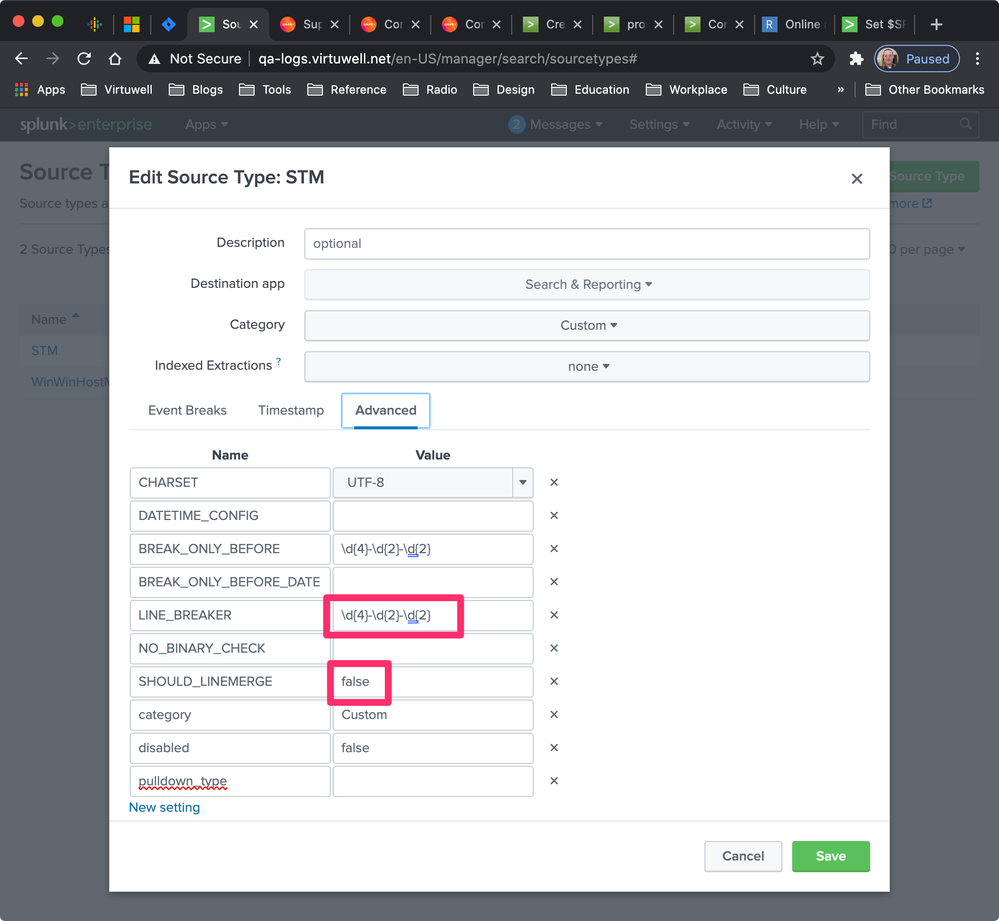
To fix, I wanted to defined a BREAK_ONLY_BEFORE in the Source Type. Unfortunately, the Web UI keeps changing values when I save. See before and after.
Before
After
Has anyone encountered this? Any help would be greatly appreciated.
Josh
- Mark as New
- Bookmark Message
- Subscribe to Message
- Mute Message
- Subscribe to RSS Feed
- Permalink
- Report Inappropriate Content


It's more efficient to use LINE_BREAKER. Try these props.conf settings.
[STM]
SHOULD_LINEMERGE = false
LINE_BREAKER = \<\/RCExtResponse\>()
TIME_PREFIX = ^
TIME_FORMAT = %Y-%m-%d %H:%M:%S,%3N
MAX_TIMESTAMP_LOOKAHEAD = 23If this reply helps you, Karma would be appreciated.
- Mark as New
- Bookmark Message
- Subscribe to Message
- Mute Message
- Subscribe to RSS Feed
- Permalink
- Report Inappropriate Content
It's more efficient to use LINE_BREAKER. Try these props.conf settings.
[STM]
SHOULD_LINEMERGE = false
LINE_BREAKER = \<\/RCExtResponse\>()
TIME_PREFIX = ^
TIME_FORMAT = %Y-%m-%d %H:%M:%S,%3N
MAX_TIMESTAMP_LOOKAHEAD = 23If this reply helps you, Karma would be appreciated.
- Mark as New
- Bookmark Message
- Subscribe to Message
- Mute Message
- Subscribe to RSS Feed
- Permalink
- Report Inappropriate Content
Rich,
Thank you so much. You were helpful.
In the end, I used the following configuration.
| TIME_PREFIX | ^ |
| TIME_FORMAT | %Y-%m-%d %H:%M:%S,%3N |
| MAX_TIMESTAMP_LOOKAHEAD | 23 |
I excluded the LINE_BREAKER and SHOULD_LINEMERGE settings since we still want to use default value (e.g. (\n\r)+). Also, our events expand multiple lines

Join the Splunk Community Slack to learn, troubleshoot, and make connections with fellow Splunk practitioners in real time!
Join Splunk User Groups to connect and learn in-person by region or remotely by topic or industry.
Make Your Machine Data AI-Ready in Splunk
Splunk Asynchronous Forwarding Explained
How to Monitor AI Agents with Splunk Agent Observability
