
Join the Conversation
- Find Answers
- :
- Splunk Administration
- :
- Getting Data In
- :
- Re: Simple value to hyperlink
- Subscribe to RSS Feed
- Mark Topic as New
- Mark Topic as Read
- Float this Topic for Current User
- Bookmark Topic
- Subscribe to Topic
- Mute Topic
- Printer Friendly Page
- Mark as New
- Bookmark Message
- Subscribe to Message
- Mute Message
- Subscribe to RSS Feed
- Permalink
- Report Inappropriate Content
Simple value to hyperlink

Hi guys ,
I need your help, I create an chain charactere with a request but i want to transform to an hyperlink, this moment i have just a text.
Do you know how I can do this ?
I think I need to change that in soure code but I don't see what to change.
Thanks for your answers
- Mark as New
- Bookmark Message
- Subscribe to Message
- Mute Message
- Subscribe to RSS Feed
- Permalink
- Report Inappropriate Content
Today i Have this :
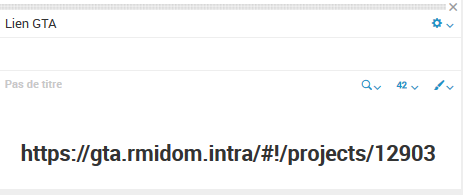
And i want transform this to a hyperlink.
    <panel>
      <title>Lien GTA</title>
      <single>
        <search>
          <query>index="gta_projets"  logs{}.projectId=$logs{}.projectId$ |fields logs{}.projectId|rename logs{}.projectId as "NOVA ID"| dedup "NOVA ID"|eval "Lien GTA"="https://gta.rmidom.intra/#!/projects/"."".'NOVA ID'| table "Lien GTA"</query>
          <earliest>0</earliest>
          <latest></latest>
        </search>
      </single>
    </panel>
Thanks,

- Mark as New
- Bookmark Message
- Subscribe to Message
- Mute Message
- Subscribe to RSS Feed
- Permalink
- Report Inappropriate Content


Hi Abarny,
sorry, but I don't understand your question: do you need to insert in a panel a link to an external url or to another Splunk object, or do you want to make a drilldown from a Splunk object (e.g. a Sinle value panel) into another dashboard?
to insert a link to an external link you have to insert in your dashboard an html panel like this
<row>
   <html>
      <h3>description: </h3><a href="http://www.splunk.com"><i><b><u>Splunk</u></b></i></a>
      <h3> This is <strong>Splunk</strong> : LOGIN, LOGOUT and FAILED LOGIN events.</h3>
   </html>
</row>
to insert a link to another App's dashboard
<row>
   <html>
      <h1>dashboard</h1>
      <p><font size="2">description</font></p>
      <table border="0" cellpadding="10" align="center">
         <th align="left"> <a href="dashbord_name">"Dashboard1"</a> </th>
      </table>
   </html>
</row>
to make a drilldown to another object, you have to see in "Splunk 6.x Dashboard Examples" App (https://splunkbase.splunk.com/app/1603/) how to manage drilldown.
Bye.
Giuseppe
- Mark as New
- Bookmark Message
- Subscribe to Message
- Mute Message
- Subscribe to RSS Feed
- Permalink
- Report Inappropriate Content
Hi Abarny,
this is a simple example of drilldown
<dashboard>
  <label>test single</label>
  <row>
    <panel>
      <single>
        <search>
          <query>index=_internal | head 1 | eval url="www.splunk.com" | table url</query>
          <sampleRatio>1</sampleRatio>
        </search>
        <drilldown>
          <link>
            <![CDATA[http://$row.url$]]>
          </link>
        </drilldown>
      </single>
    </panel>
  </row>
</dashboard>
Bye.
Giuseppe

Join the Splunk Community Slack to learn, troubleshoot, and make connections with fellow Splunk practitioners in real time!
Join Splunk User Groups to connect and learn in-person by region or remotely by topic or industry.
[Puzzles] Solve, Learn, Repeat: Classic British Rock Bands
New to the Community? Join Us for an Exclusive Post .conf26 Welcome Session (Plus a ...
Accelerate Splunk App Development with AI
