
Join the Conversation
- Find Answers
- :
- Splunk Administration
- :
- Getting Data In
- :
- Re: Simple value to hyperlink
- Subscribe to RSS Feed
- Mark Topic as New
- Mark Topic as Read
- Float this Topic for Current User
- Bookmark Topic
- Subscribe to Topic
- Mute Topic
- Printer Friendly Page
- Mark as New
- Bookmark Message
- Subscribe to Message
- Mute Message
- Subscribe to RSS Feed
- Permalink
- Report Inappropriate Content
Simple value to hyperlink

Hi guys ,
I need your help, I create an chain charactere with a request but i want to transform to an hyperlink, this moment i have just a text.
Do you know how I can do this ?
I think I need to change that in soure code but I don't see what to change.
Thanks for your answers
- Mark as New
- Bookmark Message
- Subscribe to Message
- Mute Message
- Subscribe to RSS Feed
- Permalink
- Report Inappropriate Content
Today i Have this :
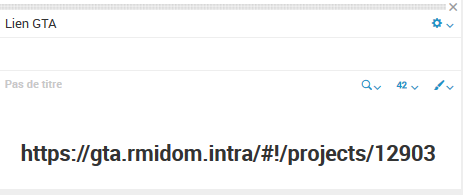
And i want transform this to a hyperlink.
    <panel>
      <title>Lien GTA</title>
      <single>
        <search>
          <query>index="gta_projets"  logs{}.projectId=$logs{}.projectId$ |fields logs{}.projectId|rename logs{}.projectId as "NOVA ID"| dedup "NOVA ID"|eval "Lien GTA"="https://gta.rmidom.intra/#!/projects/"."".'NOVA ID'| table "Lien GTA"</query>
          <earliest>0</earliest>
          <latest></latest>
        </search>
      </single>
    </panel>
Thanks,

- Mark as New
- Bookmark Message
- Subscribe to Message
- Mute Message
- Subscribe to RSS Feed
- Permalink
- Report Inappropriate Content


Hi Abarny,
sorry, but I don't understand your question: do you need to insert in a panel a link to an external url or to another Splunk object, or do you want to make a drilldown from a Splunk object (e.g. a Sinle value panel) into another dashboard?
to insert a link to an external link you have to insert in your dashboard an html panel like this
<row>
   <html>
      <h3>description: </h3><a href="http://www.splunk.com"><i><b><u>Splunk</u></b></i></a>
      <h3> This is <strong>Splunk</strong> : LOGIN, LOGOUT and FAILED LOGIN events.</h3>
   </html>
</row>
to insert a link to another App's dashboard
<row>
   <html>
      <h1>dashboard</h1>
      <p><font size="2">description</font></p>
      <table border="0" cellpadding="10" align="center">
         <th align="left"> <a href="dashbord_name">"Dashboard1"</a> </th>
      </table>
   </html>
</row>
to make a drilldown to another object, you have to see in "Splunk 6.x Dashboard Examples" App (https://splunkbase.splunk.com/app/1603/) how to manage drilldown.
Bye.
Giuseppe
- Mark as New
- Bookmark Message
- Subscribe to Message
- Mute Message
- Subscribe to RSS Feed
- Permalink
- Report Inappropriate Content
Hi Abarny,
this is a simple example of drilldown
<dashboard>
  <label>test single</label>
  <row>
    <panel>
      <single>
        <search>
          <query>index=_internal | head 1 | eval url="www.splunk.com" | table url</query>
          <sampleRatio>1</sampleRatio>
        </search>
        <drilldown>
          <link>
            <![CDATA[http://$row.url$]]>
          </link>
        </drilldown>
      </single>
    </panel>
  </row>
</dashboard>
Bye.
Giuseppe

Join the Splunk Community Slack to learn, troubleshoot, and make connections with fellow Splunk practitioners in real time!
Join Splunk User Groups to connect and learn in-person by region or remotely by topic or industry.
Manage Edge Processor pipelines end to end with APIs
Splunk Brings Proof of Control to Digital Asset Transfers
Manage Ingest Processor pipelines end to end with APIs
