
Join the Conversation
- Find Answers
- :
- Splunk Administration
- :
- Getting Data In
- :
- Reduce Event Code 4663 volume
- Subscribe to RSS Feed
- Mark Topic as New
- Mark Topic as Read
- Float this Topic for Current User
- Bookmark Topic
- Subscribe to Topic
- Mute Topic
- Printer Friendly Page
- Mark as New
- Bookmark Message
- Subscribe to Message
- Mute Message
- Subscribe to RSS Feed
- Permalink
- Report Inappropriate Content

Hello.
Thank you for reading this
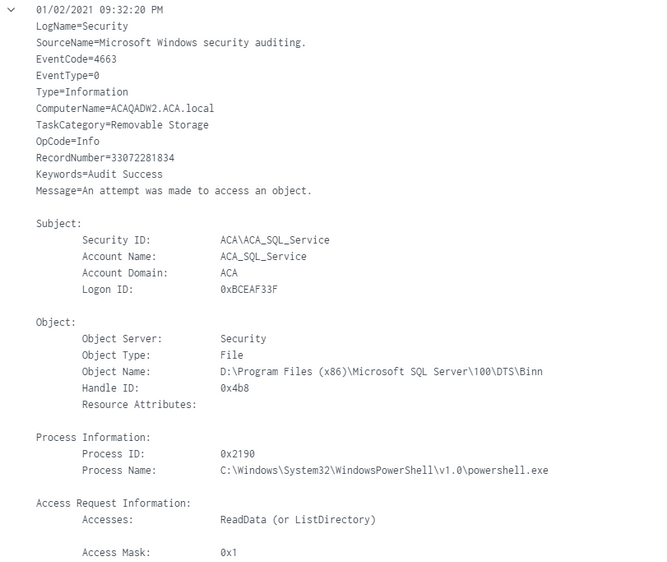
Due to license constrictions, we need to eliminate the Event Code 4663 based on the Message field that includes Accesses: ReadData (or ListDirectory). while retaining the other values from the Accesses field. We are using the Splunk_TA_windows and configuring blacklist in its inputs.conf file. We have tried tried several regex but so far they either blacklist the entire Event Code 4663 or it doesn't
Here is an example of the Message field:
n attempt was made to access an object. Subject: Security ID: ACA\ACA_SQL_Service Account Name: ACA_SQL_Service Account Domain: ACA Logon ID: 0x1347AFBE1 Object: Object Server: Security Object Type: File Object Name: G:\Program Files (x86)\Microsoft SQL Server\110\Tools\Binn Handle ID: 0x55c Resource Attributes: Process Information: Process ID: 0x55cc8 Process Name: C:\Windows\System32\WindowsPowerShell\v1.0\powershell.exe Access Request Information: Accesses: ReadData (or ListDirectory) Access Mask: 0x1
- Mark as New
- Bookmark Message
- Subscribe to Message
- Mute Message
- Subscribe to RSS Feed
- Permalink
- Report Inappropriate Content
Thank you for your reply.
Can this be done at the UF level through a blacklist regex?
- Mark as New
- Bookmark Message
- Subscribe to Message
- Mute Message
- Subscribe to RSS Feed
- Permalink
- Report Inappropriate Content

Not UF, HF or Indexer.
- Mark as New
- Bookmark Message
- Subscribe to Message
- Mute Message
- Subscribe to RSS Feed
- Permalink
- Report Inappropriate Content
HF is not an option for us at this moment.
Doing this at the indexer level still count against the daily license?
- Mark as New
- Bookmark Message
- Subscribe to Message
- Mute Message
- Subscribe to RSS Feed
- Permalink
- Report Inappropriate Content
sample event:
index=_internal | head 1 | fields _raw
| eval _raw="<Event xmlns=\"http://schemas.microsoft.com/win/2004/08/events/event\">
 <System>
 <Provider Name=\"Microsoft-Windows-Security-Auditing\" Guid=\"{54849625-5478-4994-A5BA-3E3B0328C30D}\" />
 <EventID>4663</EventID>
 <Version>1</Version>
 <Level>0</Level>
 <Task>12800</Task>
 <Opcode>0</Opcode>
 <Keywords>0x8020000000000000</Keywords>
 <TimeCreated SystemTime=\"2015-09-18T22:13:54.770429700Z\" />
 <EventRecordID>273866</EventRecordID>
 <Correlation />
 <Execution ProcessID=\"516\" ThreadID=\"524\" />
 <Channel>Security</Channel>
 <Computer>DC01.contoso.local</Computer>
 <Security />
 </System>
- <EventData>
 <Data Name=\"SubjectUserSid\">S-1-5-21-3457937927-2839227994-823803824-1104</Data>
 <Data Name=\"SubjectUserName\">dadmin</Data>
 <Data Name=\"SubjectDomainName\">CONTOSO</Data>
 <Data Name=\"SubjectLogonId\">0x4367b</Data>
 <Data Name=\"ObjectServer\">Security</Data>
 <Data Name=\"ObjectType\">File</Data>
 <Data Name=\"ObjectName\">C:\\Documents\\HBI Data.txt</Data>
 <Data Name=\"HandleId\">0x1bc</Data>
 <Data Name=\"AccessList\">%%4417 %%4418</Data>
 <Data Name=\"AccessMask\">0x6</Data>
 <Data Name=\"ProcessId\">0x458</Data>
 <Data Name=\"ProcessName\">C:\\\\Windows\\\\System32\\\\notepad.exe</Data>
 <Data Name=\"ResourceAttributes\">S:AI(RA;ID;;;;WD;(\"Impact\_MS\",TI,0x10020,3000))</Data>
 </EventData>
 </Event>"
| rex "(?ms)(?:EventID\>4663.*)(?<tmp>notepad\.exe)"https://docs.splunk.com/Documentation/Splunk/latest/Forwarding/Routeandfilterdatad
- Mark as New
- Bookmark Message
- Subscribe to Message
- Mute Message
- Subscribe to RSS Feed
- Permalink
- Report Inappropriate Content
Thank you for your reply.
Can this be done at the UF level through a blacklist regex?

Join the Splunk Community Slack to learn, troubleshoot, and make connections with fellow Splunk practitioners in real time!
Join Splunk User Groups to connect and learn in-person by region or remotely by topic or industry.
Meet the .conf26 AI Agent Buildathon Winners
Trusted Autonomy in the SOC: A Maturity Journey
Supercharging Windows Security Detection Performance: Introducing Hybrid Field ...
