
Join the Conversation
- Find Answers
- :
- Splunk Administration
- :
- Getting Data In
- :
- Re: Notification when indexes stop receiving data
- Subscribe to RSS Feed
- Mark Topic as New
- Mark Topic as Read
- Float this Topic for Current User
- Bookmark Topic
- Subscribe to Topic
- Mute Topic
- Printer Friendly Page
- Mark as New
- Bookmark Message
- Subscribe to Message
- Mute Message
- Subscribe to RSS Feed
- Permalink
- Report Inappropriate Content

Hi, we’ve had a problem recently where data has stopped flowing to an index, and it’s a few days before we find out and then resolve. Does anyone know of a splunk 9.x feature or an add-on that you can use to monitor / alert when data stops for a set amount of time?
- Mark as New
- Bookmark Message
- Subscribe to Message
- Mute Message
- Subscribe to RSS Feed
- Permalink
- Report Inappropriate Content


TrackMe (https://splunkbase.splunk.com/app/4621) is the application that can help you.
Also, you can built custom saved searches which looks over the latest _time of the events and alert if the time difference between current time and latest(_time) is more than threashold. Threashold can be maintained in the lookup and called in the search. For example, create a lookup called acceptable_diff.csv with sample entries as below -
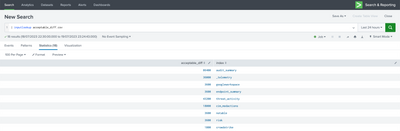
and run the below search -
| tstats latest(_time) as lastEventTime where index=* by index
| eval current_time=now()
| eval diff=current_time-lastEventTime
| lookup acceptable_diff.csv index as index OUTPUTNEW acceptable_diff as acceptable_diff
| eval diffWithAcceptableDiff=diff-acceptable_diff
| sort 0 - lastEventTime
| eval lastEventTime=strftime(lastEventTime,"%m/%d/%y %H:%M:%S")
| fields index lastEventTime diffWithAcceptableDiff acceptable_diff
| search diffWithAcceptableDiff>0
Feel free to accept the answer if it helps!
- Mark as New
- Bookmark Message
- Subscribe to Message
- Mute Message
- Subscribe to RSS Feed
- Permalink
- Report Inappropriate Content


Try something like this from the metrics log.
index=_internal source=*metrics.log* host=idx* series=yourindexname | stats latest(_time) as last_data_time by series | eval duration_seconds = now() - last_data_time | eval duration_human = strftime(duration_seconds, "%d days %H:%M:%S") | where duration_seconds > <your_duration_in_seconds>
Together we make the Splunk Community stronger
- Mark as New
- Bookmark Message
- Subscribe to Message
- Mute Message
- Subscribe to RSS Feed
- Permalink
- Report Inappropriate Content
TrackMe (https://splunkbase.splunk.com/app/4621) is the application that can help you.
Also, you can built custom saved searches which looks over the latest _time of the events and alert if the time difference between current time and latest(_time) is more than threashold. Threashold can be maintained in the lookup and called in the search. For example, create a lookup called acceptable_diff.csv with sample entries as below -
and run the below search -
| tstats latest(_time) as lastEventTime where index=* by index
| eval current_time=now()
| eval diff=current_time-lastEventTime
| lookup acceptable_diff.csv index as index OUTPUTNEW acceptable_diff as acceptable_diff
| eval diffWithAcceptableDiff=diff-acceptable_diff
| sort 0 - lastEventTime
| eval lastEventTime=strftime(lastEventTime,"%m/%d/%y %H:%M:%S")
| fields index lastEventTime diffWithAcceptableDiff acceptable_diff
| search diffWithAcceptableDiff>0
Feel free to accept the answer if it helps!
- Mark as New
- Bookmark Message
- Subscribe to Message
- Mute Message
- Subscribe to RSS Feed
- Permalink
- Report Inappropriate Content

Join the Splunk Community Slack to learn, troubleshoot, and make connections with fellow Splunk practitioners in real time!
Join Splunk User Groups to connect and learn in-person by region or remotely by topic or industry.
[Puzzles] Solve, Learn, Repeat: Classic British Rock Bands
New to the Community? Join Us for an Exclusive Post .conf26 Welcome Session (Plus a ...
Accelerate Splunk App Development with AI
