
Join the Conversation
- Find Answers
- :
- Splunk Administration
- :
- Getting Data In
- :
- Re: New Source type and Timestamp from Event
- Subscribe to RSS Feed
- Mark Topic as New
- Mark Topic as Read
- Float this Topic for Current User
- Bookmark Topic
- Subscribe to Topic
- Mute Topic
- Printer Friendly Page
- Mark as New
- Bookmark Message
- Subscribe to Message
- Mute Message
- Subscribe to RSS Feed
- Permalink
- Report Inappropriate Content
New Source type and Timestamp from Event

Hi Experts,
I have a even like below generated from my application.
{

    "index": "exp_prod",

    "host": "myhost.com",

    "source": "app.logs",

    "sourcetype": "_json",

    "event": [

        {

            "Sender": "AZSB",

            "Status": "COMPLETED",

            "ApplicationMessageType": "utility",

            "CustomStatus": "COMPLETED",

            "ApplicationMessageId": "",

            "MessageGuid": "AF61XzlbeOSc7c1yBkfQ-dTqo8VI",

            "LogStart": "2020-05-08T13:31:37.053",

            "Receiver": "JMS",

            "CorrelationId": "AF61Xzm4KCX0sO8q3PGewmmlZqem",

            "LogEnd": "2020-05-08T13:31:37.063"

        },

        {

            "Sender": "AZSB",

            "Status": "COMPLETED",

            "ApplicationMessageType": "Article",

            "CustomStatus": "NA",

            "ApplicationMessageId": "180730",

            "MessageGuid": "AF61Xzkb-vFb_xEgpfQw1mgNbPc5",

            "LogStart": "2020-05-08T13:31:37.046",

            "Receiver": "JMS",

            "CorrelationId": "AF61XzkvcPiugQGqmXc6LrN3GQ42",

            "LogEnd": "2020-05-08T13:31:37.063"

        }

    ]

}
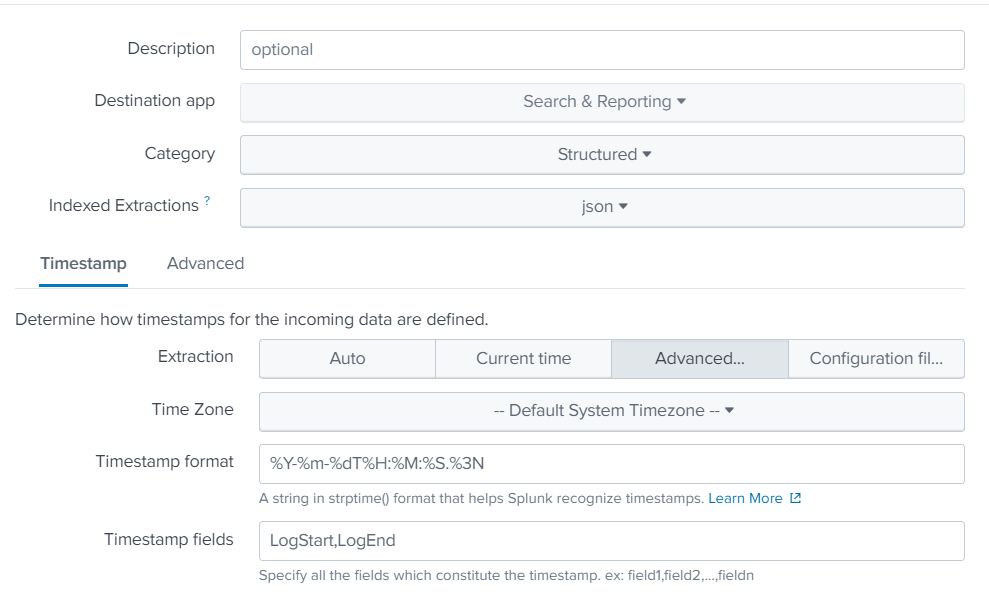
Now when I send this event to Spluk Cloud using HEC, it create two event's but the timestamp if the event is the current timestamp. However I want event time stamp to be populated from LogStart.
How to achieve this? I tried customer source type like below, but the result is same. Please assist.

- Mark as New
- Bookmark Message
- Subscribe to Message
- Mute Message
- Subscribe to RSS Feed
- Permalink
- Report Inappropriate Content

[your souecetype]
SHOULD_LINEMERGE=false
LINE_BREAKER=(\[|,)\s*{\s*\"Sender
NO_BINARY_CHECK=true
SEDCMD-trim=s/\].*//g
TIME_PREFIX=LogStart\":\s\"
You'll have to split it up.
- Mark as New
- Bookmark Message
- Subscribe to Message
- Mute Message
- Subscribe to RSS Feed
- Permalink
- Report Inappropriate Content


When you use timestamp fields, Splunk combines all of the listed fields and then applies the timestamp format. In this example, the LogStart and LogEnd fields combine to "2020-05-08T13:31:37.0462020-05-08T13:31:37.063", which does not match the specified format so Splunk ignores it and sets the event time to the current time.
The Timestamp fields setting should contain the name of the event field(s) can together describe when the event happened. It does not need to list every timestamp in the event.
If this reply helps you, Karma would be appreciated.
- Mark as New
- Bookmark Message
- Subscribe to Message
- Mute Message
- Subscribe to RSS Feed
- Permalink
- Report Inappropriate Content
Thank you for the response.
I tried below setting and that did not work either. The event still got the current timestamp.
DATETIME_CONFIG=
TIMESTAMP_FIELDS = LogStart
TIME_PREFIX = "LogStart": "
TIME_FORMAT = %Y-%m-%dT%H:%M:%S
MAX_TIMESTAMP_LOOKAHEAD=23
TZ=GMT
Not sure what is wrong! Any pointer to resolve? TIA
- Mark as New
- Bookmark Message
- Subscribe to Message
- Mute Message
- Subscribe to RSS Feed
- Permalink
- Report Inappropriate Content
Try omitting DATETIME_CONFIG. Also, change TIME_FORMAT = %Y-%m-%dT%H:%M:%S.%3N.
If this reply helps you, Karma would be appreciated.

Join the Splunk Community Slack to learn, troubleshoot, and make connections with fellow Splunk practitioners in real time!
Join Splunk User Groups to connect and learn in-person by region or remotely by topic or industry.
Tuning Edge Processor in Hybrid Mode: What Limits Each Data Path
Best Practices: Splunk auto adjust pipeline queue
Request for Professional Development: Attending .conf26
