
Join the Conversation
- Find Answers
- :
- Splunk Administration
- :
- Getting Data In
- :
- Re: Minimum free disk space reached
- Subscribe to RSS Feed
- Mark Topic as New
- Mark Topic as Read
- Float this Topic for Current User
- Bookmark Topic
- Subscribe to Topic
- Mute Topic
- Printer Friendly Page
- Mark as New
- Bookmark Message
- Subscribe to Message
- Mute Message
- Subscribe to RSS Feed
- Permalink
- Report Inappropriate Content
Minimum free disk space reached

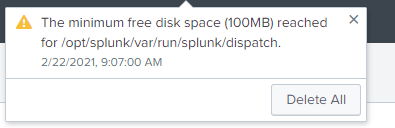
I just got Splunk ingesting some data and now I'm getting this error message. I found several posts related to this but they are 6 years old and I think they are out of date. One of them said to go to the server.conf file and edit this stanza, but I don't see that stanza in the file. Is that stanza in another location?
[diskUsage]
minFreeSpace = <num>
- Mark as New
- Bookmark Message
- Subscribe to Message
- Mute Message
- Subscribe to RSS Feed
- Permalink
- Report Inappropriate Content
Okay do I need to stop splunk on the forwarders then?
Also, the files that need to be deleted are on the splunk server? (single instance).
- Mark as New
- Bookmark Message
- Subscribe to Message
- Mute Message
- Subscribe to RSS Feed
- Permalink
- Report Inappropriate Content


Hi @TaraPennington,
The problem is a search problem so only on Indexer (your single instance).
Ciao.
Giuseppe
- Mark as New
- Bookmark Message
- Subscribe to Message
- Mute Message
- Subscribe to RSS Feed
- Permalink
- Report Inappropriate Content
Hi @TaraPennington,
The problem is that you reached the minimum disk space in the dispatched folder.
You have to delete the oldest folders and files in the folder $SPLUNK_HOME/var/run/splunk (after Splunk stop) and then restart Splunk.
Ciao.
Giuseppe


Join the Splunk Community Slack to learn, troubleshoot, and make connections with fellow Splunk practitioners in real time!
Join Splunk User Groups to connect and learn in-person by region or remotely by topic or industry.
Meet Splunk Observability Studio: AI-Assisted OpenTelemetry Instrumentation Without ...
Federated Search for Cisco Security and Analytics Logging (SAL) is now GA on Splunk ...
Your Path to AgenticOps: AI Experiences for Every Splunk Practitioner
