
Join the Conversation
- Find Answers
- :
- Splunk Administration
- :
- Getting Data In
- :
- Re: LINE_BREAKER=([\r\n]+) not working?
- Subscribe to RSS Feed
- Mark Topic as New
- Mark Topic as Read
- Float this Topic for Current User
- Bookmark Topic
- Subscribe to Topic
- Mute Topic
- Printer Friendly Page
- Mark as New
- Bookmark Message
- Subscribe to Message
- Mute Message
- Subscribe to RSS Feed
- Permalink
- Report Inappropriate Content
LINE_BREAKER=([\r\n]+) not working?

Hi,
I have a test instance of splunk - fresh out of the box. Only configure the essentials and imported a dump from the OpenLibrary.org. I have the problem that every single line should be one event but plenty of lines are merged together and I can't figure out why. The source data has reliable linebreaks in so the default should work.
I had the same issue in my enterprise environment and nobody could tell me why this is happening. After a while it magically disappeared and as far as I can tell it has vanished for good but I'd like to understand the reason why this is happening and prevent it from happening again.
Regards
Thorsten
- Mark as New
- Bookmark Message
- Subscribe to Message
- Mute Message
- Subscribe to RSS Feed
- Permalink
- Report Inappropriate Content
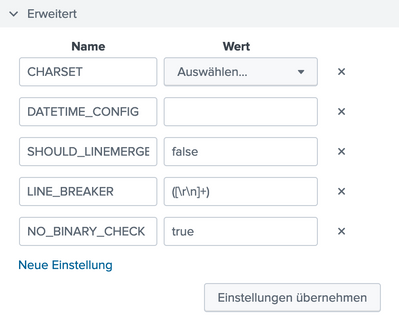
Hi Fabrizio,
thanks for you input. I had linemerge to false to avoid exactly that. Also I configure a one-time import via web. I know that splunk likes restarts like a windows 3.11 but there is no point at which one can restart splunk. I goes directly after applying to importing the data.
- Mark as New
- Bookmark Message
- Subscribe to Message
- Mute Message
- Subscribe to RSS Feed
- Permalink
- Report Inappropriate Content

Hi @bitnapper,
Without knowing what type of logs you are working with, I would assume your issue might be related to the use of the default LINE_BREAKER ([\r\n]+) while also keeping SHOULD_LINEMERGE = true (default setting).
SHOULD_LINEMERGE explanation from props.conf file:
* When you set this to "true", Splunk software combines several lines of data
  into a single multi-line event, based on values you configure
  in the following settings.
* When you set this to "false", Splunk software does not combine lines of
  data into multiline events.
* Default: true
When SHOULD_LINEMERGE is set to true, other settings (BREAK_ONLY_BEFORE_DATE (default), BREAK_ONLY_BEFORE, MUST_BREAK_AFTER...) are used to define how Splunk software builds multi-line events merging previously broken lines.
Also, remember to restart your Splunk instance where the new parsing rules are being applied (tipically HF/INDEXER or all-in-one architecture)
Hope this helps, have a nice day,
Fabrizio

Join the Splunk Community Slack to learn, troubleshoot, and make connections with fellow Splunk practitioners in real time!
Join Splunk User Groups to connect and learn in-person by region or remotely by topic or industry.
How Splunk AI Assistant Is Transforming Investigations: Insights from .conf26
Make Your Machine Data AI-Ready in Splunk
Splunk Asynchronous Forwarding Explained
