
Join the Conversation
- Find Answers
- :
- Splunk Administration
- :
- Getting Data In
- :
- Kafka-connect-Splunk: Issue in SetUp Connection in...
- Subscribe to RSS Feed
- Mark Topic as New
- Mark Topic as Read
- Float this Topic for Current User
- Bookmark Topic
- Subscribe to Topic
- Mute Topic
- Printer Friendly Page
- Mark as New
- Bookmark Message
- Subscribe to Message
- Mute Message
- Subscribe to RSS Feed
- Permalink
- Report Inappropriate Content
Kafka-connect-Splunk: Issue in SetUp Connection in Confluent

Hi Team,
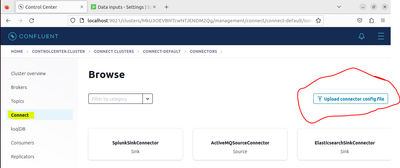
I am trying to create a topic manually using Confluent Control Center (localhost:9021) and then using Connect-->connect-default-->Connector-->Upload connector config file I am uploading the splunk sink properties which already have splunk.hec.token.
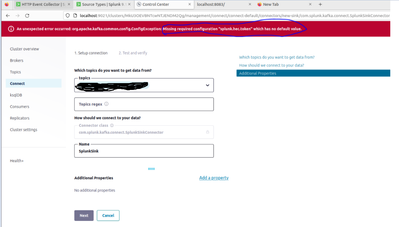
But still I am getting this error "splun.hec.token" is invalid in Confluent UI(@nd screenshot) in browser. Appreciate If anybody can help here? Please note we are tryinf in Ubuntu OS and Splunk, Confluent, Kafka Connect all the components are in same network in same server.
Splunk Sink properties:
name=TestConnector
topics=mytopic
tasks.max=1
connector.class=com.splunk.kafka.connect.SplunkSinkConnector
splunk.hec.token=453a412d-029f-4fcf-a896-8c388241add0
splunk.indexes=Attest
splunk.hec.uri=https://localhost:8889
splunk.hec.raw=true
splunk.hec.ack.enabled=true
splunk.hec.ssl.validate.cert=false
splunk.hec.ack.poll.interval=20
splunk.hec.ack.poll.threads=2
splunk.hec.event.timeout=300
splunk.hec.ssl.validate.certs=false


Join the Splunk Community Slack to learn, troubleshoot, and make connections with fellow Splunk practitioners in real time!
Join Splunk User Groups to connect and learn in-person by region or remotely by topic or industry.
Continue Your Federation Journey: Join Session 3 of the Bootcamp Series
Announcing Modern Navigation: A New Era of Splunk User Experience
Casting Call: Compete in Cyber Games
