
Join the Conversation
- Find Answers
- :
- Splunk Administration
- :
- Getting Data In
- :
- Re: Issue with timestamps creating extra events
- Subscribe to RSS Feed
- Mark Topic as New
- Mark Topic as Read
- Float this Topic for Current User
- Bookmark Topic
- Subscribe to Topic
- Mute Topic
- Printer Friendly Page
- Mark as New
- Bookmark Message
- Subscribe to Message
- Mute Message
- Subscribe to RSS Feed
- Permalink
- Report Inappropriate Content
Issue with timestamps creating extra events

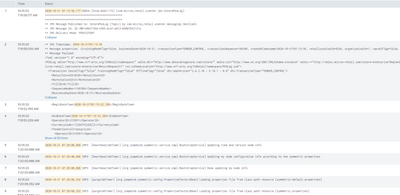
Certain events in these logs have dates in certain tags below such as <BeginDateTime> and <EndDateTime> . They are creating additional events when they should only be one. Same thing on JMS Timestamp on event 2 pictured below. What would the correct regex be to only make events when the timestamp is first like in 1, 5-9. Thank you.
- Mark as New
- Bookmark Message
- Subscribe to Message
- Mute Message
- Subscribe to RSS Feed
- Permalink
- Report Inappropriate Content


The props.conf settings are not correct for that sourcetype. Please share the current settings and also specify where events should begin and end.
If this reply helps you, Karma would be appreciated.
- Mark as New
- Bookmark Message
- Subscribe to Message
- Mute Message
- Subscribe to RSS Feed
- Permalink
- Report Inappropriate Content
I don't have a props.conf file currently configured. That's what I'm asking for help with. I want events to break like they normally would before timestamps, but to not include the time stamps you see in events 2, 3, and 4 in the image. Only timestamps that start a line.


Join the Splunk Community Slack to learn, troubleshoot, and make connections with fellow Splunk practitioners in real time!
Join Splunk User Groups to connect and learn in-person by region or remotely by topic or industry.
Meet the .conf26 AI Agent Buildathon Winners
Trusted Autonomy in the SOC: A Maturity Journey
Supercharging Windows Security Detection Performance: Introducing Hybrid Field ...
