
Join the Conversation
- Find Answers
- :
- Splunk Administration
- :
- Getting Data In
- :
- Re: Issue with Sourcetype name
- Subscribe to RSS Feed
- Mark Topic as New
- Mark Topic as Read
- Float this Topic for Current User
- Bookmark Topic
- Subscribe to Topic
- Mute Topic
- Printer Friendly Page
- Mark as New
- Bookmark Message
- Subscribe to Message
- Mute Message
- Subscribe to RSS Feed
- Permalink
- Report Inappropriate Content
Issue with Sourcetype name

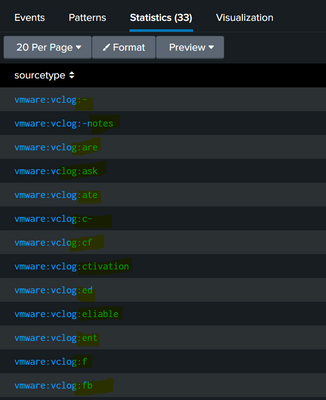
I am getting different sourcetype name in my logs. But I want the sourcetype name as per conf file.
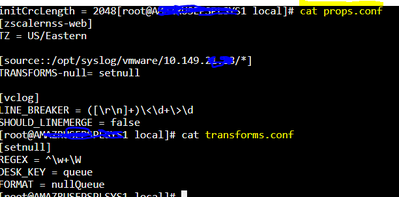
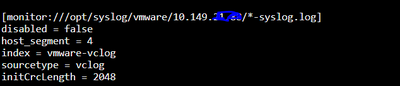
Below are the screenshots of input.conf, props.conf & transforms.conf .
Props & Transforms
Inputs
- Mark as New
- Bookmark Message
- Subscribe to Message
- Mute Message
- Subscribe to RSS Feed
- Permalink
- Report Inappropriate Content


Please use btool to ensure no other files add settings for the sourcetype.
splunk btool --debug props list vclog | grep -v "system\/default"
What query created the output in the first screenshot?
If this reply helps you, Karma would be appreciated.
- Mark as New
- Bookmark Message
- Subscribe to Message
- Mute Message
- Subscribe to RSS Feed
- Permalink
- Report Inappropriate Content
@richgalloway No luck! But I confirm there is no other files and settings.
Command used : index=vmware | stats count by sourcetype
Currently syslog is ingesting via universal forwarder.
Current configuration
input.conf
[monitor:///opt/syslog/vmware/10.149.xx.xx/*-syslog.log]
disabled = false
host_segment = 4
index = vmware-vclog
sourcetype = vclog
initCrcLength = 2048
Props.conf
[source::/opt/syslog/vmware/10.149.xx.xx/*]
TRANSFORMS-null= setnull
[vclog]
LINE_BREAKER = ([\r\n]+)\<\d+\>\d
SHOULD_LINEMERGE = false
transforms.conf
[setnull]
REGEX = ^\w+\W
DESK_KEY = queue
FORMAT = nullQueue

Join the Splunk Community Slack to learn, troubleshoot, and make connections with fellow Splunk practitioners in real time!
Join Splunk User Groups to connect and learn in-person by region or remotely by topic or industry.
Make Your Machine Data AI-Ready in Splunk
Splunk Asynchronous Forwarding Explained
How to Monitor AI Agents with Splunk Agent Observability
