
Join the Conversation
- Find Answers
- :
- Splunk Administration
- :
- Getting Data In
- :
- Re: Is it possible to force data to freeze?
- Subscribe to RSS Feed
- Mark Topic as New
- Mark Topic as Read
- Float this Topic for Current User
- Bookmark Topic
- Subscribe to Topic
- Mute Topic
- Printer Friendly Page
- Mark as New
- Bookmark Message
- Subscribe to Message
- Mute Message
- Subscribe to RSS Feed
- Permalink
- Report Inappropriate Content
Is it possible to force data to freeze?

We, up to now, have never frozen data. However, we have a requirement now to freeze some data for years.
I need to show in a development environment how this works.
I have created a new index. Defined coldToFrozenDir and set frozenTimePeriodInSecs to 600 (10 mins).
I have created input for a text file and filled it with about 100k lines of data.
The data is being successfully indexed
The directory was created, but there is no frozen data.
I suspect it's because the data is still hot.
Is there a way to force data through the bucket cycle so I can see it show up frozen?
- Mark as New
- Bookmark Message
- Subscribe to Message
- Mute Message
- Subscribe to RSS Feed
- Permalink
- Report Inappropriate Content

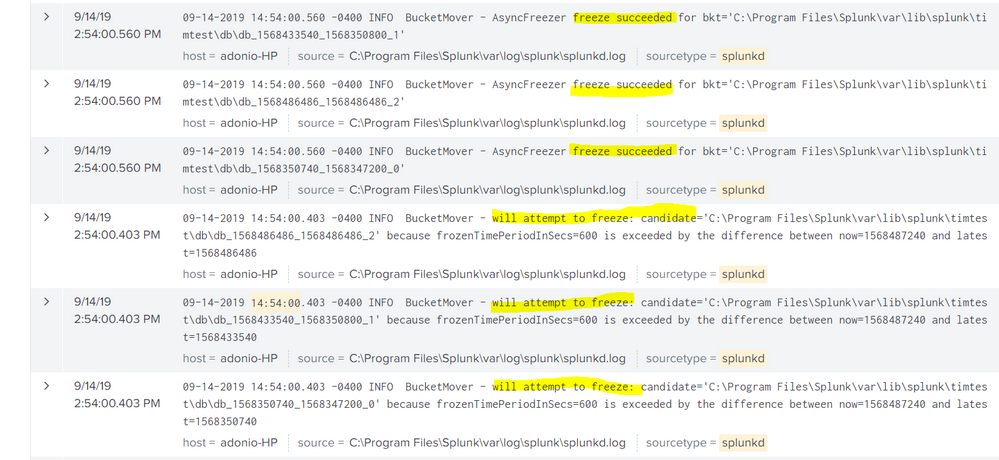
tried your settings on my laptop, and wrote a scheduled search that runs every 5 minutes and does that:
index = _internal | head 1000 | collect index=timtest"
try and run this search to see if its working:
index=_internal sourcetype=splunkd component=BucketMover freeze
works fine on my end
see screenshots:

- Mark as New
- Bookmark Message
- Subscribe to Message
- Mute Message
- Subscribe to RSS Feed
- Permalink
- Report Inappropriate Content

did you try restarting splunk? i think restarting splunk will force the bucket to roll from hot? So you could at least test that theory and/or verify if the bucket rolls to warm/cold...
- Mark as New
- Bookmark Message
- Subscribe to Message
- Mute Message
- Subscribe to RSS Feed
- Permalink
- Report Inappropriate Content
That's all it took. Restart did the trick. Interesting that the first restart created the frozendb path, but it required a second for the data to actually start freezing.
- Mark as New
- Bookmark Message
- Subscribe to Message
- Mute Message
- Subscribe to RSS Feed
- Permalink
- Report Inappropriate Content
i wonder if the bucket rolls when splunk is stopping and your setting took effect as splunk was starting. So that bucket had rolled off before it knew about the directory?
- Mark as New
- Bookmark Message
- Subscribe to Message
- Mute Message
- Subscribe to RSS Feed
- Permalink
- Report Inappropriate Content
@tsheets13
If you found a solution, kindly mark the question as answered so other will know what worked for you, also up-vote any helpful comments
- Mark as New
- Bookmark Message
- Subscribe to Message
- Mute Message
- Subscribe to RSS Feed
- Permalink
- Report Inappropriate Content
please share your indexes.conf. according to your description, it supposed to work fine. data will freeze regardless bucket status of time or size thresholds are met
- Mark as New
- Bookmark Message
- Subscribe to Message
- Mute Message
- Subscribe to RSS Feed
- Permalink
- Report Inappropriate Content
[timtest]
coldPath = $SPLUNK_DB/timtest/colddb
homePath = $SPLUNK_DB/timtest/db
maxHotSpanSecs=900
coldToFrozenDir=$SPLUNK_DB/timtest/deeperpath/frozendb
frozenTimePeriodInSecs=600
maxTotalDataSizeMB = 512000
thawedPath = $SPLUNK_DB/timtest/thaweddb




Join the Splunk Community Slack to learn, troubleshoot, and make connections with fellow Splunk practitioners in real time!
Join Splunk User Groups to connect and learn in-person by region or remotely by topic or industry.
SOC4Kafka - New Kafka Connector Powered by OpenTelemetry
Event Series: Level up your SOC: Advancing with Splunk Enterprise Security
Announcing Modern Navigation: A New Era of Splunk User Experience
