
Join the Conversation
- Find Answers
- :
- Splunk Administration
- :
- Getting Data In
- :
- Integrating Power BI to Splunk
- Subscribe to RSS Feed
- Mark Topic as New
- Mark Topic as Read
- Float this Topic for Current User
- Bookmark Topic
- Subscribe to Topic
- Mute Topic
- Printer Friendly Page
- Mark as New
- Bookmark Message
- Subscribe to Message
- Mute Message
- Subscribe to RSS Feed
- Permalink
- Report Inappropriate Content

Hello,
We are trying to achieve Power BI integration with Splunk. We have Power BI installed on windows machine and we also installed ODBC driver to connect to Splunk.
As part of configuration we added credentials (same with which we connect to our splunk cloud instance) and URL in Power BI Get Data options but we are getting below error:
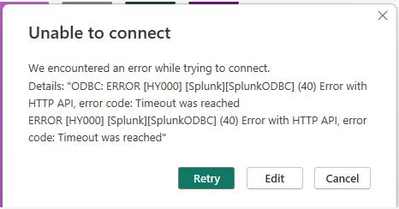
Steps:
POWER BI Desktop -> Get Data -> Other -> ODBC ->
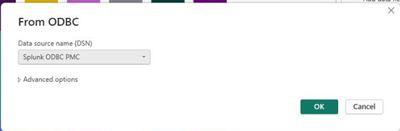
and when clicked ok, above mentioned error is displayed.
Can you please suggest how I can fix this?
Thank you.
- Mark as New
- Bookmark Message
- Subscribe to Message
- Mute Message
- Subscribe to RSS Feed
- Permalink
- Report Inappropriate Content
Hello,
after checking this with Splunk Support Team - it was just a case of adding IP (of system where PowerBI Desktop is hosted) to allow list under Server Settings->IP Allow List Management-> "Search Head API Access".
Thank you.
Regards,
Madhav
- Mark as New
- Bookmark Message
- Subscribe to Message
- Mute Message
- Subscribe to RSS Feed
- Permalink
- Report Inappropriate Content
Hello,
after checking this with Splunk Support Team - it was just a case of adding IP (of system where PowerBI Desktop is hosted) to allow list under Server Settings->IP Allow List Management-> "Search Head API Access".
Thank you.
Regards,
Madhav
- Mark as New
- Bookmark Message
- Subscribe to Message
- Mute Message
- Subscribe to RSS Feed
- Permalink
- Report Inappropriate Content

Good Day,
On the below message. Adding the IP to the Server Settings. Does the Server Settings sit in PowerBI or in Splunk? To find List Management.
I have exactly the same error trying to connect to Splunk Cloud connection from PowerBI
Any help would be appreciated - Thanks
- Mark as New
- Bookmark Message
- Subscribe to Message
- Mute Message
- Subscribe to RSS Feed
- Permalink
- Report Inappropriate Content
Hi @WilmarMeyer - this is on Splunk Side: Server Settings->IP Allow List Management-> "Search Head API Access".
- Mark as New
- Bookmark Message
- Subscribe to Message
- Mute Message
- Subscribe to RSS Feed
- Permalink
- Report Inappropriate Content

Hi,
I am facing the same issue, the Timed Out Reached error, but I am unable to find the IP Allow List Management-> "Search Head API Access" inside my server setting on the Splunk Cloud side.

- Mark as New
- Bookmark Message
- Subscribe to Message
- Mute Message
- Subscribe to RSS Feed
- Permalink
- Report Inappropriate Content
Hi @Sabahat - apologies for very late repsonse , I hope this has been already resolved but if not, this is visible for sc_admin role, I am not sure about Power User. Thank you.

Join the Splunk Community Slack to learn, troubleshoot, and make connections with fellow Splunk practitioners in real time!
Join Splunk User Groups to connect and learn in-person by region or remotely by topic or industry.
Data Outage Monitoring and Reporting
Manage Datasets and Connections in Catalog on Splunk Cloud Platform
Persistent Queue at TcpOut — One of Splunk's Most Practical Features
