
Join the Conversation
- Find Answers
- :
- Splunk Administration
- :
- Getting Data In
- :
- Inputs for Windows Registry
- Subscribe to RSS Feed
- Mark Topic as New
- Mark Topic as Read
- Float this Topic for Current User
- Bookmark Topic
- Subscribe to Topic
- Mute Topic
- Printer Friendly Page
- Mark as New
- Bookmark Message
- Subscribe to Message
- Mute Message
- Subscribe to RSS Feed
- Permalink
- Report Inappropriate Content
Inputs for Windows Registry

Hello All
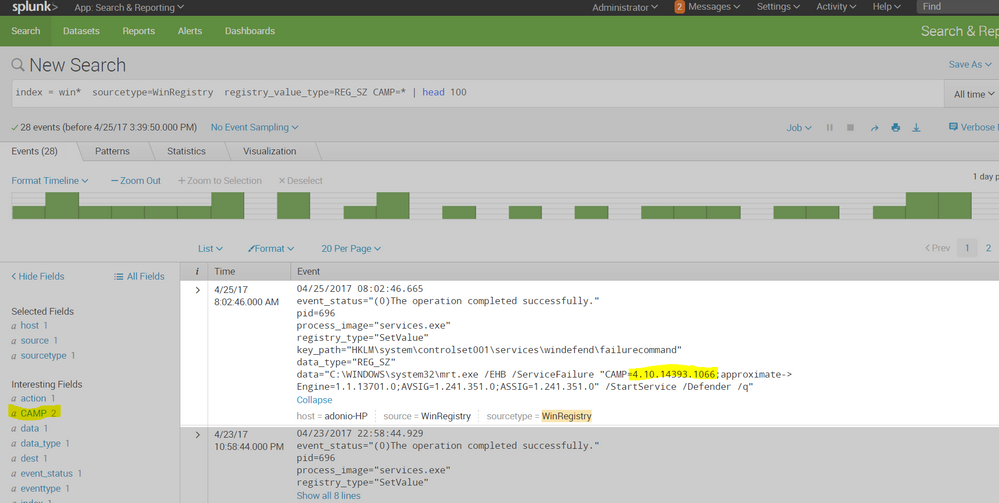
I am looking for suggestions on monitoring Windows Registry for a particular attribute. We are looking to receive the product version from the Windows Registry.

These are my current inputs, but i do not see any information popping inside Splunk.
[WinRegistry]
index = defense
source = WinReg
disabled = 0
Am i doing something wrong ?
Any assistance will be appreciated 🙂
- Mark as New
- Bookmark Message
- Subscribe to Message
- Mute Message
- Subscribe to RSS Feed
- Permalink
- Report Inappropriate Content



- Mark as New
- Bookmark Message
- Subscribe to Message
- Mute Message
- Subscribe to RSS Feed
- Permalink
- Report Inappropriate Content
You used this ? [WinRegMon://hkcu_run]
disabled = 0
index = defense
[WinRegMon://hklm_run]
disabled = 0
index = defense
also, the link you shared is not working.
- Mark as New
- Bookmark Message
- Subscribe to Message
- Mute Message
- Subscribe to RSS Feed
- Permalink
- Report Inappropriate Content
the link i shared in previous answer is to a page about: "Configure Splunk to pull Windows Defender ATP alerts". I thought you wanted t pull out data from the defender as it is highlighted in your screenshot.
just clicked on it and it does work.
i chose index = defense since your configurations sample has this index (another reason why i thought you want to collect defender data)
yes, i used this in inputs.conf on the needed windows host to collect the desired data:
[WinRegMon://hkcu_run]
disabled = 0
index = defense
[WinRegMon://hklm_run]
disabled = 0
index = defense
- Mark as New
- Bookmark Message
- Subscribe to Message
- Mute Message
- Subscribe to RSS Feed
- Permalink
- Report Inappropriate Content
@adonio
Is it possible ti fetch only the values of the WinDefender ?
As we will be deploying this across to our whole infrastructure with 100,000 hosts, we are targeting less license usage for this piece of information.
- Mark as New
- Bookmark Message
- Subscribe to Message
- Mute Message
- Subscribe to RSS Feed
- Permalink
- Report Inappropriate Content
yes,
you can use props and transforms to route and filter data
please also read this doc ni detail:
https://docs.splunk.com/Documentation/Splunk/6.5.3/Data/MonitorWindowsregistrydata
specailly this part:
https://docs.splunk.com/Documentation/Splunk/6.5.3/Data/MonitorWindowsregistrydata#Filter_incoming_R...
if you are satisfied with the answer to your original question, please mark question as answered and vote up answers / comments that you feel helped
- Mark as New
- Bookmark Message
- Subscribe to Message
- Mute Message
- Subscribe to RSS Feed
- Permalink
- Report Inappropriate Content
try this in inputs.conf or enable from GUI if you have the Windows TA installed
[WinRegMon://hkcu_run]
disabled = 0
index = defense
[WinRegMon://hklm_run]
disabled = 0
index = defense
now search: index=defense sourcetype=WinRegistry
hope it helps
- Mark as New
- Bookmark Message
- Subscribe to Message
- Mute Message
- Subscribe to RSS Feed
- Permalink
- Report Inappropriate Content
I want to retrieve only the CurrentControlSet\Services\WinDefend\FailureCommand Values.
What you had suggested, isn't that generic ? @adonio ?
- Mark as New
- Bookmark Message
- Subscribe to Message
- Mute Message
- Subscribe to RSS Feed
- Permalink
- Report Inappropriate Content
it is generic, i didnt see the screenshot when answered. Do you need to collect data from Windows Defender? there is a short article here: https://technet.microsoft.com/en-us/itpro/windows/keep-secure/configure-splunk-windows-defender-adva...
that explains how to achieve it
- Mark as New
- Bookmark Message
- Subscribe to Message
- Mute Message
- Subscribe to RSS Feed
- Permalink
- Report Inappropriate Content
@adonio
We need to collect only the version information from the Registry Window that is highlighted above.
- Mark as New
- Bookmark Message
- Subscribe to Message
- Mute Message
- Subscribe to RSS Feed
- Permalink
- Report Inappropriate Content
i am opening another answer to attach a screenshot

Join the Splunk Community Slack to learn, troubleshoot, and make connections with fellow Splunk practitioners in real time!
Join Splunk User Groups to connect and learn in-person by region or remotely by topic or industry.
Make Your Machine Data AI-Ready in Splunk
Splunk Asynchronous Forwarding Explained
How to Monitor AI Agents with Splunk Agent Observability
