
Join the Conversation
- Find Answers
- :
- Splunk Administration
- :
- Getting Data In
- :
- Re: Indexing and forward not working when using cu...
- Subscribe to RSS Feed
- Mark Topic as New
- Mark Topic as Read
- Float this Topic for Current User
- Bookmark Topic
- Subscribe to Topic
- Mute Topic
- Printer Friendly Page
- Mark as New
- Bookmark Message
- Subscribe to Message
- Mute Message
- Subscribe to RSS Feed
- Permalink
- Report Inappropriate Content

I have two standalone splunk servers for testing. On first instance, I'm trying index and forward.
Below is my inputs.conf and outputs.conf in server1
Inputs.conf>>>>
[root@localhost local]# cat inputs.conf
[monitor:///var/log/secure]
disabled = false
sourcetype = linux_secure
index = testing
And outputs.conf >>>>>
[tcpout]
defaultGroup = dataroute
indexAndForward = true
disabled = false
[tcpout:dataroute]
server = 192.168.75.139:9997
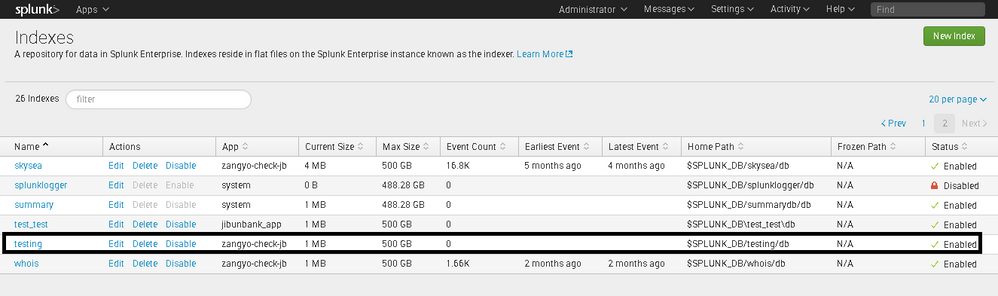
I have created testing indexes manually in both these splunk instances.
When I don't give any index then its working fine and I can see the data being forwarded to main index of 2nd instance but when I change the index to testing , it just doesn't work.
Help me figure out what I'm doing wrong.
- Mark as New
- Bookmark Message
- Subscribe to Message
- Mute Message
- Subscribe to RSS Feed
- Permalink
- Report Inappropriate Content

- Mark as New
- Bookmark Message
- Subscribe to Message
- Mute Message
- Subscribe to RSS Feed
- Permalink
- Report Inappropriate Content
- Mark as New
- Bookmark Message
- Subscribe to Message
- Mute Message
- Subscribe to RSS Feed
- Permalink
- Report Inappropriate Content
yes, moving the indexes.conf file to system/local solved the issue.



Join the Splunk Community Slack to learn, troubleshoot, and make connections with fellow Splunk practitioners in real time!
Join Splunk User Groups to connect and learn in-person by region or remotely by topic or industry.
Splunk App Dev Quarterly Roundup: AI, Agents, and Innovation!
Federated Search for Dynamic Data Self Storage Is Now Generally Available on Splunk ...
Index This | What has many keys but can’t unlock a door?
