
Join the Conversation
- Find Answers
- :
- Splunk Administration
- :
- Getting Data In
- :
- Re: How to substract two fields on epoch
- Subscribe to RSS Feed
- Mark Topic as New
- Mark Topic as Read
- Float this Topic for Current User
- Bookmark Topic
- Subscribe to Topic
- Mute Topic
- Printer Friendly Page
- Mark as New
- Bookmark Message
- Subscribe to Message
- Mute Message
- Subscribe to RSS Feed
- Permalink
- Report Inappropriate Content

Hi,
I tried to find answers on the forum but I didn't find any working solutions.
I had two fields with "hour / minute / second" like:
TReceived > 17:13:10
TSent > 17:12:20
I'm trying to substract TSent from TReceived and put it into a table.
I did something like :
| eval start=strptime(TSent, "%H:%M:%S.%N"), end=strptime(TReceived, "%H:%M:%S.%N")
| eval difference=end-start
|table end,start,difference
As a result, I correctly have something on the "end" and "star" column but "difference" stays empty.
Am I missing something?
Thanks.
- Mark as New
- Bookmark Message
- Subscribe to Message
- Mute Message
- Subscribe to RSS Feed
- Permalink
- Report Inappropriate Content

Your query is working.
| makeresults
| eval TReceived="17:13:10", TSent="17:12:20"
| eval start=strptime(TSent, "%H:%M:%S.%N"), end=strptime(TReceived, "%H:%M:%S.%N")
| eval difference=end-start
| table end,start,difference
- Mark as New
- Bookmark Message
- Subscribe to Message
- Mute Message
- Subscribe to RSS Feed
- Permalink
- Report Inappropriate Content
Your query is working.
| makeresults
| eval TReceived="17:13:10", TSent="17:12:20"
| eval start=strptime(TSent, "%H:%M:%S.%N"), end=strptime(TReceived, "%H:%M:%S.%N")
| eval difference=end-start
| table end,start,difference
- Mark as New
- Bookmark Message
- Subscribe to Message
- Mute Message
- Subscribe to RSS Feed
- Permalink
- Report Inappropriate Content
I didn't know the "makeresults" command. Seems easier to check with this.
On my side, my request is a bit more complicated but in the end, my "diff" column was still empty with this exact command |eval difference=end-start.
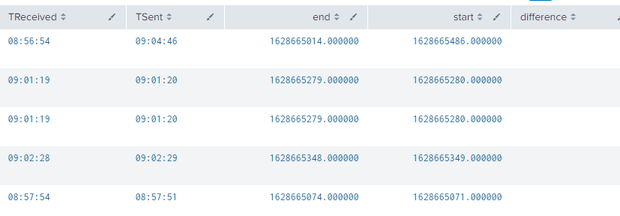
With your confirmation that the request was working correctly, I found the solution and it was a simple mistake...
My "eval" command was before the "table" command and couldn't work.
I changed the order and now it's working perfectly.
It wasn't so much but thanks, it helps me a lot to clear my mind 😉
- Mark as New
- Bookmark Message
- Subscribe to Message
- Mute Message
- Subscribe to RSS Feed
- Permalink
- Report Inappropriate Content
You're welcome! I'm glad it helped🙂


Join the Splunk Community Slack to learn, troubleshoot, and make connections with fellow Splunk practitioners in real time!
Join Splunk User Groups to connect and learn in-person by region or remotely by topic or industry.
What’s New in Splunk AI: Volume 02
Splunk App Dev Quarterly Roundup: AI, Agents, and Innovation!
Value Insights: Now Generally Available in the CMC
