
Join the Conversation
- Find Answers
- :
- Splunk Administration
- :
- Getting Data In
- :
- Re: How to split values present in a cell in diffe...
- Subscribe to RSS Feed
- Mark Topic as New
- Mark Topic as Read
- Float this Topic for Current User
- Bookmark Topic
- Subscribe to Topic
- Mute Topic
- Printer Friendly Page
- Mark as New
- Bookmark Message
- Subscribe to Message
- Mute Message
- Subscribe to RSS Feed
- Permalink
- Report Inappropriate Content

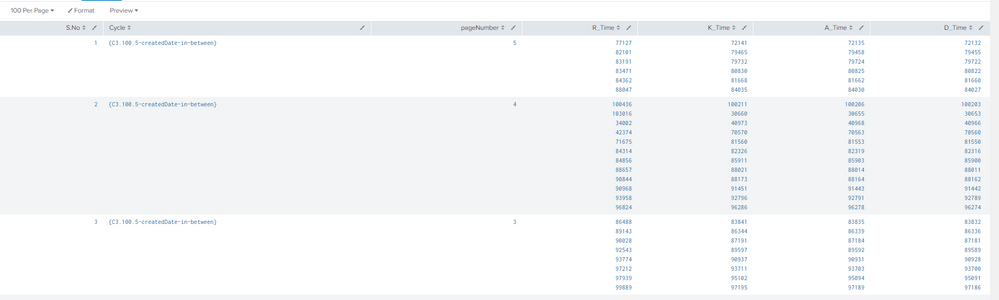
In this attached multiple values are grouped in table. I want to split all the values separately so that i can calculate average for each field

- Mark as New
- Bookmark Message
- Subscribe to Message
- Mute Message
- Subscribe to RSS Feed
- Permalink
- Report Inappropriate Content

Have look at this answer by @mrobichaud_splunk ,
https://answers.splunk.com/answers/25653/mvexpand-multiple-multi-value-fields.html
- Mark as New
- Bookmark Message
- Subscribe to Message
- Mute Message
- Subscribe to RSS Feed
- Permalink
- Report Inappropriate Content

@rajeswarir what is your existing query which gives the above table. If you are interested in Average and not multi valued fields, you can do the same upfront using appropriate statistical function from transforming command. Rather than circumventing through multi-valued field.
| makeresults | eval message= "Happy Splunking!!!"
- Mark as New
- Bookmark Message
- Subscribe to Message
- Mute Message
- Subscribe to RSS Feed
- Permalink
- Report Inappropriate Content
Hi niketnilay,
my query is:
source="K_range.log" OR source="AD_range.log" OR source="R_range.zip:" Cycle={C3.100.5}
|transaction CommonFieldbetweenalllogs
|table S.No Cycle R_Time K_Time A_Time D_Time|eval S.No=1 | accum S.No
can u please explain how can i compute average without splitting the values using transforming command.
I need to calculate 2 things here:
1. Average for all the fields
2. one more field named "RA_Time" which is the addition of R_Time+A_Time
- Mark as New
- Bookmark Message
- Subscribe to Message
- Mute Message
- Subscribe to RSS Feed
- Permalink
- Report Inappropriate Content
Have look at this answer by @mrobichaud_splunk ,
https://answers.splunk.com/answers/25653/mvexpand-multiple-multi-value-fields.html

Join the Splunk Community Slack to learn, troubleshoot, and make connections with fellow Splunk practitioners in real time!
Join Splunk User Groups to connect and learn in-person by region or remotely by topic or industry.
Make Your Machine Data AI-Ready in Splunk
Splunk Asynchronous Forwarding Explained
How to Monitor AI Agents with Splunk Agent Observability
