
Join the Conversation
- Find Answers
- :
- Splunk Administration
- :
- Getting Data In
- :
- How to set a correct line breaks in my props.conf
- Subscribe to RSS Feed
- Mark Topic as New
- Mark Topic as Read
- Float this Topic for Current User
- Bookmark Topic
- Subscribe to Topic
- Mute Topic
- Printer Friendly Page
- Mark as New
- Bookmark Message
- Subscribe to Message
- Mute Message
- Subscribe to RSS Feed
- Permalink
- Report Inappropriate Content
How to set a correct line breaks in my props.conf

The first picture is my original logs

The second picture is my logs in the splunk
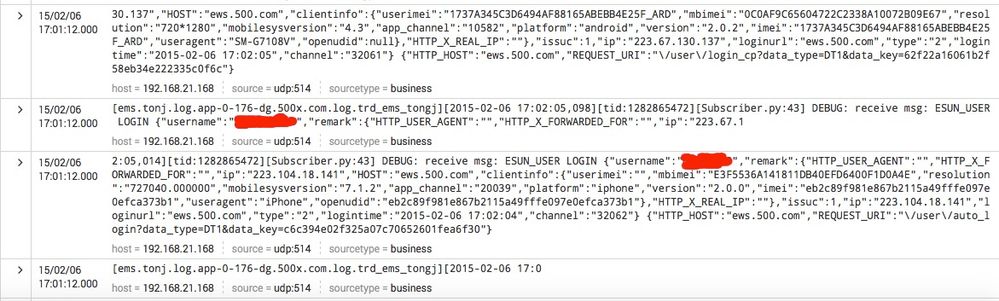
Now,we can see the splunk wrap my logs in the wrong places.
Please tell me how to set in the props.conf can solve this problem.
Thanks very much!


- Mark as New
- Bookmark Message
- Subscribe to Message
- Mute Message
- Subscribe to RSS Feed
- Permalink
- Report Inappropriate Content
Hi,
Try this,
LINE_BREAKER = ([\r\n]+)\[[^\]]+\]\[\d{4}\-\d{2}\-\d{2}\s++\d{2}\:\d{2}\:\d{2}\,\d{3}\]\[tid\:
THat should break the events better for you
- Mark as New
- Bookmark Message
- Subscribe to Message
- Mute Message
- Subscribe to RSS Feed
- Permalink
- Report Inappropriate Content

Hi perlish
There seems to be two problems. First the output of your logs has unwanted carriage returns in it. The second splunk is not recognising this as a multiline event. The latter can be fixed with the following stanza in props.conf. The time prefix looks complex but it is saying look for a line that starts with [ and the time should come after the second [
[business]
SHOULD_LINEMERGE = true
BREAK_ONLY_BEFORE_DATE = true
TIME_PREFIX = ^\[[^\[]+\[
TIME_FORMAT = %Y-%m-%d %H:%M:%S,%q3
MAX_TIMESTAMP_LOOKAHEAD = 24
The line breaks will still be there and may cause fields to break in half. I suggest you look at how these logs are generated for the cause.
- Mark as New
- Bookmark Message
- Subscribe to Message
- Mute Message
- Subscribe to RSS Feed
- Permalink
- Report Inappropriate Content
Ignore the 5. before time format. I don't know where that came from.
- Mark as New
- Bookmark Message
- Subscribe to Message
- Mute Message
- Subscribe to RSS Feed
- Permalink
- Report Inappropriate Content
I tried this method but it seems did not work.
How can I set up the line breaker like a '\n'.
- Mark as New
- Bookmark Message
- Subscribe to Message
- Mute Message
- Subscribe to RSS Feed
- Permalink
- Report Inappropriate Content


It's a line number added by the system in all code samples.
If this reply helps you, Karma would be appreciated.
- Mark as New
- Bookmark Message
- Subscribe to Message
- Mute Message
- Subscribe to RSS Feed
- Permalink
- Report Inappropriate Content
What are the current props.conf settings for this log? Have you tried BREAK_ONLY_BEFORE=[ems.ton]?
If this reply helps you, Karma would be appreciated.
- Mark as New
- Bookmark Message
- Subscribe to Message
- Mute Message
- Subscribe to RSS Feed
- Permalink
- Report Inappropriate Content
Yes,I have tried but did not work.

Join the Splunk Community Slack to learn, troubleshoot, and make connections with fellow Splunk practitioners in real time!
Join Splunk User Groups to connect and learn in-person by region or remotely by topic or industry.
May 2026 Splunk Expert Sessions: Security & Observability
Network to App: Observability Unlocked [May & June Series]
SPL2 Deep Dives, AppDynamics Integrations, SAML Made Simple and Much More on Splunk ...
