
Join the Conversation
- Find Answers
- :
- Splunk Administration
- :
- Getting Data In
- :
- Re: ERROR PersistentScript
- Subscribe to RSS Feed
- Mark Topic as New
- Mark Topic as Read
- Float this Topic for Current User
- Bookmark Topic
- Subscribe to Topic
- Mute Topic
- Printer Friendly Page
- Mark as New
- Bookmark Message
- Subscribe to Message
- Mute Message
- Subscribe to RSS Feed
- Permalink
- Report Inappropriate Content
How to resolve ERROR PersistentScript?

Disponemos de Splunk Cloud Victoria 9.0.2208.4 y hemos instalado y configurado:
- Seguridad en la nube de Cisco
- Complemento de paraguas de seguridad en la nube de Cisco
Seguimos los pasos para instalar pero no tenemos datos. Con esta consulta tenemos estos errores de registro
index=_internal log_level=ERROR event_message="*paraguas*"
21-12-2022 11:24:02.878 + 0000 ERROR PersistentScript [ 25593 PersistentScriptIo ] - De { /opt/splunk/bin/python3.7 /opt/splunk/etc/apps/TA-cisco-cloud-security-umbrella- addon/bin/TA_cisco_cloud_security_umbrella_addon_rh_settings.py persistente } : archivo " /opt/splunk/etc/apps/TA-cisco-cloud-security-umbrella-addon/bin/ta_cisco_cloud_security_umbrella_addon/aob_py3/solnlib/credentials.py ", línea 133 , en obtener_contraseña
12-21-2022 11:24:02.878 +0000 ERROR PersistentScript [25593 PersistentScriptIo] - From {/opt/splunk/bin/python3.7 /opt/splunk/etc/apps/TA-cisco-cloud-security-umbrella-addon/bin/TA_cisco_cloud_security_umbrella_addon_rh_settings.py persistent}: return func(*args, **kwargs)
12-21-2022 11:24:02.878 +0000 ERROR PersistentScript [25593 PersistentScriptIo] - From {/opt/splunk/bin/python3.7 /opt/splunk/etc/apps/TA-cisco-cloud-security-umbrella-addon/bin/TA_cisco_cloud_security_umbrella_addon_rh_settings.py persistent}: File "/opt/splunk/etc/apps/TA-cisco-cloud-security-umbrella-addon/bin/ta_cisco_cloud_security_umbrella_addon/aob_py3/solnlib/utils.py", line 128, in wrapper
12-21-2022 11:24:02.878 +0000 ERROR PersistentScript [25593 PersistentScriptIo] - From {/opt/splunk/bin/python3.7 /opt/splunk/etc/apps/TA-cisco-cloud-security-umbrella-addon/bin/TA_cisco_cloud_security_umbrella_addon_rh_settings.py persistent}: WARNING:root:Run function: get_password failed: Traceback (most recent call last😞
12-21-2022 11:24:02.749 +0000 ERROR PersistentScript [25593 PersistentScriptIo] - From {/opt/splunk/bin/python3.7 /opt/splunk/etc/apps/TA-cisco-cloud-security-umbrella-addon/bin/TA_cisco_cloud_security_umbrella_addon_rh_settings.py persistent}: .
12-21-2022 11:24:02.749 +0000 ERROR PersistentScript [25593 PersistentScriptIo] - From {/opt/splunk/bin/python3.7 /opt/splunk/etc/apps/TA-cisco-cloud-security-umbrella-addon/bin/TA_cisco_cloud_security_umbrella_addon_rh_settings.py persistent}: solnlib.credentials.CredentialNotExistException: Failed to get password of realm=__REST_CREDENTIAL__#TA-cisco-cloud-security-paraguas - complemento # configs / conf - ta _ cisco _ nube _ seguridad _ paraguas _ complemento _ configuración , usuario = proxy .
- Mark as New
- Bookmark Message
- Subscribe to Message
- Mute Message
- Subscribe to RSS Feed
- Permalink
- Report Inappropriate Content
I can't find where to set the credentials in the Umbrella apps:
Cisco Cloud Security Umbrella
Cisco Cloud Security
- Mark as New
- Bookmark Message
- Subscribe to Message
- Mute Message
- Subscribe to RSS Feed
- Permalink
- Report Inappropriate Content


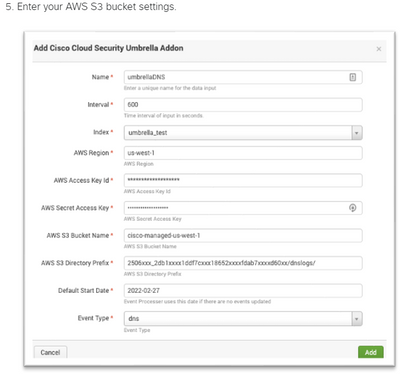
Have you installed the add-on that is used with the app? Credentials go there. See https://developer.cisco.com/docs/cloud-security/#!cloud-security-add-on-for-splunk/configure-cloud-s...
If this reply helps you, Karma would be appreciated.
- Mark as New
- Bookmark Message
- Subscribe to Message
- Mute Message
- Subscribe to RSS Feed
- Permalink
- Report Inappropriate Content
Yes, we have this app. And we have followed the steps. We have created the Inputs with the data from AWS S3. Where do I put the credentials?
- Mark as New
- Bookmark Message
- Subscribe to Message
- Mute Message
- Subscribe to RSS Feed
- Permalink
- Report Inappropriate Content
The documentation at the link I provided specifies where the credentials go.
If this reply helps you, Karma would be appreciated.
- Mark as New
- Bookmark Message
- Subscribe to Message
- Mute Message
- Subscribe to RSS Feed
- Permalink
- Report Inappropriate Content
Sorry but I don't see it. Can you help us? We need to have this app running in Splunk.
Thanks.
- Mark as New
- Bookmark Message
- Subscribe to Message
- Mute Message
- Subscribe to RSS Feed
- Permalink
- Report Inappropriate Content
If this reply helps you, Karma would be appreciated.
- Mark as New
- Bookmark Message
- Subscribe to Message
- Mute Message
- Subscribe to RSS Feed
- Permalink
- Report Inappropriate Content
The error messages say a password could not be found. Are the apps configured? Are credentials specified?
If this reply helps you, Karma would be appreciated.


Join the Splunk Community Slack to learn, troubleshoot, and make connections with fellow Splunk practitioners in real time!
Join Splunk User Groups to connect and learn in-person by region or remotely by topic or industry.
Self-Healing Pipeline Is Now Generally Available: AI-Powered CIM Compliance
Meet Splunk Observability Studio: AI-Assisted OpenTelemetry Instrumentation Without ...
Federated Search for Cisco Security and Analytics Logging (SAL) is now GA on Splunk ...
