
Join the Conversation
- Find Answers
- :
- Splunk Administration
- :
- Getting Data In
- :
- Re: How to remove double quotes from a token using...
- Subscribe to RSS Feed
- Mark Topic as New
- Mark Topic as Read
- Float this Topic for Current User
- Bookmark Topic
- Subscribe to Topic
- Mute Topic
- Printer Friendly Page
- Mark as New
- Bookmark Message
- Subscribe to Message
- Mute Message
- Subscribe to RSS Feed
- Permalink
- Report Inappropriate Content

Hello!
I have the token() whose content is this:
$support_group_token$=support_group="Service Desk"
Is there any way to remove the quotes from the token?
I tried to remove the double quotes using single quotes but the replace didn't work.
|eval my_variable = IF(replace('support_group="Service Desk","\"","")="support_group=Service Desk",1,0)
|table my_variable
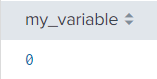
Has anyone experienced the same problem?
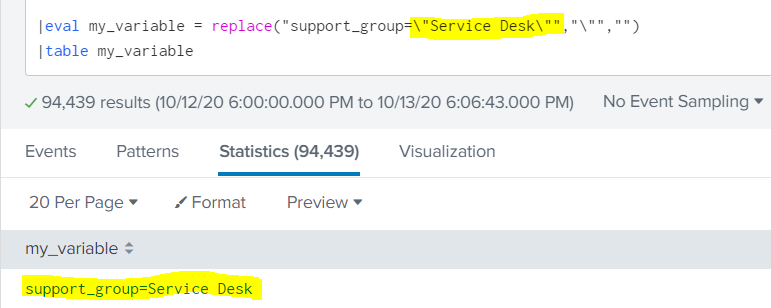
Basically I want to get the result below but the problem is that my token doesn't have the \" between the Service Desk name.
- Mark as New
- Bookmark Message
- Subscribe to Message
- Mute Message
- Subscribe to RSS Feed
- Permalink
- Report Inappropriate Content


If you are trying to set a token in XML try
<eval token="my_variable">replace($support_group_token$,"\"","")</eval>- Mark as New
- Bookmark Message
- Subscribe to Message
- Mute Message
- Subscribe to RSS Feed
- Permalink
- Report Inappropriate Content

You may use the same solution.. \ is used to escape the quotes.
Please check this
|makeresults |eval field="support_group=\"Service Desk\""
|eval new_field=replace(field,"\"","")
What goes around comes around. If it helps, hit it with Karma 🙂
- Mark as New
- Bookmark Message
- Subscribe to Message
- Mute Message
- Subscribe to RSS Feed
- Permalink
- Report Inappropriate Content
@renjith_nair Thanks for the answer!
Unfortunately this solution does not work for me because the token already comes to me this way (support_group="Service Desk").
I have to work with the double quotes anyway.
I think the solution is in what character do I have to put before support and after Desk.
Unfortunately trying something like this didn't work for me either:
|makeresults |eval field=\"support_group="Service Desk"\"- Mark as New
- Bookmark Message
- Subscribe to Message
- Mute Message
- Subscribe to RSS Feed
- Permalink
- Report Inappropriate Content
Here is an example with token. Let me know if this is what you are looking for.
Used $token|s$ to escape the token and replaced
<form>
<label>Token Special</label>
<fieldset submitButton="false">
<input type="dropdown" token="category">
<label>Category</label>
<choice value="support_group="Service Desk"">SupportGroup</choice>
<choice value="support_level="Level1"">SupportLevel</choice>
</input>
</fieldset>
<row>
<panel>
<title>Category : $category$</title>
<table>
<search>
<query>|makeresults|eval category=$category|s$|eval new_category=replace($category|s$,"\"","")</query>
<earliest>-15m</earliest>
<latest>now</latest>
</search>
<option name="drilldown">none</option>
<option name="refresh.display">progressbar</option>
</table>
</panel>
</row>
</form>
What goes around comes around. If it helps, hit it with Karma 🙂
- Mark as New
- Bookmark Message
- Subscribe to Message
- Mute Message
- Subscribe to RSS Feed
- Permalink
- Report Inappropriate Content
@renjith_nair
Good hint!
Unfortunately it wouldn't work either because my token is of the multiselect type
<input type="multiselect" token="support_group_token">
      <label>Support Group</label>
      <choice value="*">All</choice>
      <default>*</default>
      <search base="filters_base_search">
        <query>
          | stats count by support_group
        </query>
      </search>
      <fieldForLabel>support_group</fieldForLabel>
      <fieldForValue>support_group</fieldForValue>
      <valuePrefix>support_group="</valuePrefix>
      <valueSuffix>"</valueSuffix>
      <delimiter> OR </delimiter>
</input>- Mark as New
- Bookmark Message
- Subscribe to Message
- Mute Message
- Subscribe to RSS Feed
- Permalink
- Report Inappropriate Content
If you are trying to set a token in XML try
<eval token="my_variable">replace($support_group_token$,"\"","")</eval>- Mark as New
- Bookmark Message
- Subscribe to Message
- Mute Message
- Subscribe to RSS Feed
- Permalink
- Report Inappropriate Content
Thank you @ITWhisperer !
This worked perfectly!

Join the Splunk Community Slack to learn, troubleshoot, and make connections with fellow Splunk practitioners in real time!
Join Splunk User Groups to connect and learn in-person by region or remotely by topic or industry.
[Puzzles] Solve, Learn, Repeat: Classic British Rock Bands
New to the Community? Join Us for an Exclusive Post .conf26 Welcome Session (Plus a ...
Accelerate Splunk App Development with AI
